Urban Parking Solutions WordPress Theme


Edit Template Offline
2. Create new page and search for id 6623238
Edit Template Online
Create Awesome Websites


Free Nicepage Builder
Keywords
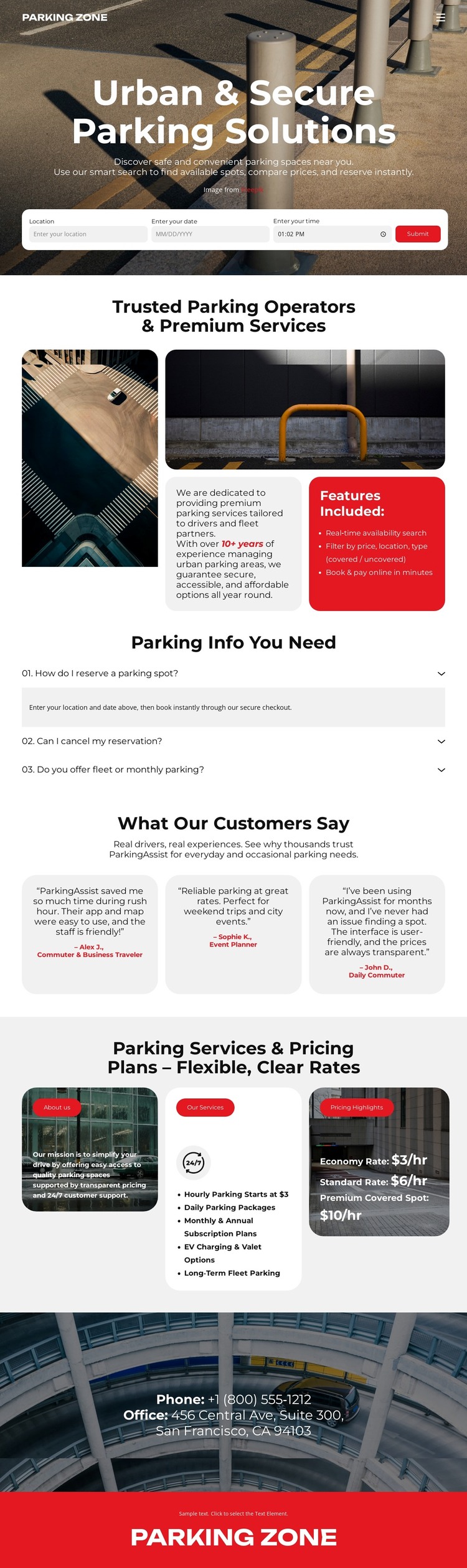
Page Content and Repeated Service Cards Suit a Managed Parking Theme
The page-oriented content is divided into areas that can remain stable while parking information changes. The hero carries the Parking Zone identity and search fields, making it a natural primary page area for visitors looking for a parking option. The operator section and Features Included card provide more permanent explanatory content, while the FAQ gathers three practical questions into a separate information group rather than mixing answers into the opening copy.
The repeated cards give the design a useful content pattern. Three testimonials can represent separate customer-oriented entries, and the monthly, event, and short-term parking cards divide service information into recognizable categories. The displayed hourly rates add a comparison layer, but they should be treated as the sample values shown in the design until a site owner verifies current pricing. This distinction keeps the template’s content structure useful without presenting demo information as a live commercial offer.
The closing phone detail, office address, parking image, and red footer complete the page-oriented presentation. In a WordPress project, the design can therefore provide a visual environment for permanent parking information and additional regularly updated content, while the exact WordPress content structures remain a project decision rather than an existing claim. Its theme value comes from keeping search, service descriptions, questions, customer perspective, rates, and contact content within one consistent visual system.
Customize with Nicepage
Open this ready-made template in the WordPress Website Builder and customize it visually in the Nicepage editor. Replace demo content, edit page sections, and adapt the design to your project without rebuilding the template from scratch.
Manage and Edit This Theme in WordPress
Customize and Install the WordPress Theme
Start with this ready-made theme instead of building the WordPress design from scratch. Customize its layout, content, typography, images, sections, and other design elements visually in Nicepage editor, then export and install the WordPress Theme, Plugin, and Pages on your WordPress site. The Nicepage WordPress Plugin lets you continue working with the site after installation.
Edit the Theme Directly in WordPress
After installation, you can edit the WordPress Theme directly in WordPress with the Nicepage WordPress Plugin. Use Site Style to customize site Colors, Fonts, Header, Footer, Blog, and Post Page Templates while working within your WordPress website.
Edit WordPress Pages Visually
Use the Nicepage WordPress Plugin to edit page content directly from the WordPress admin area. Open a WordPress Page with Nicepage and visually change its text, images, sections, and other page elements while continuing to manage the Page through WordPress.
WordPress Content and Theme Integration
Use the customized theme with WordPress Pages, Posts, Blog and Post Templates, menus, widgets, and other CMS-managed content. Shared theme elements such as Colors, Fonts, Header, Footer, Blog, and Post Page Templates can be managed as part of the overall site design, while WordPress provides the CMS environment for managing site content.
This workflow combines a ready-made WordPress Theme with visual customization, direct theme editing in WordPress, and continued content management through the Nicepage WordPress Plugin.