Advanced innovation cars WordPress Theme


Edit Template Offline
2. Create new page and search for id 17201
Edit Template Online
Create Awesome Websites


Free Nicepage Builder
Keywords
Technology Stories and Gallery Content Fit the Theme Structure
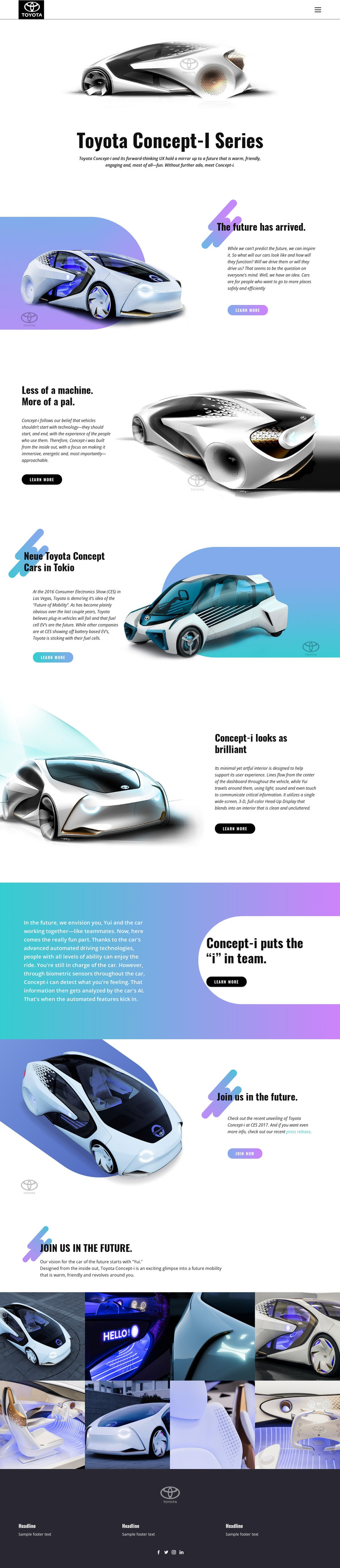
The page separates several kinds of content that can remain useful as managed WordPress page material. The Toyota Concept-i introduction establishes the main subject, while the future-mobility and automated-driving sections provide distinct explanatory areas for permanent concept information. The references to biometric sensors and Yui add different content relationships: one emphasizes vehicle technology, while the other explains the human experience around the machine. Keeping those subjects in separate sections helps the visual theme support structured page content rather than presenting one undifferentiated product statement.
The interior and interface section, followed by the eight-image vehicle and interior gallery, provides a second content pattern based on visual evidence. That gallery could accompany project, design, or editorial material in a WordPress site without claiming that posts or categories already exist in the template. Repeated learn-more actions and the join-now area create page-level destinations, while navigation, mobile navigation, social links, and the dark footer represent shared site elements that can frame additional content. The template’s value as a WordPress theme therefore comes from the relationship between permanent concept information, recurring imagery, and site-wide navigation. The existing design character can remain recognizable as content is expanded, while the confirmed page areas give editors a clear basis for organizing future mobility stories and related visual material.
Customize with Nicepage
Open this ready-made template in the WordPress Website Builder and customize it visually in the Nicepage editor. Replace demo content, edit page sections, and adapt the design to your project without rebuilding the template from scratch.
Manage and Edit This Theme in WordPress
Customize and Install the WordPress Theme
Start with this ready-made theme instead of building the WordPress design from scratch. Customize its layout, content, typography, images, sections, and other design elements visually in Nicepage editor, then export and install the WordPress Theme, Plugin, and Pages on your WordPress site. The Nicepage WordPress Plugin lets you continue working with the site after installation.
Edit the Theme Directly in WordPress
After installation, you can edit the WordPress Theme directly in WordPress with the Nicepage WordPress Plugin. Use Site Style to customize site Colors, Fonts, Header, Footer, Blog, and Post Page Templates while working within your WordPress website.
Edit WordPress Pages Visually
Use the Nicepage WordPress Plugin to edit page content directly from the WordPress admin area. Open a WordPress Page with Nicepage and visually change its text, images, sections, and other page elements while continuing to manage the Page through WordPress.
WordPress Content and Theme Integration
Use the customized theme with WordPress Pages, Posts, Blog and Post Templates, menus, widgets, and other CMS-managed content. Shared theme elements such as Colors, Fonts, Header, Footer, Blog, and Post Page Templates can be managed as part of the overall site design, while WordPress provides the CMS environment for managing site content.
This workflow combines a ready-made WordPress Theme with visual customization, direct theme editing in WordPress, and continued content management through the Nicepage WordPress Plugin.