Harley Davidson WordPress Theme
Edit Template Offline
2. Create new page and search for id 18994
Edit Template Online
Create Awesome Websites


Free Nicepage Builder
Keywords
Product and Rider Content Fit a Structured WordPress Theme
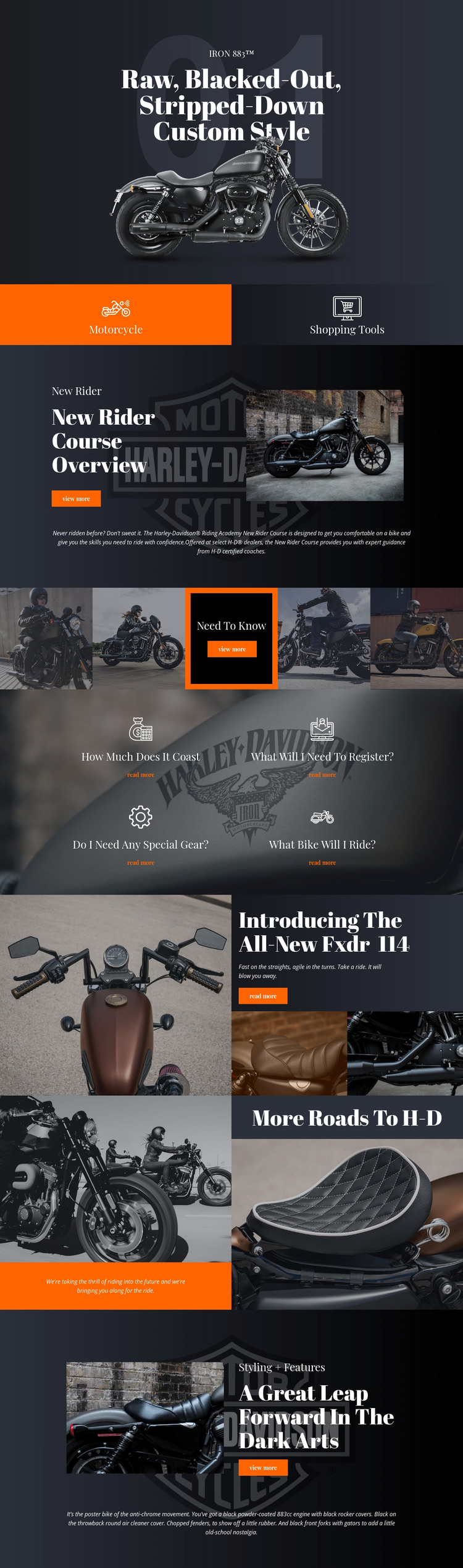
The page separates its permanent informational subjects into recognizable areas that can translate naturally into a WordPress-managed content environment. The IRON 883™ hero and the Fxdr 114 promotion provide model-oriented content, while the Motorcycle and Shopping Tools tiles establish navigation between broader product or purchasing topics. These are page-level interpretations of the verified design, not claims that WordPress posts, categories, or templates already exist in the source page.
The New Rider Course section offers a different content relationship. Its image, explanatory panel, supporting paragraph, and “view more” action present educational material as a distinct area rather than mixing it into the model promotion. The four repeated questions extend that information group with practical subjects covering cost, registration, gear, and the motorcycle used. In a WordPress project, these areas could be maintained as related page content while retaining the same visual direction.
The theme’s repeated dark surfaces, image tiles, compact text panels, and “read more” actions also provide a consistent frame for future motorcycle information. The More Roads To H-D statement section can support broader brand messaging, while the final styling-and-features block provides a place for feature-focused content. The result is a useful theme foundation for organizing model, training, shopping, and feature information without asserting that any unverified CMS content structure is already present.
Customize with Nicepage
Open this ready-made template in the WordPress Website Builder and customize it visually in the Nicepage editor. Replace demo content, edit page sections, and adapt the design to your project without rebuilding the template from scratch.
Manage and Edit This Theme in WordPress
Customize and Install the WordPress Theme
Start with this ready-made theme instead of building the WordPress design from scratch. Customize its layout, content, typography, images, sections, and other design elements visually in Nicepage editor, then export and install the WordPress Theme, Plugin, and Pages on your WordPress site. The Nicepage WordPress Plugin lets you continue working with the site after installation.
Edit the Theme Directly in WordPress
After installation, you can edit the WordPress Theme directly in WordPress with the Nicepage WordPress Plugin. Use Site Style to customize site Colors, Fonts, Header, Footer, Blog, and Post Page Templates while working within your WordPress website.
Edit WordPress Pages Visually
Use the Nicepage WordPress Plugin to edit page content directly from the WordPress admin area. Open a WordPress Page with Nicepage and visually change its text, images, sections, and other page elements while continuing to manage the Page through WordPress.
WordPress Content and Theme Integration
Use the customized theme with WordPress Pages, Posts, Blog and Post Templates, menus, widgets, and other CMS-managed content. Shared theme elements such as Colors, Fonts, Header, Footer, Blog, and Post Page Templates can be managed as part of the overall site design, while WordPress provides the CMS environment for managing site content.
This workflow combines a ready-made WordPress Theme with visual customization, direct theme editing in WordPress, and continued content management through the Nicepage WordPress Plugin.