Audi luxury cars WordPress Theme


Edit Template Offline
2. Create new page and search for id 17195
Edit Template Online
Create Awesome Websites


Free Nicepage Builder
Keywords
Permanent model content and publishable feature groups fit a WordPress theme structure
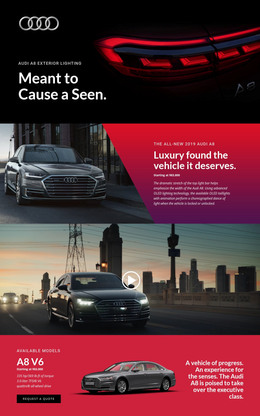
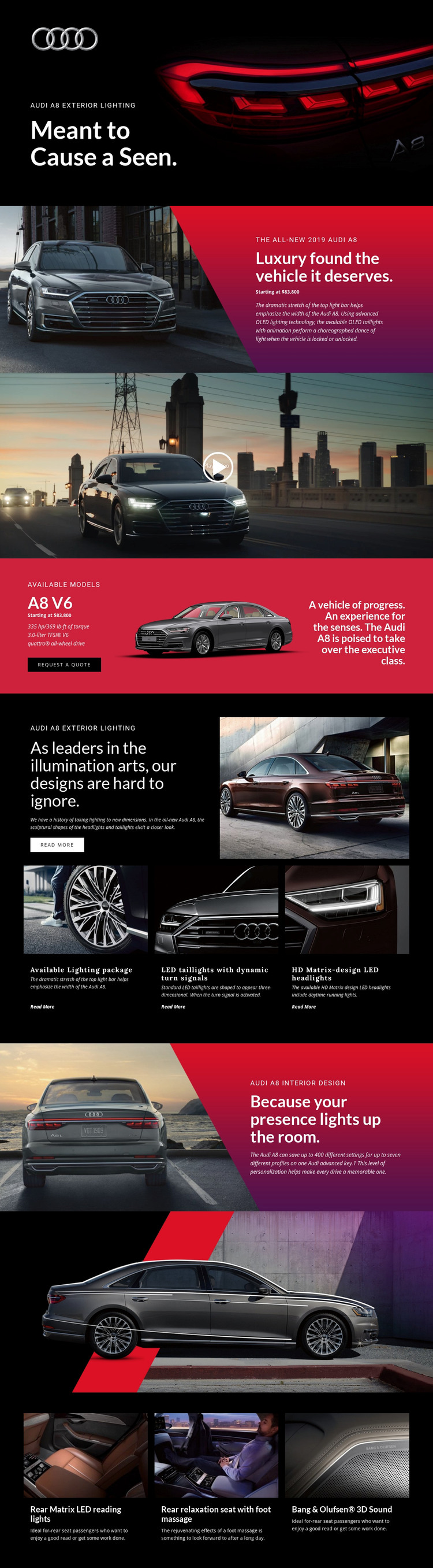
The A8 V6 section gives the design a strong page-oriented content core. It combines the featured model, displayed starting price, 3.0-liter TFSI V6, 335 hp/369 lb-ft of torque, quattro all-wheel drive, vehicle imagery, and a Request a Quote action. These details can remain central page content while the surrounding visual system continues to present the Audi A8 as one coherent product. The full-width video adds a separate media area that can sit alongside the model information rather than interrupting its purpose.
The repeated feature groups offer another useful relationship for WordPress-managed content. The three exterior-lighting items can represent distinct product-information units, while the interior design section and three comfort panels provide additional page content about personalization, rear Matrix LED reading lights, the relaxation seat with foot massage, and Bang & Olufsen 3D Sound. If the project later adds regularly updated automotive articles or announcements, those editorial items could appear around the permanent A8 page without requiring a different visual direction. The template therefore works as a WordPress theme interpretation through its combination of stable model content, repeatable feature areas, media, and response content—not through an unsupported claim that posts or blog structures already exist.
Customize with Nicepage
Open this ready-made template in the WordPress Website Builder and customize it visually in the Nicepage editor. Replace demo content, edit page sections, and adapt the design to your project without rebuilding the template from scratch.
Manage and Edit This Theme in WordPress
Customize and Install the WordPress Theme
Start with this ready-made theme instead of building the WordPress design from scratch. Customize its layout, content, typography, images, sections, and other design elements visually in Nicepage editor, then export and install the WordPress Theme, Plugin, and Pages on your WordPress site. The Nicepage WordPress Plugin lets you continue working with the site after installation.
Edit the Theme Directly in WordPress
After installation, you can edit the WordPress Theme directly in WordPress with the Nicepage WordPress Plugin. Use Site Style to customize site Colors, Fonts, Header, Footer, Blog, and Post Page Templates while working within your WordPress website.
Edit WordPress Pages Visually
Use the Nicepage WordPress Plugin to edit page content directly from the WordPress admin area. Open a WordPress Page with Nicepage and visually change its text, images, sections, and other page elements while continuing to manage the Page through WordPress.
WordPress Content and Theme Integration
Use the customized theme with WordPress Pages, Posts, Blog and Post Templates, menus, widgets, and other CMS-managed content. Shared theme elements such as Colors, Fonts, Header, Footer, Blog, and Post Page Templates can be managed as part of the overall site design, while WordPress provides the CMS environment for managing site content.
This workflow combines a ready-made WordPress Theme with visual customization, direct theme editing in WordPress, and continued content management through the Nicepage WordPress Plugin.