Uber's Aerial Taxi Play WordPress Theme



Edit Template Offline
2. Create new page and search for id 12799
Edit Template Online
Create Awesome Websites


Free Nicepage Builder
Keywords
Permanent Program Content Can Sit Beside Continuing Mobility Stories
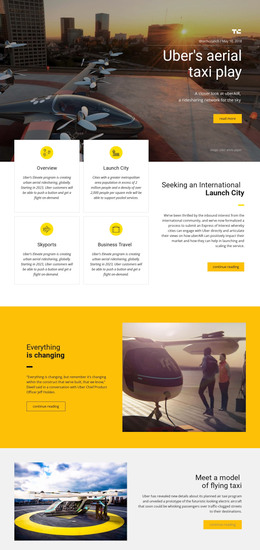
The page contains several durable information areas that translate naturally into a WordPress-oriented content environment. The hero can carry the main aerial-taxi feature, while the four cards divide permanent program information into Overview, Launch City, Skyports, and Business Travel. That separation is useful for page-oriented content because each topic has a visible place in the design instead of being hidden inside one long block of copy. The larger international launch-city panel adds a focused stakeholder message beside those topics.
The three related news tiles provide a different content relationship. They are shown as a repeated visual row under a news heading, so they can represent continuing editorial material about future mobility without changing the page's core visual direction. The yellow quote section, prototype explanation, and later transportation question can remain supporting feature content around those recurring stories. The direct email strip and dark footer then act as shared or closing site regions, depending on the final project structure.
The analysis does not verify WordPress Posts, categories, or blog templates as existing elements, so those should not be presented as current components. Instead, the template supplies a clear visual arrangement for permanent pages, repeated news content, and contact information. Nicepage documentation confirms that a WordPress Plugin can edit theme styling directly in WordPress; that product bridge is optional and does not change the template-specific interpretation.
Customize with Nicepage
Open this ready-made template in the WordPress Website Builder and customize it visually in the Nicepage editor. Replace demo content, edit page sections, and adapt the design to your project without rebuilding the template from scratch.
Manage and Edit This Theme in WordPress
Customize and Install the WordPress Theme
Start with this ready-made theme instead of building the WordPress design from scratch. Customize its layout, content, typography, images, sections, and other design elements visually in Nicepage editor, then export and install the WordPress Theme, Plugin, and Pages on your WordPress site. The Nicepage WordPress Plugin lets you continue working with the site after installation.
Edit the Theme Directly in WordPress
After installation, you can edit the WordPress Theme directly in WordPress with the Nicepage WordPress Plugin. Use Site Style to customize site Colors, Fonts, Header, Footer, Blog, and Post Page Templates while working within your WordPress website.
Edit WordPress Pages Visually
Use the Nicepage WordPress Plugin to edit page content directly from the WordPress admin area. Open a WordPress Page with Nicepage and visually change its text, images, sections, and other page elements while continuing to manage the Page through WordPress.
WordPress Content and Theme Integration
Use the customized theme with WordPress Pages, Posts, Blog and Post Templates, menus, widgets, and other CMS-managed content. Shared theme elements such as Colors, Fonts, Header, Footer, Blog, and Post Page Templates can be managed as part of the overall site design, while WordPress provides the CMS environment for managing site content.
This workflow combines a ready-made WordPress Theme with visual customization, direct theme editing in WordPress, and continued content management through the Nicepage WordPress Plugin.