Car repair gallery WordPress Theme


Edit Template Offline
2. Create new page and search for id 6455498
Edit Template Online
Create Awesome Websites


Free Nicepage Builder
Keywords
Service Categories and Gallery Content Fit a Managed Repair Site
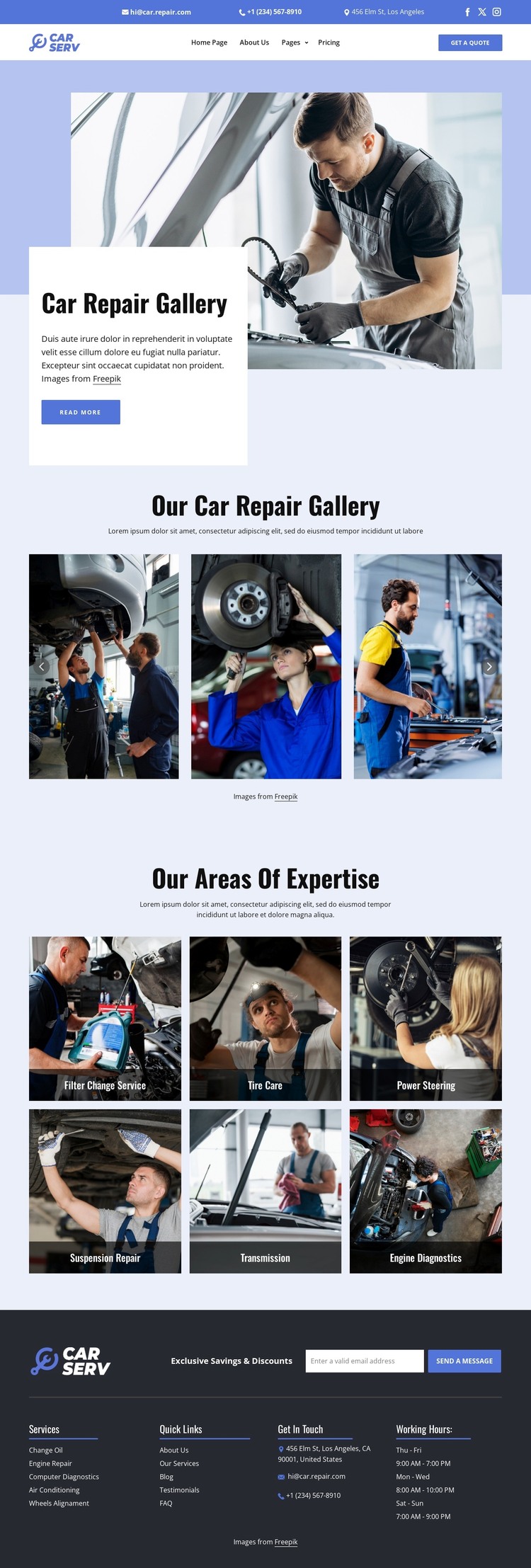
The page separates permanent service information from visual workshop presentation in a way that suits a managed automotive site. The three-image gallery can carry project or repair-work imagery, while the six expertise tiles provide distinct page content around filter change service, tire care, power steering, suspension repair, transmission, and engine diagnostics. These areas are not presented as verified WordPress Posts or categories; they are concrete design regions that can be mapped to the content a WordPress project needs to maintain.
The header and footer supply the shared site framework around those page areas. Contact details, social links, primary navigation, and the Get a Quote action give visitors routes into the site, while the footer combines a subscription form with services, quick links, contact information, and hours. That combination leaves room for the site to add regularly updated material later without losing the central relationship between repair imagery and service expertise.
For a WordPress implementation, the visual system can therefore support both stable service pages and changing content while keeping the same blue, white, navy, and photography-led character. The WordPress Plugin is a relevant Nicepage bridge for editing page content in WordPress, but it does not change the verified fact that this source design is a single automotive repair gallery page.
Customize with Nicepage
Open this ready-made template in the WordPress Website Builder and customize it visually in the Nicepage editor. Replace demo content, edit page sections, and adapt the design to your project without rebuilding the template from scratch.
Manage and Edit This Theme in WordPress
Customize and Install the WordPress Theme
Start with this ready-made theme instead of building the WordPress design from scratch. Customize its layout, content, typography, images, sections, and other design elements visually in Nicepage editor, then export and install the WordPress Theme, Plugin, and Pages on your WordPress site. The Nicepage WordPress Plugin lets you continue working with the site after installation.
Edit the Theme Directly in WordPress
After installation, you can edit the WordPress Theme directly in WordPress with the Nicepage WordPress Plugin. Use Site Style to customize site Colors, Fonts, Header, Footer, Blog, and Post Page Templates while working within your WordPress website.
Edit WordPress Pages Visually
Use the Nicepage WordPress Plugin to edit page content directly from the WordPress admin area. Open a WordPress Page with Nicepage and visually change its text, images, sections, and other page elements while continuing to manage the Page through WordPress.
WordPress Content and Theme Integration
Use the customized theme with WordPress Pages, Posts, Blog and Post Templates, menus, widgets, and other CMS-managed content. Shared theme elements such as Colors, Fonts, Header, Footer, Blog, and Post Page Templates can be managed as part of the overall site design, while WordPress provides the CMS environment for managing site content.
This workflow combines a ready-made WordPress Theme with visual customization, direct theme editing in WordPress, and continued content management through the Nicepage WordPress Plugin.