Bronco Rc Car WordPress Theme


Edit Template Offline
2. Create new page and search for id 14117
Edit Template Online
Create Awesome Websites


Free Nicepage Builder
Keywords
Product Facts and Repeated Feature Cards Fit Page-Oriented Content
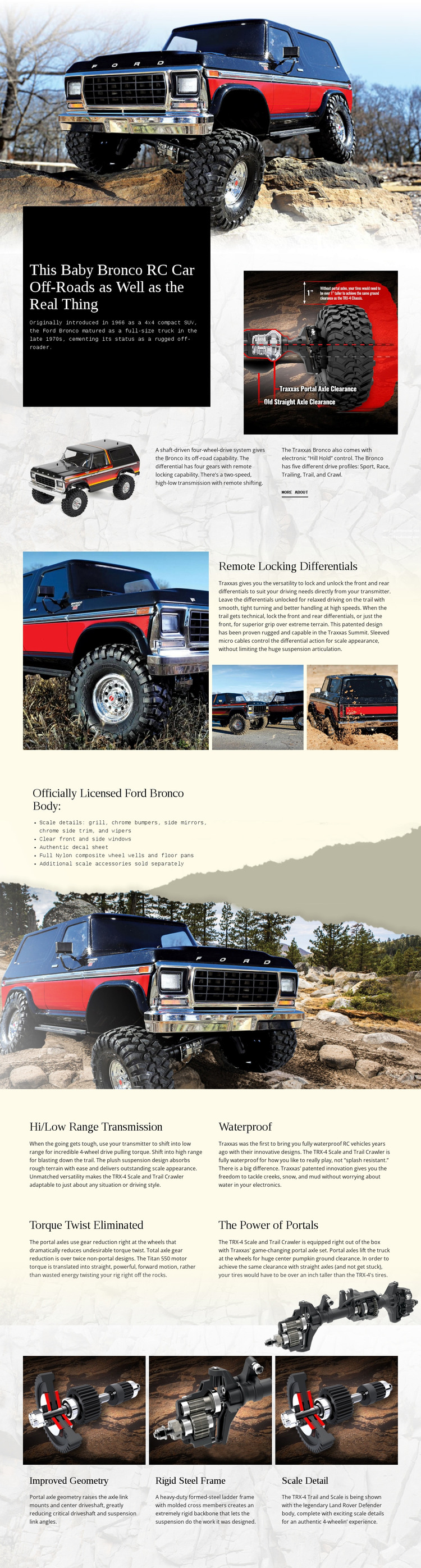
The page provides clear permanent content areas for a WordPress-oriented product presentation. The opening image and introduction can carry the primary Ford Bronco RC information, including the product statement, historical context, drivetrain description, vehicle imagery, and More About link. This page-focused material is distinct from regularly updated editorial content and gives the theme a stable central subject.
The remote locking differentials section is useful as a separate feature area because it combines a specific capability with one large image and two detail photographs. The licensed body section supplies another content relationship, pairing a concise list of chrome bumpers, mirrors, trim, wipers, clear windows, and an authentic decal sheet with a vehicle background. Four repeated blocks then create a consistent pattern for transmission, waterproof construction, torque twist elimination, and portal power.
The final three cards can continue the same visual system around improved geometry, a rigid steel frame, and scale detail. If a project later adds regularly updated announcements or articles, those additions would need their own verified content structure rather than being assumed from this template. In a WordPress project, the WordPress Plugin can support direct theme editing, but the template-specific interpretation is the mapping of its existing product areas to permanent page content and reusable feature presentation.
Customize with Nicepage
Open this ready-made template in the WordPress Website Builder and customize it visually in the Nicepage editor. Replace demo content, edit page sections, and adapt the design to your project without rebuilding the template from scratch.
Manage and Edit This Theme in WordPress
Customize and Install the WordPress Theme
Start with this ready-made theme instead of building the WordPress design from scratch. Customize its layout, content, typography, images, sections, and other design elements visually in Nicepage editor, then export and install the WordPress Theme, Plugin, and Pages on your WordPress site. The Nicepage WordPress Plugin lets you continue working with the site after installation.
Edit the Theme Directly in WordPress
After installation, you can edit the WordPress Theme directly in WordPress with the Nicepage WordPress Plugin. Use Site Style to customize site Colors, Fonts, Header, Footer, Blog, and Post Page Templates while working within your WordPress website.
Edit WordPress Pages Visually
Use the Nicepage WordPress Plugin to edit page content directly from the WordPress admin area. Open a WordPress Page with Nicepage and visually change its text, images, sections, and other page elements while continuing to manage the Page through WordPress.
WordPress Content and Theme Integration
Use the customized theme with WordPress Pages, Posts, Blog and Post Templates, menus, widgets, and other CMS-managed content. Shared theme elements such as Colors, Fonts, Header, Footer, Blog, and Post Page Templates can be managed as part of the overall site design, while WordPress provides the CMS environment for managing site content.
This workflow combines a ready-made WordPress Theme with visual customization, direct theme editing in WordPress, and continued content management through the Nicepage WordPress Plugin.