Mustang WordPress Theme


Edit Template Offline
2. Create new page and search for id 24072
Edit Template Online
Create Awesome Websites


Free Nicepage Builder
Keywords
Model Features and Build Stories Create Clear WordPress Content Areas
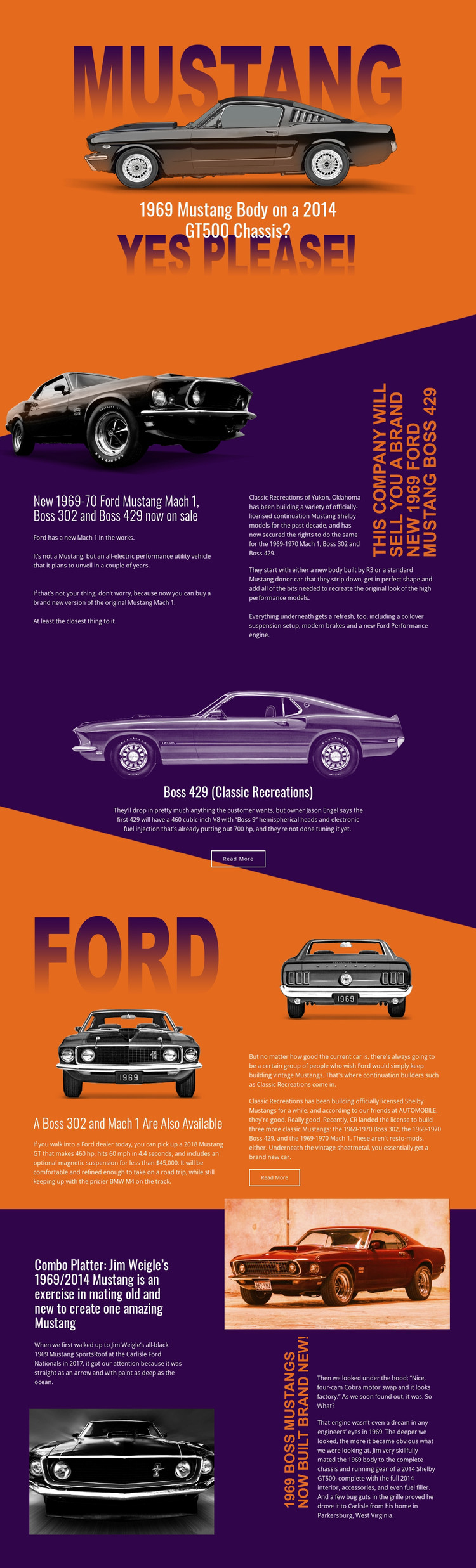
The page separates permanent subject areas that can translate naturally into a WordPress-managed editorial environment. The opening hero introduces the main Mustang feature, the continuation-model section groups Mach 1, Boss 302, and Boss 429 coverage, and the centered Boss 429 panel gives one story a stronger featured presentation. The later section about the Boss 302 and Mach 1 adds another repeatable model-content area, while the Jim Weigle feature supplies a distinct custom-build narrative.
These relationships matter more than the CMS label itself. The design can keep permanent information about classic Mustang models visually coordinated while related editorial material is added around the same orange, purple, and image-led system. Read More actions identify article-style continuation points, but the template does not prove that WordPress Posts, categories, or a blog structure already exist. Those content types should be introduced only if the final project requires them.
The theme interpretation is therefore based on content relationships: model coverage can remain organized as subject-focused page material, while custom restoration or engineering stories can receive their own feature treatment. Shared visual elements, bold headings, and recurring image-and-text arrangements provide a stable character for future WordPress-managed content without turning the existing page into a claim about a completed CMS setup.
Customize with Nicepage
Open this ready-made template in the WordPress Website Builder and customize it visually in the Nicepage editor. Replace demo content, edit page sections, and adapt the design to your project without rebuilding the template from scratch.
Manage and Edit This Theme in WordPress
Customize and Install the WordPress Theme
Start with this ready-made theme instead of building the WordPress design from scratch. Customize its layout, content, typography, images, sections, and other design elements visually in Nicepage editor, then export and install the WordPress Theme, Plugin, and Pages on your WordPress site. The Nicepage WordPress Plugin lets you continue working with the site after installation.
Edit the Theme Directly in WordPress
After installation, you can edit the WordPress Theme directly in WordPress with the Nicepage WordPress Plugin. Use Site Style to customize site Colors, Fonts, Header, Footer, Blog, and Post Page Templates while working within your WordPress website.
Edit WordPress Pages Visually
Use the Nicepage WordPress Plugin to edit page content directly from the WordPress admin area. Open a WordPress Page with Nicepage and visually change its text, images, sections, and other page elements while continuing to manage the Page through WordPress.
WordPress Content and Theme Integration
Use the customized theme with WordPress Pages, Posts, Blog and Post Templates, menus, widgets, and other CMS-managed content. Shared theme elements such as Colors, Fonts, Header, Footer, Blog, and Post Page Templates can be managed as part of the overall site design, while WordPress provides the CMS environment for managing site content.
This workflow combines a ready-made WordPress Theme with visual customization, direct theme editing in WordPress, and continued content management through the Nicepage WordPress Plugin.