School of Psychology WordPress Theme


Edit Template Offline
2. Create new page and search for id 6225099
Edit Template Online
Create Awesome Websites


Free Nicepage Builder
Keywords
Service Cards and Publishable Page Areas Keep the Theme Content-Oriented
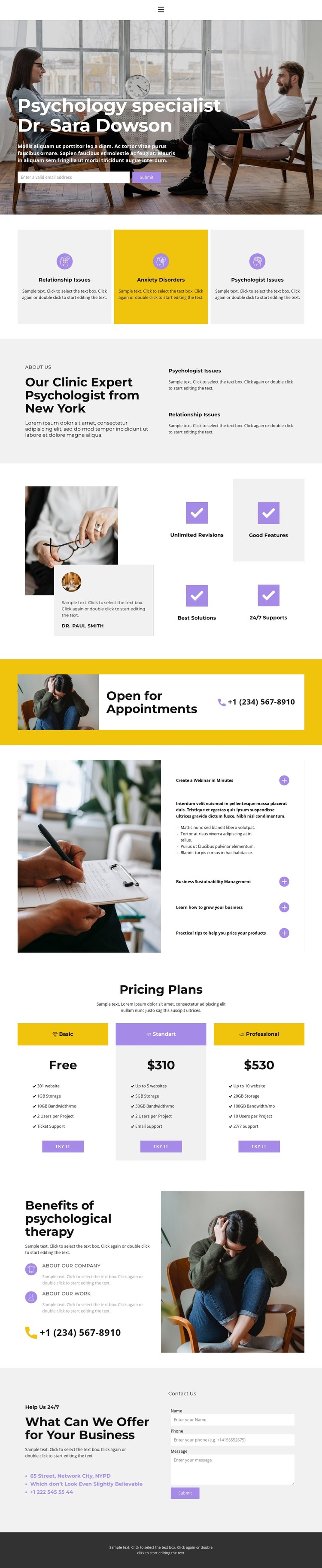
The three service cards give the design a strong page-oriented content structure. Relationship Issues, Anxiety Disorders, and Psychologist Issues appear as parallel areas that can be interpreted as permanent clinic information rather than as one undifferentiated block. The clinic introduction then provides broader explanatory content, while the therapy benefits section gives the page another focused area for describing the value of the service.
The four feature tiles and four accordion items introduce repeatable content patterns with different purposes. Feature tiles can support concise benefit statements, while the accordion keeps additional information available without expanding every topic across the full page. The three-plan comparison offers a separate group for presenting options, displayed pricing content, feature lists, and actions. These are structural observations; the analysis does not verify WordPress Posts, categories, or any existing blog implementation.
The hero form, appointment strip, phone links, and closing inquiry form create communication areas around the permanent page content. In a WordPress-oriented project, those page sections could remain part of the same visual system while content is maintained through the CMS, and regularly updated material could be added later if required. The theme’s value comes from the relationship between stable service and clinic areas, repeated informational groups, and contact-focused sections—not from simply labeling the design with a CMS name.
Customize with Nicepage
Open this ready-made template in the WordPress Website Builder and customize it visually in the Nicepage editor. Replace demo content, edit page sections, and adapt the design to your project without rebuilding the template from scratch.
Manage and Edit This Theme in WordPress
Customize and Install the WordPress Theme
Start with this ready-made theme instead of building the WordPress design from scratch. Customize its layout, content, typography, images, sections, and other design elements visually in Nicepage editor, then export and install the WordPress Theme, Plugin, and Pages on your WordPress site. The Nicepage WordPress Plugin lets you continue working with the site after installation.
Edit the Theme Directly in WordPress
After installation, you can edit the WordPress Theme directly in WordPress with the Nicepage WordPress Plugin. Use Site Style to customize site Colors, Fonts, Header, Footer, Blog, and Post Page Templates while working within your WordPress website.
Edit WordPress Pages Visually
Use the Nicepage WordPress Plugin to edit page content directly from the WordPress admin area. Open a WordPress Page with Nicepage and visually change its text, images, sections, and other page elements while continuing to manage the Page through WordPress.
WordPress Content and Theme Integration
Use the customized theme with WordPress Pages, Posts, Blog and Post Templates, menus, widgets, and other CMS-managed content. Shared theme elements such as Colors, Fonts, Header, Footer, Blog, and Post Page Templates can be managed as part of the overall site design, while WordPress provides the CMS environment for managing site content.
This workflow combines a ready-made WordPress Theme with visual customization, direct theme editing in WordPress, and continued content management through the Nicepage WordPress Plugin.