Quality medical care WordPress Theme


Edit Template Offline
2. Create new page and search for id 121618
Edit Template Online
Create Awesome Websites


Free Nicepage Builder
Keywords
Service Categories and Clinician Profiles Create Clear WordPress Content Areas
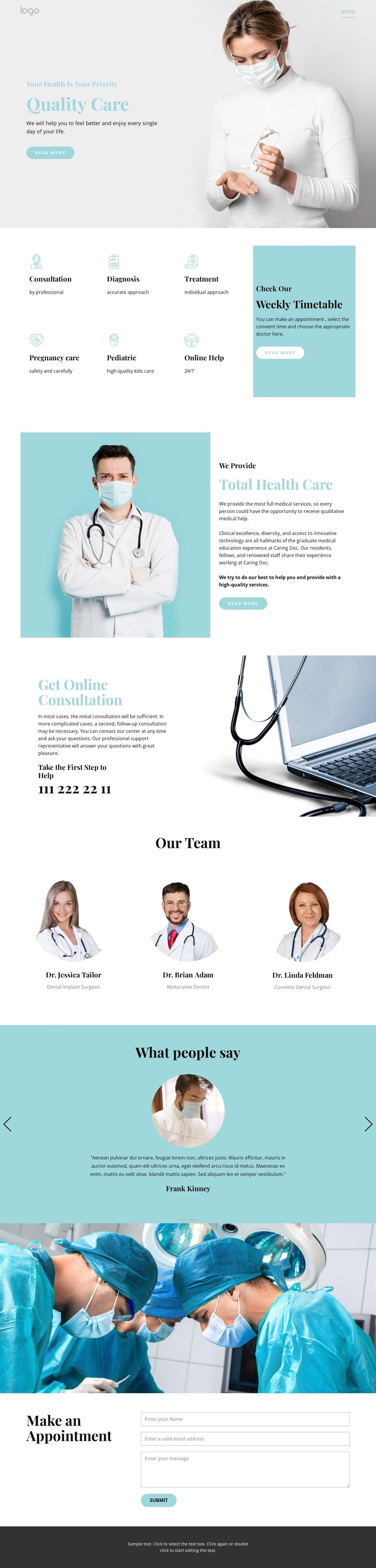
The six labeled service categories give the page a strong set of permanent content areas for a healthcare website. Consultation, Diagnosis, Treatment, Pregnancy care, Pediatric, and Online Help can be interpreted as distinct topics within the same visual system, while the opening hero provides the broader patient-care context. This separation makes the design suitable for presenting core clinic information without reducing every subject to one general paragraph.
Other sections support different kinds of page content. The Weekly Timetable panel introduces scheduling guidance, and the online consultation area gives remote care its own communication focus. The three-person team section organizes clinician profiles into comparable cards, allowing professional information to remain visually consistent. The testimonial carousel adds a separate patient-perspective area with two slides, creating a place for supporting statements without confusing them with service descriptions.
At the end, the “Make an Appointment” section combines medical imagery with a form for a name, email address, and message. That closing structure can remain a dedicated contact area while the service, timetable, consultation, team, and testimonial sections continue to serve their own content roles. In a WordPress project, the design therefore offers a practical theme interpretation for page-oriented clinic content and recurring informational updates, while avoiding any claim that blog posts or other CMS elements already exist in this specific template.
Customize with Nicepage
Open this ready-made template in the WordPress Website Builder and customize it visually in the Nicepage editor. Replace demo content, edit page sections, and adapt the design to your project without rebuilding the template from scratch.
Manage and Edit This Theme in WordPress
Customize and Install the WordPress Theme
Start with this ready-made theme instead of building the WordPress design from scratch. Customize its layout, content, typography, images, sections, and other design elements visually in Nicepage editor, then export and install the WordPress Theme, Plugin, and Pages on your WordPress site. The Nicepage WordPress Plugin lets you continue working with the site after installation.
Edit the Theme Directly in WordPress
After installation, you can edit the WordPress Theme directly in WordPress with the Nicepage WordPress Plugin. Use Site Style to customize site Colors, Fonts, Header, Footer, Blog, and Post Page Templates while working within your WordPress website.
Edit WordPress Pages Visually
Use the Nicepage WordPress Plugin to edit page content directly from the WordPress admin area. Open a WordPress Page with Nicepage and visually change its text, images, sections, and other page elements while continuing to manage the Page through WordPress.
WordPress Content and Theme Integration
Use the customized theme with WordPress Pages, Posts, Blog and Post Templates, menus, widgets, and other CMS-managed content. Shared theme elements such as Colors, Fonts, Header, Footer, Blog, and Post Page Templates can be managed as part of the overall site design, while WordPress provides the CMS environment for managing site content.
This workflow combines a ready-made WordPress Theme with visual customization, direct theme editing in WordPress, and continued content management through the Nicepage WordPress Plugin.