High quality dental services WordPress Theme


Edit Template Offline
2. Create new page and search for id 326416
Edit Template Online
Create Awesome Websites


Free Nicepage Builder
Keywords
Permanent Care Information Leaves Space for WordPress Content Growth
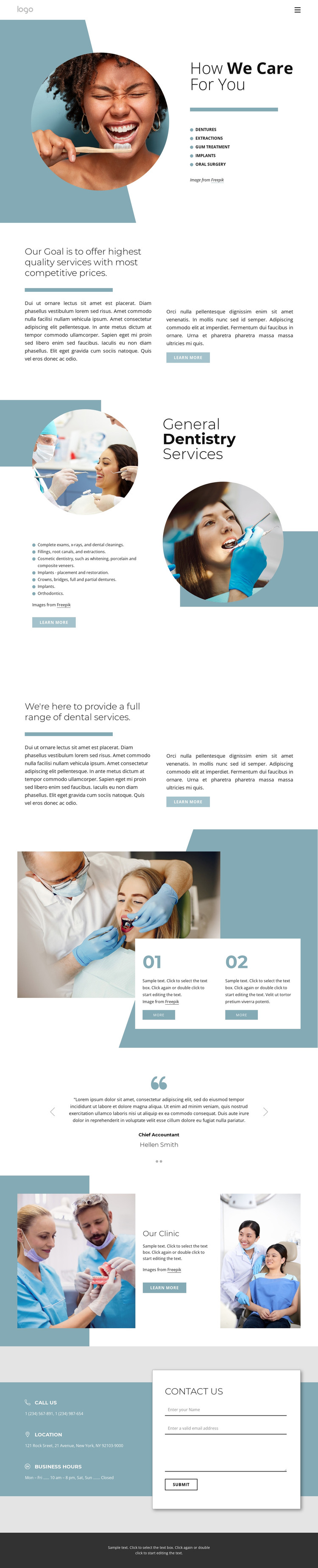
The page's treatment information naturally divides into page-oriented clinic content. The opening section presents dentures, extractions, gum treatment, implants, and oral surgery, while General Dentistry Services expands the range with examinations, cleanings, fillings, root canals, cosmetic dentistry, crowns, bridges, and orthodontics. These are durable information areas that can remain part of a WordPress dental site as the clinic refines descriptions, replaces images, or adds related content. The quality-and-value and full-range statements provide supporting editorial context between the more specific service groups.
Other sections support content that may be updated independently from the main treatment explanation. The testimonial carousel contains two displayed entries and can serve as a separate patient-feedback area, while Our Clinic establishes the clinic's identity through paired photographs and introductory text. The closing contact region keeps the inquiry form together with phone, location, and business-hours information, making permanent contact content easy to distinguish from promotional copy. The navigation row and dark footer provide shared site elements that can frame additional clinic pages without changing the design character. Nicepage's WordPress Plugin can support visual work with WordPress content, but the theme interpretation here rests on the concrete relationship between service pages or sections, recurring patient-oriented content, clinic information, and the final contact area rather than on an unverified blog or post structure.
Customize with Nicepage
Open this ready-made template in the WordPress Website Builder and customize it visually in the Nicepage editor. Replace demo content, edit page sections, and adapt the design to your project without rebuilding the template from scratch.
Manage and Edit This Theme in WordPress
Customize and Install the WordPress Theme
Start with this ready-made theme instead of building the WordPress design from scratch. Customize its layout, content, typography, images, sections, and other design elements visually in Nicepage editor, then export and install the WordPress Theme, Plugin, and Pages on your WordPress site. The Nicepage WordPress Plugin lets you continue working with the site after installation.
Edit the Theme Directly in WordPress
After installation, you can edit the WordPress Theme directly in WordPress with the Nicepage WordPress Plugin. Use Site Style to customize site Colors, Fonts, Header, Footer, Blog, and Post Page Templates while working within your WordPress website.
Edit WordPress Pages Visually
Use the Nicepage WordPress Plugin to edit page content directly from the WordPress admin area. Open a WordPress Page with Nicepage and visually change its text, images, sections, and other page elements while continuing to manage the Page through WordPress.
WordPress Content and Theme Integration
Use the customized theme with WordPress Pages, Posts, Blog and Post Templates, menus, widgets, and other CMS-managed content. Shared theme elements such as Colors, Fonts, Header, Footer, Blog, and Post Page Templates can be managed as part of the overall site design, while WordPress provides the CMS environment for managing site content.
This workflow combines a ready-made WordPress Theme with visual customization, direct theme editing in WordPress, and continued content management through the Nicepage WordPress Plugin.