Stay-at-home medicine WordPress Theme


Edit Template Offline
2. Create new page and search for id 79580
Edit Template Online
Create Awesome Websites


Free Nicepage Builder
Keywords
Page Content Moves from Mental Health Information to Contact
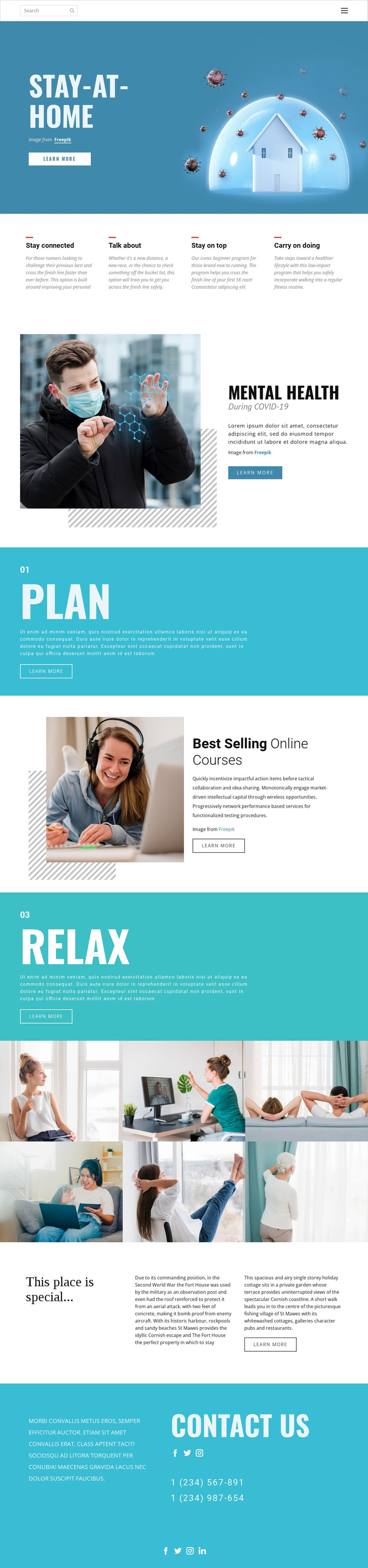
The page-oriented content gives this design a clear way to organize a WordPress project without assuming that blog posts or categories already exist. The four feature highlights can introduce concise informational points, while the Mental Health section carries a longer image-and-text explanation. The Plan and Relax panels divide additional guidance into visually prominent areas, and the Best Selling Online Courses section can represent a separate educational content direction within the same theme.
The six-image lifestyle gallery works as a distinct visual content region rather than as another text block. It is followed by accommodation-related copy in a three-column arrangement, showing how the design can hold different page subjects while retaining its visual identity. The contact section then gathers social links and two telephone channels, with a second social-links row in the footer supporting shared site communication.
For WordPress, these areas can be interpreted as permanent page content that may later be accompanied by regularly updated material if the project requires it. That possibility does not prove that Posts, a Blog, or categories are present in the template. The stronger connection is between the existing content regions and a managed editorial environment: informational copy, course promotion, image media, accommodation details, and contact information can be maintained while the cyan panels, condensed headings, and alternating image-text direction continue to define the theme.
Customize with Nicepage
Open this ready-made template in the WordPress Website Builder and customize it visually in the Nicepage editor. Replace demo content, edit page sections, and adapt the design to your project without rebuilding the template from scratch.
Manage and Edit This Theme in WordPress
Customize and Install the WordPress Theme
Start with this ready-made theme instead of building the WordPress design from scratch. Customize its layout, content, typography, images, sections, and other design elements visually in Nicepage editor, then export and install the WordPress Theme, Plugin, and Pages on your WordPress site. The Nicepage WordPress Plugin lets you continue working with the site after installation.
Edit the Theme Directly in WordPress
After installation, you can edit the WordPress Theme directly in WordPress with the Nicepage WordPress Plugin. Use Site Style to customize site Colors, Fonts, Header, Footer, Blog, and Post Page Templates while working within your WordPress website.
Edit WordPress Pages Visually
Use the Nicepage WordPress Plugin to edit page content directly from the WordPress admin area. Open a WordPress Page with Nicepage and visually change its text, images, sections, and other page elements while continuing to manage the Page through WordPress.
WordPress Content and Theme Integration
Use the customized theme with WordPress Pages, Posts, Blog and Post Templates, menus, widgets, and other CMS-managed content. Shared theme elements such as Colors, Fonts, Header, Footer, Blog, and Post Page Templates can be managed as part of the overall site design, while WordPress provides the CMS environment for managing site content.
This workflow combines a ready-made WordPress Theme with visual customization, direct theme editing in WordPress, and continued content management through the Nicepage WordPress Plugin.