Pro health and medicine WordPress Theme


Edit Template Offline
2. Create new page and search for id 16719
Edit Template Online
Create Awesome Websites


Free Nicepage Builder
Keywords
Service information and patient-facing sections map naturally to clinic content
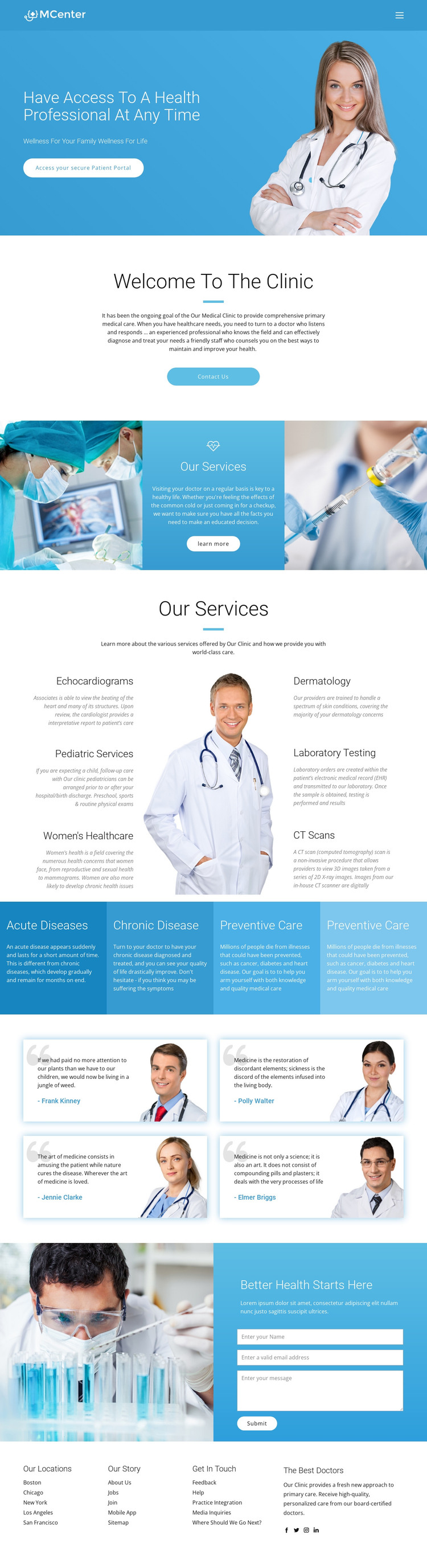
The page-oriented content is well suited to a WordPress-managed clinic presentation because its main areas can be understood as stable information for patients. The hero introduces access through the secure Patient Portal action, while the clinic introduction and Contact Us button establish a direct informational and inquiry context. These are permanent page concerns rather than claims about a particular publishing system already being present in the design.
The six-service directory supplies a clear set of subject areas for clinic content: echocardiograms, pediatric services, women’s healthcare, dermatology, laboratory testing, and CT scans. The four colored panels then broaden the content relationship by grouping acute disease, chronic disease, and preventive care. This structure could support page-oriented medical information while keeping the visual system consistent across related content. The four testimonial cards offer another repeated content pattern, though the displayed names and quotations are sample entries and should be replaced or verified before publication.
The laboratory image and contact form create a patient-inquiry area, while the footer groups locations, clinic story, contact details, doctor-related links, and social links. These recurring areas can remain part of the theme’s visual direction as the site content grows. Where direct WordPress editing is relevant, the WordPress Plugin is a product bridge, not evidence that WordPress content already exists in this template.
Customize with Nicepage
Open this ready-made template in the WordPress Website Builder and customize it visually in the Nicepage editor. Replace demo content, edit page sections, and adapt the design to your project without rebuilding the template from scratch.
Manage and Edit This Theme in WordPress
Customize and Install the WordPress Theme
Start with this ready-made theme instead of building the WordPress design from scratch. Customize its layout, content, typography, images, sections, and other design elements visually in Nicepage editor, then export and install the WordPress Theme, Plugin, and Pages on your WordPress site. The Nicepage WordPress Plugin lets you continue working with the site after installation.
Edit the Theme Directly in WordPress
After installation, you can edit the WordPress Theme directly in WordPress with the Nicepage WordPress Plugin. Use Site Style to customize site Colors, Fonts, Header, Footer, Blog, and Post Page Templates while working within your WordPress website.
Edit WordPress Pages Visually
Use the Nicepage WordPress Plugin to edit page content directly from the WordPress admin area. Open a WordPress Page with Nicepage and visually change its text, images, sections, and other page elements while continuing to manage the Page through WordPress.
WordPress Content and Theme Integration
Use the customized theme with WordPress Pages, Posts, Blog and Post Templates, menus, widgets, and other CMS-managed content. Shared theme elements such as Colors, Fonts, Header, Footer, Blog, and Post Page Templates can be managed as part of the overall site design, while WordPress provides the CMS environment for managing site content.
This workflow combines a ready-made WordPress Theme with visual customization, direct theme editing in WordPress, and continued content management through the Nicepage WordPress Plugin.