Let's count the victories WordPress Theme


Percentage Cards Turn a Business Message Into Stable Page Content
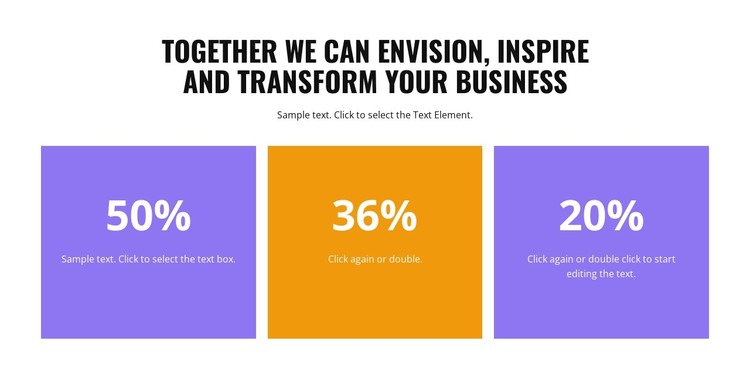
The heading and supporting paragraph give this block a page-oriented introduction before the repeated counters present their figures. That relationship makes the section suitable for permanent informational content: the opening text establishes the theme of business transformation, and the three cards provide separate places for concise metric explanations. Their shared format keeps the values visually comparable without requiring a long narrative.
For a WordPress-managed page, the block can function as a stable statistics section within broader publishable content. The visible 50%, 36%, and 20% values should be treated as sample counter content, while the underlying structure can support finalized figures and descriptions supplied for the page. The section remains one reusable content area rather than a complete theme, and other page content can provide the surrounding introduction, services, proof, or contact context.
The card treatment gives the content a consistent visual pattern that can remain recognizable when the section is reused. The first and third cards use purple, the center card uses orange, and all three place large white percentage values above supporting text. On a WordPress-oriented project, this distinction helps a reader scan separate information units while preserving one cohesive design. The centered alignment and generous white space also keep the metrics visually independent from neighboring page sections.
Customize with Nicepage
Open this ready-made template in the WordPress Website Builder and customize it visually in the Nicepage editor. Replace demo content, edit page sections, and adapt the design to your project without rebuilding the template from scratch.
Edit Template Offline
2. Create a new page or select existing
3. Click Add new block, search for id 5815221 and click enter
Edit Template Online
Create Awesome Websites


Free Nicepage Builder
Keywords
Manage and Edit This Theme in WordPress
Customize and Install the WordPress Theme
Start with this ready-made theme instead of building the WordPress design from scratch. Customize its layout, content, typography, images, sections, and other design elements visually in Nicepage editor, then export and install the WordPress Theme, Plugin, and Pages on your WordPress site. The Nicepage WordPress Plugin lets you continue working with the site after installation.
Edit the Theme Directly in WordPress
After installation, you can edit the WordPress Theme directly in WordPress with the Nicepage WordPress Plugin. Use Site Style to customize site Colors, Fonts, Header, Footer, Blog, and Post Page Templates while working within your WordPress website.
Edit WordPress Pages Visually
Use the Nicepage WordPress Plugin to edit page content directly from the WordPress admin area. Open a WordPress Page with Nicepage and visually change its text, images, sections, and other page elements while continuing to manage the Page through WordPress.
WordPress Content and Theme Integration
Use the customized theme with WordPress Pages, Posts, Blog and Post Templates, menus, widgets, and other CMS-managed content. Shared theme elements such as Colors, Fonts, Header, Footer, Blog, and Post Page Templates can be managed as part of the overall site design, while WordPress provides the CMS environment for managing site content.
This workflow combines a ready-made WordPress Theme with visual customization, direct theme editing in WordPress, and continued content management through the Nicepage WordPress Plugin.