Calculating profit for the year WordPress Theme


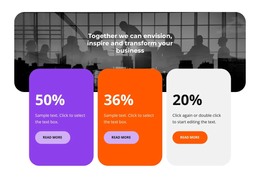
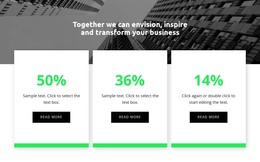
A Contextual Banner Leads Into Three Stable Metric Cards
The section’s business-oriented heading gives the statistics a clear editorial frame before visitors reach the repeated content. Set over a dark grayscale city-and-people image with rounded corners, the centered banner creates a strong visual introduction without presenting a complete page narrative. The image supplies atmosphere, while the heading explains that the following figures relate to transformation or business indicators.
The lower area is organized as three rounded cards arranged horizontally and partly overlapping the banner. Large percentage values—50%, 36%, and 20%—make the cards immediately scannable. Supporting text and a “read more” button repeat inside each card, creating a stable content pattern that can be maintained as page content in a WordPress-managed project. The displayed values and sample wording should be replaced with the site’s actual information before publication.
For a WordPress-oriented use, this block fits naturally as a permanent statistics or business-highlight section on a managed page. The cards can remain a consistent visual unit while surrounding content handles fuller explanations, related pages, or changing editorial material. The block’s role is therefore to present a concise set of structured indicators, not to function as a standalone WordPress Theme or an entire site.
Customize with Nicepage
Open this ready-made template in the WordPress Website Builder and customize it visually in the Nicepage editor. Replace demo content, edit page sections, and adapt the design to your project without rebuilding the template from scratch.
Edit Template Offline
2. Create a new page or select existing
3. Click Add new block, search for id 3651967 and click enter
Edit Template Online
Create Awesome Websites


Free Nicepage Builder
Keywords
Use This Block in a WordPress-Managed Website
Keep the Block as Page Content
Use the block as one content/layout section inside a WordPress-oriented site rather than treating the Block ID as a complete WordPress Theme. Its verified text, images, repeated items, forms, galleries, or other elements can remain part of permanent page content while WordPress manages the wider site.
Work With Nicepage and WordPress
A Nicepage WordPress project can be installed using the WordPress Theme, Plugin, and Pages workflow. After installation, the same visual section can participate in WordPress-managed pages as part of the broader theme/site structure.
Continue Editing in WordPress
Nicepage supports editing the WordPress Theme directly in WordPress. Use WordPress Pages, Posts, Blog structures, and other CMS concepts only when they are relevant to the surrounding project; their existence must not be inferred from the analyzed block alone.
This workflow keeps the block's verified section function separate from the WordPress theme architecture while allowing it to participate in a CMS-managed website.