Counter Your Business WordPress Theme



Stable Business Metrics Fit a Permanent Page Content Area
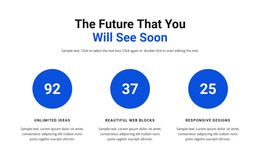
The centered heading and supporting line make this block read as stable informational content rather than a time-sensitive update. It introduces a business-growth message, then organizes four related metrics into a permanent section: 12+ Years of Experience, 48 Awards Wins, 27k Happy Clients, and 15 Perfect Products. In a WordPress-managed project, that kind of content can sit within a services, company, or overview page while the wider site manages other content around it.
The block’s page-content logic comes from the relationship between its fixed message and repeated metric items. The four counters share one horizontal row, so the section presents a concise summary instead of a long article. Large thin values provide the first visual point of attention, while the smaller labels identify the subject of each figure. The dark charcoal background, centered light copy, and purple numbers give the content a consistent visual container that can remain recognizable when placed beside other page sections.
This interpretation concerns how the section can participate in a WordPress-oriented page, not a standalone theme. The surrounding project can provide navigation, additional pages, editorial material, services, or contact areas, while this block retains its focused statistics role. Its value is the combination of durable page information, repeatable structure, and a visual treatment that separates the achievement summary from denser content nearby.
Customize with Nicepage
Open this ready-made template in the WordPress Website Builder and customize it visually in the Nicepage editor. Replace demo content, edit page sections, and adapt the design to your project without rebuilding the template from scratch.
Edit Template Offline
2. Create a new page or select existing
3. Click Add new block, search for id 43721 and click enter
Edit Template Online
Create Awesome Websites


Free Nicepage Builder
Keywords
Manage and Edit This Theme in WordPress
Customize and Install the WordPress Theme
Start with this ready-made theme instead of building the WordPress design from scratch. Customize its layout, content, typography, images, sections, and other design elements visually in Nicepage editor, then export and install the WordPress Theme, Plugin, and Pages on your WordPress site. The Nicepage WordPress Plugin lets you continue working with the site after installation.
Edit the Theme Directly in WordPress
After installation, you can edit the WordPress Theme directly in WordPress with the Nicepage WordPress Plugin. Use Site Style to customize site Colors, Fonts, Header, Footer, Blog, and Post Page Templates while working within your WordPress website.
Edit WordPress Pages Visually
Use the Nicepage WordPress Plugin to edit page content directly from the WordPress admin area. Open a WordPress Page with Nicepage and visually change its text, images, sections, and other page elements while continuing to manage the Page through WordPress.
WordPress Content and Theme Integration
Use the customized theme with WordPress Pages, Posts, Blog and Post Templates, menus, widgets, and other CMS-managed content. Shared theme elements such as Colors, Fonts, Header, Footer, Blog, and Post Page Templates can be managed as part of the overall site design, while WordPress provides the CMS environment for managing site content.
This workflow combines a ready-made WordPress Theme with visual customization, direct theme editing in WordPress, and continued content management through the Nicepage WordPress Plugin.