
Doing branding for business WordPress Theme


Edit Template Offline
2. Create new page and search for id 82540
Edit Template Online
Create Awesome Websites


Free Nicepage Builder
Keywords
Page Content and Repeatable Proof Fit the Branding Theme
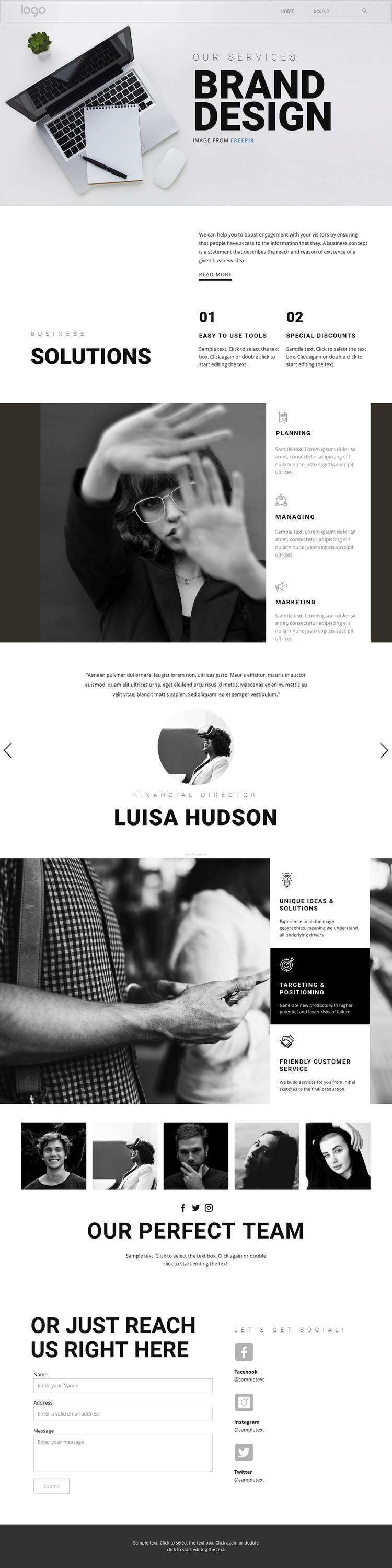
The page separates permanent informational content into areas that can be interpreted naturally in a WordPress-oriented environment. Brand design and Business solutions provide the principal page message, while the two feature items and the Planning, Managing, and Marketing panels create clearly bounded service information. The second capability group—Unique ideas and solutions, Targeting and positioning, and Friendly customer service—can be treated as additional page content that explains the strategic side of the offer rather than as unrelated decorative text.
The testimonial section introduces repeatable content with two entries containing quotations, portraits, roles, names, and directional controls. Their demo values should not be presented as verified customer evidence, but the structure itself shows how proof-oriented content is arranged. The five-photo team showcase provides a separate people-focused area, with the Our perfect team heading and supporting copy giving it a clear page role. Together, these sections create a content pattern that can be expanded around a consistent theme without claiming that WordPress posts, categories, or blog templates already exist.
The final contact region is oriented toward permanent page content: it contains name, email, and message inputs, then places Facebook, Instagram, and Twitter listings alongside the form. Navigation and mobile-navigation connect the sections, while the dark footer provides a shared closing area. This makes the design useful as a WordPress theme concept because its service, strategy, proof, team, and contact content can remain within one visual system as the site’s managed pages develop. The interpretation concerns content mapping, not installation or plugin instructions.
Customize with Nicepage
Open this ready-made template in the WordPress Website Builder and customize it visually in the Nicepage editor. Replace demo content, edit page sections, and adapt the design to your project without rebuilding the template from scratch.
Manage and Edit This Theme in WordPress
Customize and Install the WordPress Theme
Start with this ready-made theme instead of building the WordPress design from scratch. Customize its layout, content, typography, images, sections, and other design elements visually in Nicepage editor, then export and install the WordPress Theme, Plugin, and Pages on your WordPress site. The Nicepage WordPress Plugin lets you continue working with the site after installation.
Edit the Theme Directly in WordPress
After installation, you can edit the WordPress Theme directly in WordPress with the Nicepage WordPress Plugin. Use Site Style to customize site Colors, Fonts, Header, Footer, Blog, and Post Page Templates while working within your WordPress website.
Edit WordPress Pages Visually
Use the Nicepage WordPress Plugin to edit page content directly from the WordPress admin area. Open a WordPress Page with Nicepage and visually change its text, images, sections, and other page elements while continuing to manage the Page through WordPress.
WordPress Content and Theme Integration
Use the customized theme with WordPress Pages, Posts, Blog and Post Templates, menus, widgets, and other CMS-managed content. Shared theme elements such as Colors, Fonts, Header, Footer, Blog, and Post Page Templates can be managed as part of the overall site design, while WordPress provides the CMS environment for managing site content.
This workflow combines a ready-made WordPress Theme with visual customization, direct theme editing in WordPress, and continued content management through the Nicepage WordPress Plugin.





















