A brief history of legendary guitarist WordPress Theme


The Biography Reads as Stable Featured-Artist Page Content
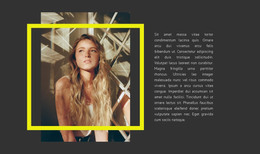
The Carlos Santana heading, performance image, and two biographical paragraphs form stable informational content suited to a WordPress-managed page. The left image gives the section an immediate visual subject, while the black right-hand panel keeps the artist’s name and profile text together. This makes the block appropriate for a permanent biography or featured-musician area rather than content that depends on a changing list or archive.
The two-column relationship also gives the section a consistent presentation within a broader page. The image occupies one half, and the text remains vertically centered in the other, so the profile can sit alongside other WordPress-managed content without losing its identity. The large uppercase heading provides a durable visual entry point, while the two paragraphs offer enough context for an artist introduction without expanding into a full article layout.
A WordPress-oriented project can therefore treat this block as reusable page content inside a wider theme and site structure. The block itself supplies the visual and editorial arrangement; surrounding pages or content areas can provide additional musicians, music coverage, media, or navigation. Its static interaction keeps the focus on reading and recognition, and the monochrome image with white-on-black typography gives the section a defined presentation that can remain consistent when the wider project is updated. The result is a stable artist-profile region, not a standalone WordPress Theme.
Customize with Nicepage
Open this ready-made template in the WordPress Website Builder and customize it visually in the Nicepage editor. Replace demo content, edit page sections, and adapt the design to your project without rebuilding the template from scratch.
Edit Template Offline
2. Create a new page or select existing
3. Click Add new block, search for id 58608 and click enter
Edit Template Online
Create Awesome Websites


Free Nicepage Builder
Keywords
Use This Block in a WordPress-Managed Website
Keep the Block as Page Content
Use the block as one content/layout section inside a WordPress-oriented site rather than treating the Block ID as a complete WordPress Theme. Its verified text, images, repeated items, forms, galleries, or other elements can remain part of permanent page content while WordPress manages the wider site.
Work With Nicepage and WordPress
A Nicepage WordPress project can be installed using the WordPress Theme, Plugin, and Pages workflow. After installation, the same visual section can participate in WordPress-managed pages as part of the broader theme/site structure.
Continue Editing in WordPress
Nicepage supports editing the WordPress Theme directly in WordPress. Use WordPress Pages, Posts, Blog structures, and other CMS concepts only when they are relevant to the surrounding project; their existence must not be inferred from the analyzed block alone.
This workflow keeps the block's verified section function separate from the WordPress theme architecture while allowing it to participate in a CMS-managed website.