Gallery with architecture forms WordPress Theme


Five Monochrome Images as Stable Page Content
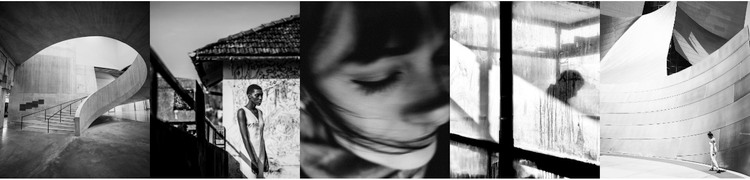
The equal-width image row gives this block a straightforward role as visual content within a WordPress-managed page. Five tall, portrait-oriented tiles run across the section without gaps in the main arrangement, creating a continuous gallery strip. Several photographs depict architectural spaces and structures, while the inclusion of portrait and figure details adds variation to the sequence. The predominantly black-and-white treatment keeps those different subjects connected through tone and presentation.
Because the block contains no heading, paragraph, button, or visible control, it is best understood as a stable image area rather than a complete information section. A WordPress-oriented page can place explanatory copy, titles, or related publishable content around it, while this block retains its focused visual function. The absence of built-in text also allows the surrounding page context to determine whether the gallery supports an architecture feature, a portfolio-like presentation, or a visual transition between content areas. Its reusable value comes from the defined five-tile structure and consistent photographic treatment, not from any assumed CMS item type or standalone theme scope.
Customize with Nicepage
Open this ready-made template in the WordPress Website Builder and customize it visually in the Nicepage editor. Replace demo content, edit page sections, and adapt the design to your project without rebuilding the template from scratch.
Edit Template Offline
2. Create a new page or select existing
3. Click Add new block, search for id 55652 and click enter
Edit Template Online
Create Awesome Websites


Free Nicepage Builder
Keywords
Manage and Edit This Theme in WordPress
Customize and Install the WordPress Theme
Start with this ready-made theme instead of building the WordPress design from scratch. Customize its layout, content, typography, images, sections, and other design elements visually in Nicepage editor, then export and install the WordPress Theme, Plugin, and Pages on your WordPress site. The Nicepage WordPress Plugin lets you continue working with the site after installation.
Edit the Theme Directly in WordPress
After installation, you can edit the WordPress Theme directly in WordPress with the Nicepage WordPress Plugin. Use Site Style to customize site Colors, Fonts, Header, Footer, Blog, and Post Page Templates while working within your WordPress website.
Edit WordPress Pages Visually
Use the Nicepage WordPress Plugin to edit page content directly from the WordPress admin area. Open a WordPress Page with Nicepage and visually change its text, images, sections, and other page elements while continuing to manage the Page through WordPress.
WordPress Content and Theme Integration
Use the customized theme with WordPress Pages, Posts, Blog and Post Templates, menus, widgets, and other CMS-managed content. Shared theme elements such as Colors, Fonts, Header, Footer, Blog, and Post Page Templates can be managed as part of the overall site design, while WordPress provides the CMS environment for managing site content.
This workflow combines a ready-made WordPress Theme with visual customization, direct theme editing in WordPress, and continued content management through the Nicepage WordPress Plugin.