
Creative lab for digital art WordPress Theme


Edit Template Offline
2. Create new page and search for id 32528
Edit Template Online
Create Awesome Websites


Free Nicepage Builder
Keywords
Process Content and Service Areas Fit a Managed Agency Site
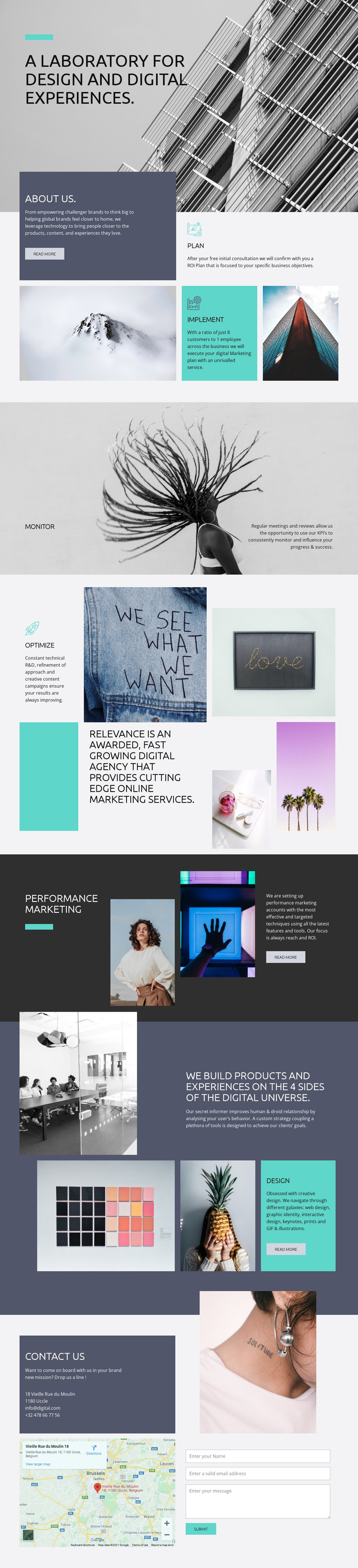
The page’s permanent content areas map naturally to a WordPress-managed agency presentation. About Us provides a page-oriented introduction, while plan, implement, monitor, and optimize divide the agency process into recognizable editorial topics. Those labels can help keep recurring explanations distinct as content is revised, without changing the visual relationship between the process text and its supporting imagery. The optimization section adds positioning content, giving the site another area for a considered agency message rather than only a list of services.
Performance marketing and design offer two different capability directions. Performance marketing is presented in a dark, compact block with imagery, explanatory text, and a Read more action; the digital products section uses alternating images and text to explain design-related work. In a WordPress project, these verified areas can remain stable page content while future editorial material is added around the same visual system. No unverified blog, post, or category structure is assumed.
The contact section is especially suitable as a persistent response-oriented page area. Its contact information, map, portrait image, form, and Submit action connect the agency story with a practical enquiry destination. Nicepage’s WordPress Plugin can support visual editing of WordPress content, but the main value here is the template’s clear division between agency information, process explanation, capability content, and contact response.
Customize with Nicepage
Open this ready-made template in the WordPress Website Builder and customize it visually in the Nicepage editor. Replace demo content, edit page sections, and adapt the design to your project without rebuilding the template from scratch.
Manage and Edit This Theme in WordPress
Customize and Install the WordPress Theme
Start with this ready-made theme instead of building the WordPress design from scratch. Customize its layout, content, typography, images, sections, and other design elements visually in Nicepage editor, then export and install the WordPress Theme, Plugin, and Pages on your WordPress site. The Nicepage WordPress Plugin lets you continue working with the site after installation.
Edit the Theme Directly in WordPress
After installation, you can edit the WordPress Theme directly in WordPress with the Nicepage WordPress Plugin. Use Site Style to customize site Colors, Fonts, Header, Footer, Blog, and Post Page Templates while working within your WordPress website.
Edit WordPress Pages Visually
Use the Nicepage WordPress Plugin to edit page content directly from the WordPress admin area. Open a WordPress Page with Nicepage and visually change its text, images, sections, and other page elements while continuing to manage the Page through WordPress.
WordPress Content and Theme Integration
Use the customized theme with WordPress Pages, Posts, Blog and Post Templates, menus, widgets, and other CMS-managed content. Shared theme elements such as Colors, Fonts, Header, Footer, Blog, and Post Page Templates can be managed as part of the overall site design, while WordPress provides the CMS environment for managing site content.
This workflow combines a ready-made WordPress Theme with visual customization, direct theme editing in WordPress, and continued content management through the Nicepage WordPress Plugin.





















