Modern fashion solutions WordPress Theme


Image-led editorial content fits a stable page section
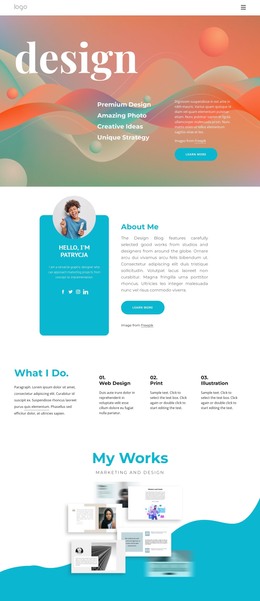
The upper paragraph and lower supporting copy give the central image a clear content frame. Visitors first encounter a small amount of introductory context, then the abstract black-and-white artwork presents the dominant idea through the stacked white serif word “design.” The paragraph beneath the image can extend that idea with explanation, creating a compact editorial rhythm without relying on a card grid, form, or other interactive component.
That arrangement can work well as permanent page content in a WordPress-managed site when a project needs an art or design section that is visually stronger than a plain text column. The image remains the memorable anchor, while the two text areas provide places for carefully maintained descriptive copy. Centering keeps the section self-contained, and the generous white background spacing helps it sit cleanly between other page sections with different content responsibilities.
In this context, the block is best understood as a reusable visual content region within a broader WordPress project, not as a complete WordPress Theme. The placeholder paragraphs can be replaced with the project’s approved wording while the image-and-title relationship remains intact. Other page content can surround it, allowing this section to contribute a specific art-led moment without taking responsibility for site-wide publishing structure or navigation.
Customize with Nicepage
Open this ready-made template in the WordPress Website Builder and customize it visually in the Nicepage editor. Replace demo content, edit page sections, and adapt the design to your project without rebuilding the template from scratch.
Edit Template Offline
2. Create a new page or select existing
3. Click Add new block, search for id 471750 and click enter
Edit Template Online
Create Awesome Websites


Free Nicepage Builder
Keywords
Manage and Edit This Theme in WordPress
Customize and Install the WordPress Theme
Start with this ready-made theme instead of building the WordPress design from scratch. Customize its layout, content, typography, images, sections, and other design elements visually in Nicepage editor, then export and install the WordPress Theme, Plugin, and Pages on your WordPress site. The Nicepage WordPress Plugin lets you continue working with the site after installation.
Edit the Theme Directly in WordPress
After installation, you can edit the WordPress Theme directly in WordPress with the Nicepage WordPress Plugin. Use Site Style to customize site Colors, Fonts, Header, Footer, Blog, and Post Page Templates while working within your WordPress website.
Edit WordPress Pages Visually
Use the Nicepage WordPress Plugin to edit page content directly from the WordPress admin area. Open a WordPress Page with Nicepage and visually change its text, images, sections, and other page elements while continuing to manage the Page through WordPress.
WordPress Content and Theme Integration
Use the customized theme with WordPress Pages, Posts, Blog and Post Templates, menus, widgets, and other CMS-managed content. Shared theme elements such as Colors, Fonts, Header, Footer, Blog, and Post Page Templates can be managed as part of the overall site design, while WordPress provides the CMS environment for managing site content.
This workflow combines a ready-made WordPress Theme with visual customization, direct theme editing in WordPress, and continued content management through the Nicepage WordPress Plugin.