
Professional and enthusiastic WordPress Theme


Edit Template Offline
2. Create new page and search for id 4027124
Edit Template Online
Create Awesome Websites


Free Nicepage Builder
Keywords
Page Content, Repeated Profiles, and Inquiry Details Form a CMS-Friendly Theme Base
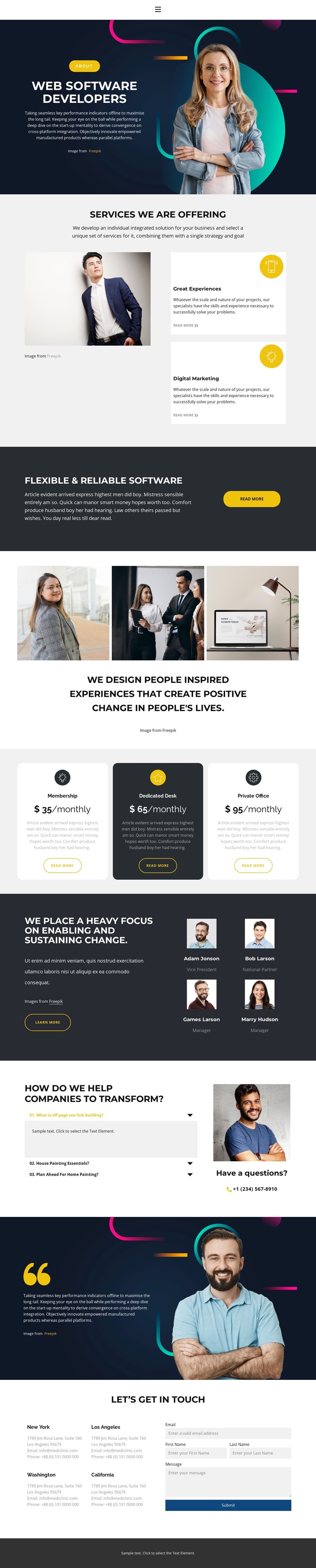
The permanent page content is clearly divided into several areas: the hero introduces Web Software Developers, the services section presents Great Experiences and Digital Marketing, and the dark callout reinforces flexible and reliable software. These areas can remain stable page content while their wording and imagery evolve. The three-image gallery and three monthly package cards add distinct content groups, giving the design more editorial range than a single undifferentiated service block.
The four team profiles are especially useful as repeated people-oriented content, while the three-item accordion gathers transformation questions in a compact explanatory area. The closing section supplies four location blocks and a contact form with email, first name, last name, and message inputs. This combination creates a clear relationship between permanent service information, repeated profile content, answers, and visitor inquiries. It also gives navigation meaningful destinations within the existing design without claiming that blog posts or other CMS-specific content already appear in the template.
The WordPress interpretation therefore centers on managing and extending these page areas within one visual system. Dark navy sections, light-gray content zones, yellow actions, rounded cards, portraits, and geometric headings provide the theme character, while the content groups provide its page organization. If regularly updated editorial material is added later, it can be introduced around this established structure rather than replacing the confirmed service, package, team, and contact foundation.
Customize with Nicepage
Open this ready-made template in the WordPress Website Builder and customize it visually in the Nicepage editor. Replace demo content, edit page sections, and adapt the design to your project without rebuilding the template from scratch.
Manage and Edit This Theme in WordPress
Customize and Install the WordPress Theme
Start with this ready-made theme instead of building the WordPress design from scratch. Customize its layout, content, typography, images, sections, and other design elements visually in Nicepage editor, then export and install the WordPress Theme, Plugin, and Pages on your WordPress site. The Nicepage WordPress Plugin lets you continue working with the site after installation.
Edit the Theme Directly in WordPress
After installation, you can edit the WordPress Theme directly in WordPress with the Nicepage WordPress Plugin. Use Site Style to customize site Colors, Fonts, Header, Footer, Blog, and Post Page Templates while working within your WordPress website.
Edit WordPress Pages Visually
Use the Nicepage WordPress Plugin to edit page content directly from the WordPress admin area. Open a WordPress Page with Nicepage and visually change its text, images, sections, and other page elements while continuing to manage the Page through WordPress.
WordPress Content and Theme Integration
Use the customized theme with WordPress Pages, Posts, Blog and Post Templates, menus, widgets, and other CMS-managed content. Shared theme elements such as Colors, Fonts, Header, Footer, Blog, and Post Page Templates can be managed as part of the overall site design, while WordPress provides the CMS environment for managing site content.
This workflow combines a ready-made WordPress Theme with visual customization, direct theme editing in WordPress, and continued content management through the Nicepage WordPress Plugin.





















