Smartphone technology WordPress Theme


Product References and a Central Image Form Stable WordPress Page Content
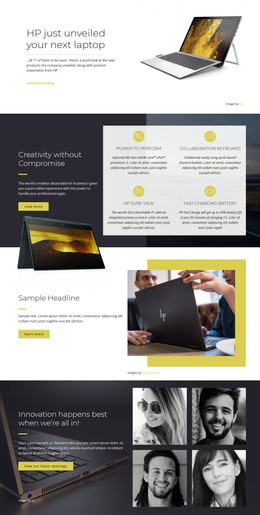
The text region gives this block a practical role as stable product-related content. It identifies a quick look at eleven new products and refers to position statements from HP, so the section reads as an announcement or introductory information area rather than a collection of regularly changing items. In a WordPress-managed page, that kind of focused copy can remain part of permanent content while other site areas handle detailed product entries, editorial updates, or supporting company information.
The visual relationship is equally specific. Small light-gray text sits in the upper-left, while a colorful laptop-like product image becomes the central focus against a predominantly black background. Generous empty space keeps the two areas from competing, allowing the written message to frame the image without covering or fragmenting it. Since the interaction is static, visitors receive the announcement as one direct visual and reading sequence.
Used within a WordPress-oriented site, the block can provide a consistent technology introduction on a suitable page while the surrounding project manages its wider content structure. Its value is the pairing of a compact announcement with a strong product visual: the copy supplies context, and the image makes that context immediately identifiable. Other page sections can extend the subject without changing this block’s focused role.
Customize with Nicepage
Open this ready-made template in the WordPress Website Builder and customize it visually in the Nicepage editor. Replace demo content, edit page sections, and adapt the design to your project without rebuilding the template from scratch.
Edit Template Offline
2. Create a new page or select existing
3. Click Add new block, search for id 44668 and click enter
Edit Template Online
Create Awesome Websites


Free Nicepage Builder
Keywords
Manage and Edit This Theme in WordPress
Customize and Install the WordPress Theme
Start with this ready-made theme instead of building the WordPress design from scratch. Customize its layout, content, typography, images, sections, and other design elements visually in Nicepage editor, then export and install the WordPress Theme, Plugin, and Pages on your WordPress site. The Nicepage WordPress Plugin lets you continue working with the site after installation.
Edit the Theme Directly in WordPress
After installation, you can edit the WordPress Theme directly in WordPress with the Nicepage WordPress Plugin. Use Site Style to customize site Colors, Fonts, Header, Footer, Blog, and Post Page Templates while working within your WordPress website.
Edit WordPress Pages Visually
Use the Nicepage WordPress Plugin to edit page content directly from the WordPress admin area. Open a WordPress Page with Nicepage and visually change its text, images, sections, and other page elements while continuing to manage the Page through WordPress.
WordPress Content and Theme Integration
Use the customized theme with WordPress Pages, Posts, Blog and Post Templates, menus, widgets, and other CMS-managed content. Shared theme elements such as Colors, Fonts, Header, Footer, Blog, and Post Page Templates can be managed as part of the overall site design, while WordPress provides the CMS environment for managing site content.
This workflow combines a ready-made WordPress Theme with visual customization, direct theme editing in WordPress, and continued content management through the Nicepage WordPress Plugin.