Best computer technology WordPress Theme


Edit Template Offline
2. Create new page and search for id 12840
Edit Template Online
Create Awesome Websites


Free Nicepage Builder
Keywords
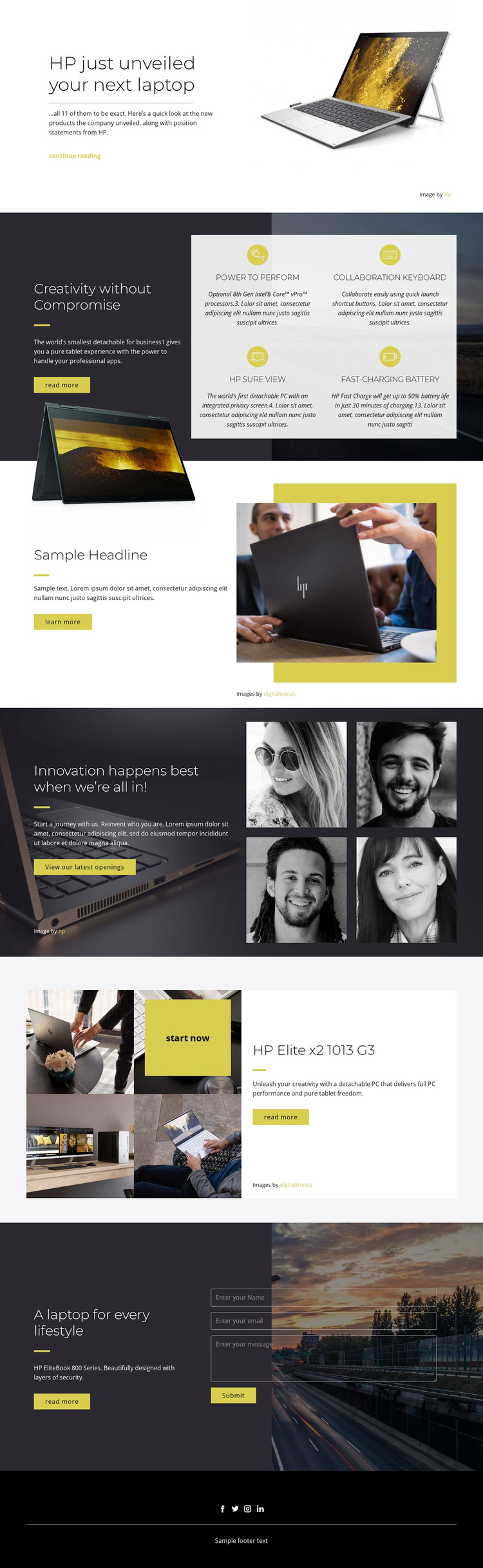
Product Pages and Repeated Content Fit the HP Technology Layout
The opening announcement and the featured HP Elite x2 1013 G3 section provide two useful page-oriented content models. One introduces a laptop through editorial copy and product imagery; the other concentrates on a named product with four images and an adjacent information panel. Between them, the four repeated cards provide a consistent pattern for presenting capability-focused content such as Power to Perform, Collaboration Keyboard, HP Sure View, and Fast-Charging Battery. Together, these areas give a WordPress project clear permanent content roles without claiming that specific WordPress posts or categories already exist.
The career block adds a separate publishing direction. Its recruitment description, opening-related button, and four portraits could support people and opportunity content while remaining visually connected to the product sections. The final HP EliteBook 800 Series area is especially relevant to page content because it combines product information with a contact form, giving visitors a direct way to submit an inquiry. The footer’s Facebook, Twitter, Instagram, and LinkedIn links can remain part of the shared site presentation. This interpretation treats the design as a WordPress theme foundation for organizing product pages, recurring feature content, career material, and contact-oriented content. The CMS does not replace the page’s visual character; it gives these distinct areas a practical content environment while the established layout continues to guide presentation.
Customize with Nicepage
Open this ready-made template in the WordPress Website Builder and customize it visually in the Nicepage editor. Replace demo content, edit page sections, and adapt the design to your project without rebuilding the template from scratch.
Manage and Edit This Theme in WordPress
Customize and Install the WordPress Theme
Start with this ready-made theme instead of building the WordPress design from scratch. Customize its layout, content, typography, images, sections, and other design elements visually in Nicepage editor, then export and install the WordPress Theme, Plugin, and Pages on your WordPress site. The Nicepage WordPress Plugin lets you continue working with the site after installation.
Edit the Theme Directly in WordPress
After installation, you can edit the WordPress Theme directly in WordPress with the Nicepage WordPress Plugin. Use Site Style to customize site Colors, Fonts, Header, Footer, Blog, and Post Page Templates while working within your WordPress website.
Edit WordPress Pages Visually
Use the Nicepage WordPress Plugin to edit page content directly from the WordPress admin area. Open a WordPress Page with Nicepage and visually change its text, images, sections, and other page elements while continuing to manage the Page through WordPress.
WordPress Content and Theme Integration
Use the customized theme with WordPress Pages, Posts, Blog and Post Templates, menus, widgets, and other CMS-managed content. Shared theme elements such as Colors, Fonts, Header, Footer, Blog, and Post Page Templates can be managed as part of the overall site design, while WordPress provides the CMS environment for managing site content.
This workflow combines a ready-made WordPress Theme with visual customization, direct theme editing in WordPress, and continued content management through the Nicepage WordPress Plugin.