Progress in robot technology WordPress Theme


Edit Template Offline
2. Create new page and search for id 23330
Edit Template Online
Create Awesome Websites


Free Nicepage Builder
Keywords
Robot Features and Technology Topics Map Clearly to WordPress Content Areas
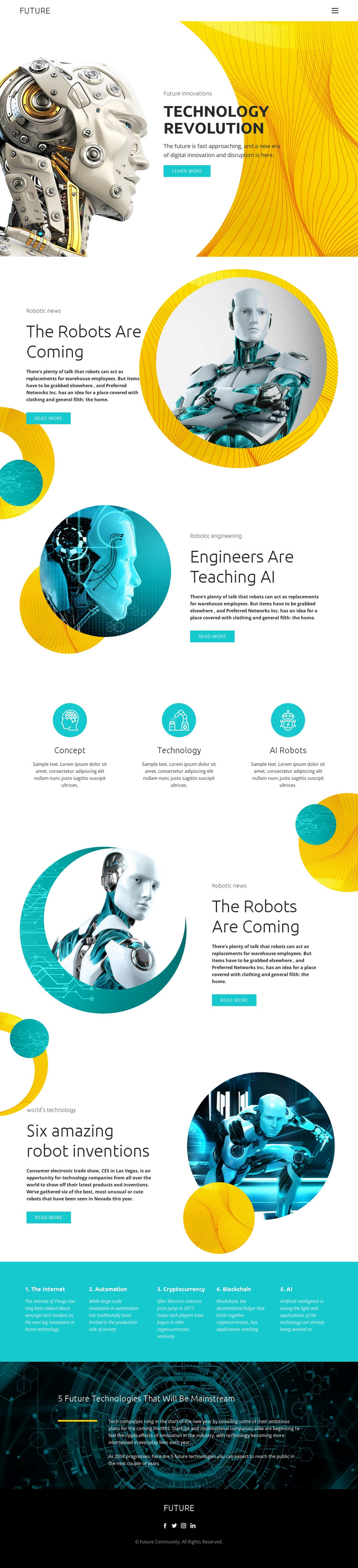
The page-oriented sections provide a useful starting point for a WordPress-managed technology site. The hero can represent permanent introductory content, while the split blocks give separate places for robotics, engineering and AI, and robot inventions. Each area combines a heading, image treatment, explanatory text, and a Learn more or Read more action, making the content relationships clearer than a single undivided article layout.
The three-item feature group can summarize core technology concepts, while the turquoise band groups five related subjects: The Internet, Automation, Cryptocurrency, Blockchain, and AI. Together, these regions could support a visual system in which permanent information and future editorial additions share the same palette, typography, circular imagery, and spacing. The dark future-technology statement provides a strong thematic close, and the FUTURE footer label can remain part of the shared site character.
The template analysis does not verify existing blog posts, categories, or WordPress-specific content structures, so those should not be presented as current elements. Instead, the design can be interpreted as a theme foundation for page content and later technology-focused publishing. If a project needs to keep the visual direction consistent while managing content in WordPress, the WordPress Plugin is a relevant product bridge. The essential fit comes from the template’s distinct content regions, not from replacing its design with generic CMS terminology.
Customize with Nicepage
Open this ready-made template in the WordPress Website Builder and customize it visually in the Nicepage editor. Replace demo content, edit page sections, and adapt the design to your project without rebuilding the template from scratch.
Manage and Edit This Theme in WordPress
Customize and Install the WordPress Theme
Start with this ready-made theme instead of building the WordPress design from scratch. Customize its layout, content, typography, images, sections, and other design elements visually in Nicepage editor, then export and install the WordPress Theme, Plugin, and Pages on your WordPress site. The Nicepage WordPress Plugin lets you continue working with the site after installation.
Edit the Theme Directly in WordPress
After installation, you can edit the WordPress Theme directly in WordPress with the Nicepage WordPress Plugin. Use Site Style to customize site Colors, Fonts, Header, Footer, Blog, and Post Page Templates while working within your WordPress website.
Edit WordPress Pages Visually
Use the Nicepage WordPress Plugin to edit page content directly from the WordPress admin area. Open a WordPress Page with Nicepage and visually change its text, images, sections, and other page elements while continuing to manage the Page through WordPress.
WordPress Content and Theme Integration
Use the customized theme with WordPress Pages, Posts, Blog and Post Templates, menus, widgets, and other CMS-managed content. Shared theme elements such as Colors, Fonts, Header, Footer, Blog, and Post Page Templates can be managed as part of the overall site design, while WordPress provides the CMS environment for managing site content.
This workflow combines a ready-made WordPress Theme with visual customization, direct theme editing in WordPress, and continued content management through the Nicepage WordPress Plugin.