Belgard barbier WordPress Theme


The Welcome Heading Anchors Stable WordPress Page Content
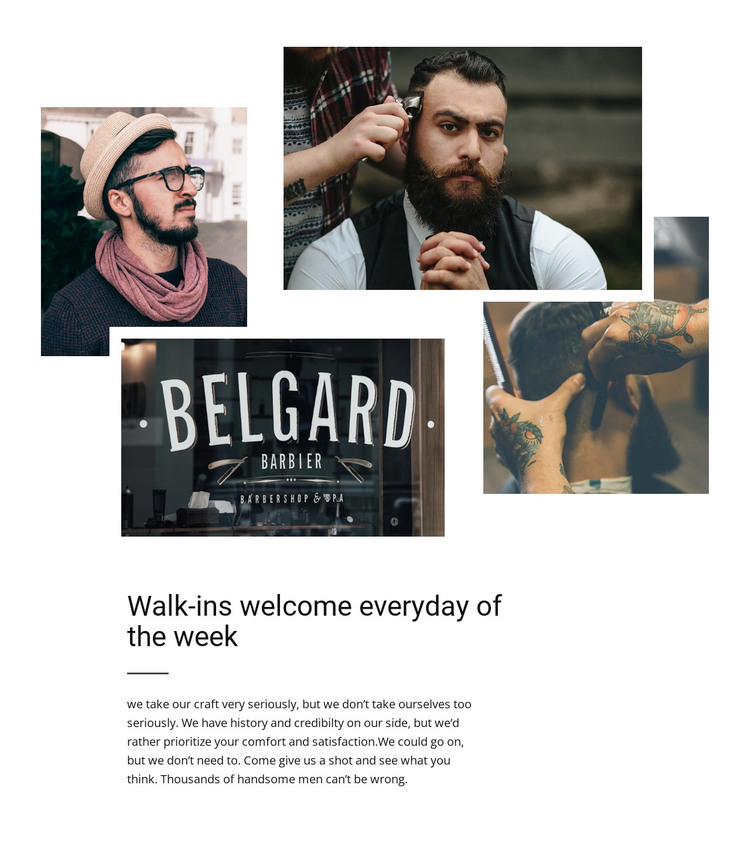
The collage and text panel give this block the character of permanent about content rather than a changing list of entries. Four layered photographs show barbering and haircut imagery in an asymmetrical arrangement, with different image sizes and white gaps creating depth above the written message. The visual group can establish atmosphere for a barbershop section, while the content beneath it explains that setting in a compact form.
The heading, “Walk-ins welcome everyday of the week,” is the strongest textual anchor. It introduces the section with a practical welcome, and the horizontal divider immediately below it creates separation before the supporting paragraph. That ordering matters: the visitor receives the primary message first, then can read the shorter explanatory text without the paragraph being lost among the images. Black typography and the white background keep the information easy to identify while allowing the muted collage to carry the visual emphasis.
In a WordPress-managed project, this block can fit naturally as stable content on an about or services-related page. The heading, paragraph, and image arrangement can remain one coherent visual section while the wider site handles other page content around it. The block does not need to become a complete theme to be useful; its role is narrower and clearer. It provides a reusable introduction that can sit alongside separate service details, booking information, or contact content managed elsewhere in the project.
Customize with Nicepage
Open this ready-made template in the WordPress Website Builder and customize it visually in the Nicepage editor. Replace demo content, edit page sections, and adapt the design to your project without rebuilding the template from scratch.
Edit Template Offline
2. Create a new page or select existing
3. Click Add new block, search for id 44549 and click enter
Edit Template Online
Create Awesome Websites


Free Nicepage Builder
Keywords
Manage and Edit This Theme in WordPress
Customize and Install the WordPress Theme
Start with this ready-made theme instead of building the WordPress design from scratch. Customize its layout, content, typography, images, sections, and other design elements visually in Nicepage editor, then export and install the WordPress Theme, Plugin, and Pages on your WordPress site. The Nicepage WordPress Plugin lets you continue working with the site after installation.
Edit the Theme Directly in WordPress
After installation, you can edit the WordPress Theme directly in WordPress with the Nicepage WordPress Plugin. Use Site Style to customize site Colors, Fonts, Header, Footer, Blog, and Post Page Templates while working within your WordPress website.
Edit WordPress Pages Visually
Use the Nicepage WordPress Plugin to edit page content directly from the WordPress admin area. Open a WordPress Page with Nicepage and visually change its text, images, sections, and other page elements while continuing to manage the Page through WordPress.
WordPress Content and Theme Integration
Use the customized theme with WordPress Pages, Posts, Blog and Post Templates, menus, widgets, and other CMS-managed content. Shared theme elements such as Colors, Fonts, Header, Footer, Blog, and Post Page Templates can be managed as part of the overall site design, while WordPress provides the CMS environment for managing site content.
This workflow combines a ready-made WordPress Theme with visual customization, direct theme editing in WordPress, and continued content management through the Nicepage WordPress Plugin.