We build websites for your business WordPress Theme


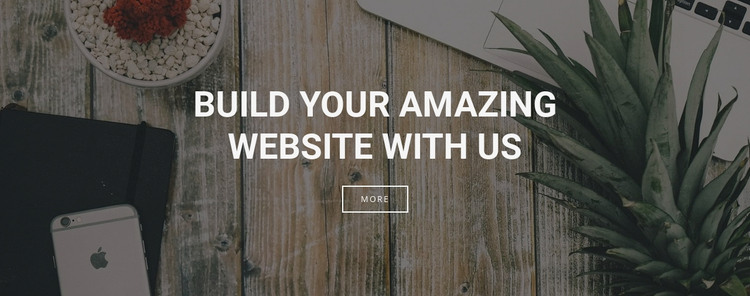
A Focused Hero Section for WordPress Page Content
The headline and image form a stable page-content unit rather than a collection of frequently changing items. “Build Your Amazing Website with US” states the section’s introductory message, and the full-width photograph gives that message a defined visual setting through the wood surface, plant, smartphone, and decorative bowl. A darkened overlay keeps the light uppercase type readable, while the outlined “more” button supplies one contained action below the message. Together, these elements can remain a consistent hero area on a WordPress-managed page.
The section’s centered arrangement is useful when the surrounding project needs a recognizable opening before more detailed content appears. The single heading avoids competing messages, and the button does not overwhelm the image or typography with a second visual emphasis. Because the destination of “more” is not specified within the block, the page content around it can determine whether the control leads to further information, another section, or a separate destination. The block itself continues to serve as the visual introduction.
In a WordPress context, this kind of section can hold permanent page content while the broader project manages other page areas independently. The photographic treatment can establish the tone for nearby content, but one block should not be treated as the entire theme or site design. Its practical role is narrower: provide a reusable, centered hero pattern with a clear message, a supporting image, and one outlined response point that can sit within a larger content structure.
Customize with Nicepage
Open this ready-made template in the WordPress Website Builder and customize it visually in the Nicepage editor. Replace demo content, edit page sections, and adapt the design to your project without rebuilding the template from scratch.
Edit Template Offline
2. Create a new page or select existing
3. Click Add new block, search for id 41753 and click enter
Edit Template Online
Create Awesome Websites


Free Nicepage Builder
Keywords
Manage and Edit This Theme in WordPress
Customize and Install the WordPress Theme
Start with this ready-made theme instead of building the WordPress design from scratch. Customize its layout, content, typography, images, sections, and other design elements visually in Nicepage editor, then export and install the WordPress Theme, Plugin, and Pages on your WordPress site. The Nicepage WordPress Plugin lets you continue working with the site after installation.
Edit the Theme Directly in WordPress
After installation, you can edit the WordPress Theme directly in WordPress with the Nicepage WordPress Plugin. Use Site Style to customize site Colors, Fonts, Header, Footer, Blog, and Post Page Templates while working within your WordPress website.
Edit WordPress Pages Visually
Use the Nicepage WordPress Plugin to edit page content directly from the WordPress admin area. Open a WordPress Page with Nicepage and visually change its text, images, sections, and other page elements while continuing to manage the Page through WordPress.
WordPress Content and Theme Integration
Use the customized theme with WordPress Pages, Posts, Blog and Post Templates, menus, widgets, and other CMS-managed content. Shared theme elements such as Colors, Fonts, Header, Footer, Blog, and Post Page Templates can be managed as part of the overall site design, while WordPress provides the CMS environment for managing site content.
This workflow combines a ready-made WordPress Theme with visual customization, direct theme editing in WordPress, and continued content management through the Nicepage WordPress Plugin.