Yoga studio classes WordPress Theme


Stable Class Content for a WordPress-Managed Page
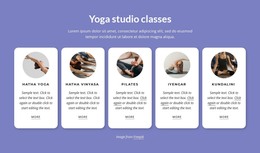
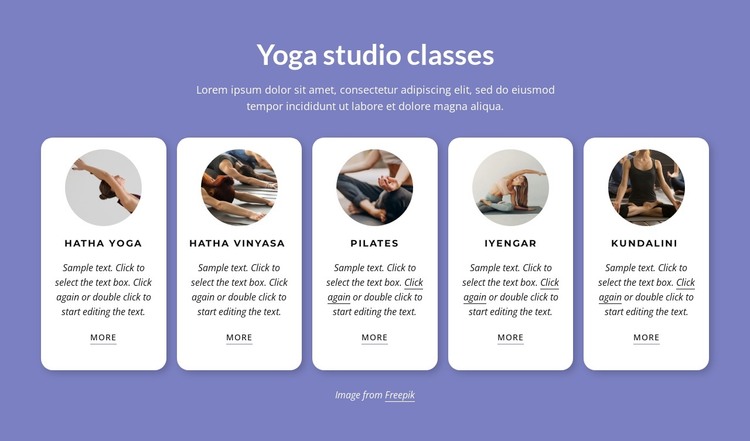
The heading “Yoga studio classes” and the five named offerings form stable page-oriented content rather than a time-sensitive feed. Hatha Yoga, Hatha Vinyasa, Pilates, Iyengar, and Kundalini can be presented as a reusable services area within a WordPress-managed page, with each card retaining its own circular image, title, compact description, and “more” link. The block’s role is to organize class information visually while the wider project manages other page content around it.
The repeated card pattern supports consistent publishing of related offerings. White rounded cards separate the five items from the lavender-purple background, and soft shadows reinforce their individual boundaries. Dark uppercase titles make the class names easy to scan, while the compact descriptions provide a secondary layer of information beneath the images. Because the interaction is static, the section reads as dependable page content rather than as a rotating or expandable feed.
This interpretation keeps the block within a broader WordPress content context instead of treating it as a complete theme. Other parts of the project may provide studio introduction, instructors, schedules, testimonials, or contact information, while this section remains focused on class discovery. The “more” links can connect each offering to further information when the surrounding page structure provides those destinations, preserving the block’s usefulness as a stable services region.
Customize with Nicepage
Open this ready-made template in the WordPress Website Builder and customize it visually in the Nicepage editor. Replace demo content, edit page sections, and adapt the design to your project without rebuilding the template from scratch.
Edit Template Offline
2. Create a new page or select existing
3. Click Add new block, search for id 3583103 and click enter
Edit Template Online
Create Awesome Websites


Free Nicepage Builder
Keywords
Manage and Edit This Theme in WordPress
Customize and Install the WordPress Theme
Start with this ready-made theme instead of building the WordPress design from scratch. Customize its layout, content, typography, images, sections, and other design elements visually in Nicepage editor, then export and install the WordPress Theme, Plugin, and Pages on your WordPress site. The Nicepage WordPress Plugin lets you continue working with the site after installation.
Edit the Theme Directly in WordPress
After installation, you can edit the WordPress Theme directly in WordPress with the Nicepage WordPress Plugin. Use Site Style to customize site Colors, Fonts, Header, Footer, Blog, and Post Page Templates while working within your WordPress website.
Edit WordPress Pages Visually
Use the Nicepage WordPress Plugin to edit page content directly from the WordPress admin area. Open a WordPress Page with Nicepage and visually change its text, images, sections, and other page elements while continuing to manage the Page through WordPress.
WordPress Content and Theme Integration
Use the customized theme with WordPress Pages, Posts, Blog and Post Templates, menus, widgets, and other CMS-managed content. Shared theme elements such as Colors, Fonts, Header, Footer, Blog, and Post Page Templates can be managed as part of the overall site design, while WordPress provides the CMS environment for managing site content.
This workflow combines a ready-made WordPress Theme with visual customization, direct theme editing in WordPress, and continued content management through the Nicepage WordPress Plugin.