Best car WordPress Theme


Stable Rental Content for a WordPress-Managed Page
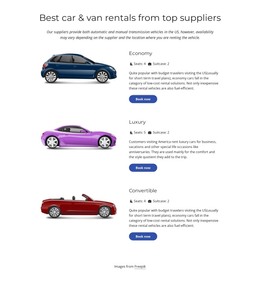
The heading and supporting paragraph give this block the character of stable page content: they introduce a rental offering that can remain part of a services or vehicle-category area. Beneath them, Economy, Luxury, and Convertible form three reusable content groups. Each group keeps its image, descriptive copy, seating and suitcase specifications, and Book now button together, making the section readable as organized page content rather than as one undifferentiated graphic.
The category details provide a concrete content model for a WordPress-oriented project. Economy and Convertible show four seats and two suitcases, while Luxury shows five seats and two suitcases. Those values can remain associated with the correct vehicle category when the wider page is edited or expanded. The consistent image-left and text-right arrangement also gives the section a stable visual pattern that can sit alongside other managed content.
Nicepage’s WordPress workflow can support visual sections within WordPress-managed pages, but this block is not itself a complete WordPress Theme. Its role is narrower and more useful: it provides a prepared rental content area that can coexist with other page sections and CMS-managed material. The surrounding project can handle navigation, additional pages, policies, or a broader booking process, while this block continues to present the three vehicle choices and their individual actions.
Customize with Nicepage
Open this ready-made template in the WordPress Website Builder and customize it visually in the Nicepage editor. Replace demo content, edit page sections, and adapt the design to your project without rebuilding the template from scratch.
Edit Template Offline
2. Create a new page or select existing
3. Click Add new block, search for id 3545012 and click enter
Edit Template Online
Create Awesome Websites


Free Nicepage Builder
Keywords
Manage and Edit This Theme in WordPress
Customize and Install the WordPress Theme
Start with this ready-made theme instead of building the WordPress design from scratch. Customize its layout, content, typography, images, sections, and other design elements visually in Nicepage editor, then export and install the WordPress Theme, Plugin, and Pages on your WordPress site. The Nicepage WordPress Plugin lets you continue working with the site after installation.
Edit the Theme Directly in WordPress
After installation, you can edit the WordPress Theme directly in WordPress with the Nicepage WordPress Plugin. Use Site Style to customize site Colors, Fonts, Header, Footer, Blog, and Post Page Templates while working within your WordPress website.
Edit WordPress Pages Visually
Use the Nicepage WordPress Plugin to edit page content directly from the WordPress admin area. Open a WordPress Page with Nicepage and visually change its text, images, sections, and other page elements while continuing to manage the Page through WordPress.
WordPress Content and Theme Integration
Use the customized theme with WordPress Pages, Posts, Blog and Post Templates, menus, widgets, and other CMS-managed content. Shared theme elements such as Colors, Fonts, Header, Footer, Blog, and Post Page Templates can be managed as part of the overall site design, while WordPress provides the CMS environment for managing site content.
This workflow combines a ready-made WordPress Theme with visual customization, direct theme editing in WordPress, and continued content management through the Nicepage WordPress Plugin.