Prenatal health and nutrition WordPress Theme

Edit Template Offline
2. Create new page and search for id 1562327
Edit Template Online
Create Awesome Websites


Free Nicepage Builder
Keywords
Course pages and recurring guidance can share one pregnancy-focused visual system
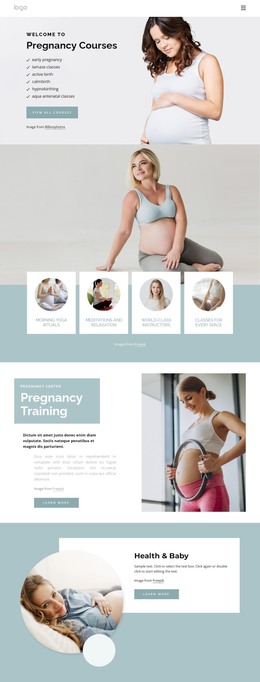
The six course categories provide permanent page-oriented content for the main pregnancy education offer, while the four wellness cards summarize related themes such as yoga, meditation, instructors, and class availability. In a WordPress-managed project, these areas could remain visually coordinated as the site develops additional content, but the template itself does not prove that WordPress Pages, Posts, or categories are already present.
The middle of the design offers several different content relationships. Pregnancy Training and Health & Baby use focused heading-and-image sections, the numbered block presents two compact information items, and the healthy pregnancy tips area combines guidance with family imagery. The accordion adds four specific questions about pregnancy, giving the page a place for focused educational material. These varied regions could support a mixture of stable page content and future updates without reducing the design to a generic blog layout.
The closing block is particularly relevant to ongoing communication: newsletter messaging, contact details, five social-network links, and a contact form appear together. Navigation and the dark footer can remain consistent around related pages as the project grows. The Nicepage WordPress Plugin is an optional bridge for editing supported WordPress content, but the template-specific value here is the way courses, guidance, questions, and contact elements already share a clear visual direction.
Customize with Nicepage
Open this ready-made template in the WordPress Website Builder and customize it visually in the Nicepage editor. Replace demo content, edit page sections, and adapt the design to your project without rebuilding the template from scratch.
Manage and Edit This Theme in WordPress
Customize and Install the WordPress Theme
Start with this ready-made theme instead of building the WordPress design from scratch. Customize its layout, content, typography, images, sections, and other design elements visually in Nicepage editor, then export and install the WordPress Theme, Plugin, and Pages on your WordPress site. The Nicepage WordPress Plugin lets you continue working with the site after installation.
Edit the Theme Directly in WordPress
After installation, you can edit the WordPress Theme directly in WordPress with the Nicepage WordPress Plugin. Use Site Style to customize site Colors, Fonts, Header, Footer, Blog, and Post Page Templates while working within your WordPress website.
Edit WordPress Pages Visually
Use the Nicepage WordPress Plugin to edit page content directly from the WordPress admin area. Open a WordPress Page with Nicepage and visually change its text, images, sections, and other page elements while continuing to manage the Page through WordPress.
WordPress Content and Theme Integration
Use the customized theme with WordPress Pages, Posts, Blog and Post Templates, menus, widgets, and other CMS-managed content. Shared theme elements such as Colors, Fonts, Header, Footer, Blog, and Post Page Templates can be managed as part of the overall site design, while WordPress provides the CMS environment for managing site content.
This workflow combines a ready-made WordPress Theme with visual customization, direct theme editing in WordPress, and continued content management through the Nicepage WordPress Plugin.