Support That Heals WordPress Theme



Edit Template Offline
2. Create new page and search for id 6612659
Edit Template Online
Create Awesome Websites


Free Nicepage Builder
Keywords
Service and Profile Content Can Support a WordPress Clinic Structure
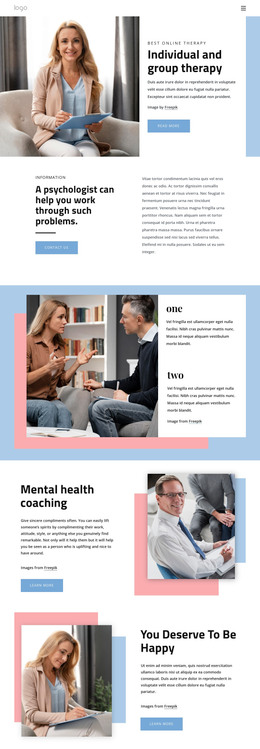
The six service cards provide the clearest page-oriented content foundation for a WordPress interpretation. Each card identifies a distinct area of mental health support, from individual anxiety therapy and cognitive behavioral therapy to relationship, stress, adolescent, and workplace support. Together they can remain as a coordinated overview while selected topics are expanded or maintained as separate project content. The four professional profile cards create a different content relationship, focusing on the people associated with the practice rather than on service categories.
The online therapy section and the four-step care pathway add useful supporting content. Online sessions present a specific offering, while the sequence from initial consultation to personalized plan, regular sessions, and progress and support gives visitors process context. The About section, newsletter form, phone area, opening hours, and address then provide permanent page information and communication points. These areas are more naturally understood as clinic content than as generic decorative blocks.
A WordPress-managed project could preserve the shared header, footer, palette, and card styling while adding or updating content around this homepage. That is an interpretation of the verified structure, not proof that WordPress Pages, Posts, categories, or blog templates already exist in the design. Nicepage’s WordPress Plugin is an optional product bridge for projects that need CMS-oriented editing, but the main value lies in mapping the service, profile, therapy, pathway, and contact regions into a content environment.
Customize with Nicepage
Open this ready-made template in the WordPress Website Builder and customize it visually in the Nicepage editor. Replace demo content, edit page sections, and adapt the design to your project without rebuilding the template from scratch.
Manage and Edit This Theme in WordPress
Customize and Install the WordPress Theme
Start with this ready-made theme instead of building the WordPress design from scratch. Customize its layout, content, typography, images, sections, and other design elements visually in Nicepage editor, then export and install the WordPress Theme, Plugin, and Pages on your WordPress site. The Nicepage WordPress Plugin lets you continue working with the site after installation.
Edit the Theme Directly in WordPress
After installation, you can edit the WordPress Theme directly in WordPress with the Nicepage WordPress Plugin. Use Site Style to customize site Colors, Fonts, Header, Footer, Blog, and Post Page Templates while working within your WordPress website.
Edit WordPress Pages Visually
Use the Nicepage WordPress Plugin to edit page content directly from the WordPress admin area. Open a WordPress Page with Nicepage and visually change its text, images, sections, and other page elements while continuing to manage the Page through WordPress.
WordPress Content and Theme Integration
Use the customized theme with WordPress Pages, Posts, Blog and Post Templates, menus, widgets, and other CMS-managed content. Shared theme elements such as Colors, Fonts, Header, Footer, Blog, and Post Page Templates can be managed as part of the overall site design, while WordPress provides the CMS environment for managing site content.
This workflow combines a ready-made WordPress Theme with visual customization, direct theme editing in WordPress, and continued content management through the Nicepage WordPress Plugin.