Impacting lives with medicine WordPress Theme


Edit Template Offline
2. Create new page and search for id 29804
Edit Template Online
Create Awesome Websites


Free Nicepage Builder
Keywords
Service Directories and Patient Content Within a Hospital Theme
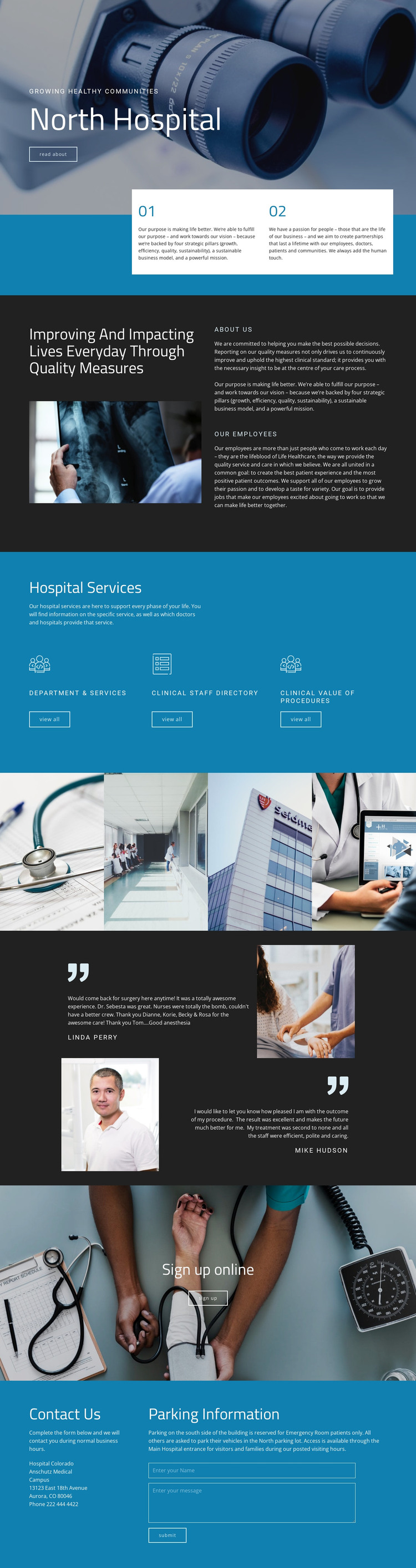
The Hospital Services section gives this design a strong page-oriented content structure. Three access panels lead visitors toward Department & Services, the Clinical Staff Directory, and the Clinical Value of Procedures, separating service discovery, staff information, and explanatory clinical content. That arrangement can support permanent hospital pages while leaving room for regularly updated material to sit alongside them without changing the visual direction of the site.
The earlier sections provide context for those destinations. The image-backed hero introduces the hospital and its “Read about” action, while the two numbered principle panels establish purpose and people-focused partnerships. The quality-measure and employee section adds institutional information, so the design is not limited to a service catalog. A four-image clinical gallery and two patient testimonial entries then supply visual and patient-oriented content that can accompany the more formal hospital information.
The separate sign-up banner creates a clear patient-access area, and the closing contact section combines a message form with contact and parking guidance. In a WordPress-managed project, these page areas can organize lasting hospital information alongside content that may be expanded or updated over time. The blue and teal palette, white panels, and dark image-backed sections keep service, editorial, and contact content within one recognizable theme character.
Customize with Nicepage
Open this ready-made template in the WordPress Website Builder and customize it visually in the Nicepage editor. Replace demo content, edit page sections, and adapt the design to your project without rebuilding the template from scratch.
Manage and Edit This Theme in WordPress
Customize and Install the WordPress Theme
Start with this ready-made theme instead of building the WordPress design from scratch. Customize its layout, content, typography, images, sections, and other design elements visually in Nicepage editor, then export and install the WordPress Theme, Plugin, and Pages on your WordPress site. The Nicepage WordPress Plugin lets you continue working with the site after installation.
Edit the Theme Directly in WordPress
After installation, you can edit the WordPress Theme directly in WordPress with the Nicepage WordPress Plugin. Use Site Style to customize site Colors, Fonts, Header, Footer, Blog, and Post Page Templates while working within your WordPress website.
Edit WordPress Pages Visually
Use the Nicepage WordPress Plugin to edit page content directly from the WordPress admin area. Open a WordPress Page with Nicepage and visually change its text, images, sections, and other page elements while continuing to manage the Page through WordPress.
WordPress Content and Theme Integration
Use the customized theme with WordPress Pages, Posts, Blog and Post Templates, menus, widgets, and other CMS-managed content. Shared theme elements such as Colors, Fonts, Header, Footer, Blog, and Post Page Templates can be managed as part of the overall site design, while WordPress provides the CMS environment for managing site content.
This workflow combines a ready-made WordPress Theme with visual customization, direct theme editing in WordPress, and continued content management through the Nicepage WordPress Plugin.