
Amazing portrait art WordPress Theme


Edit Template Offline
2. Create new page and search for id 30753
Edit Template Online
Create Awesome Websites


Free Nicepage Builder
Keywords
Course Topics and Instructor Content Suit Managed WordPress Pages
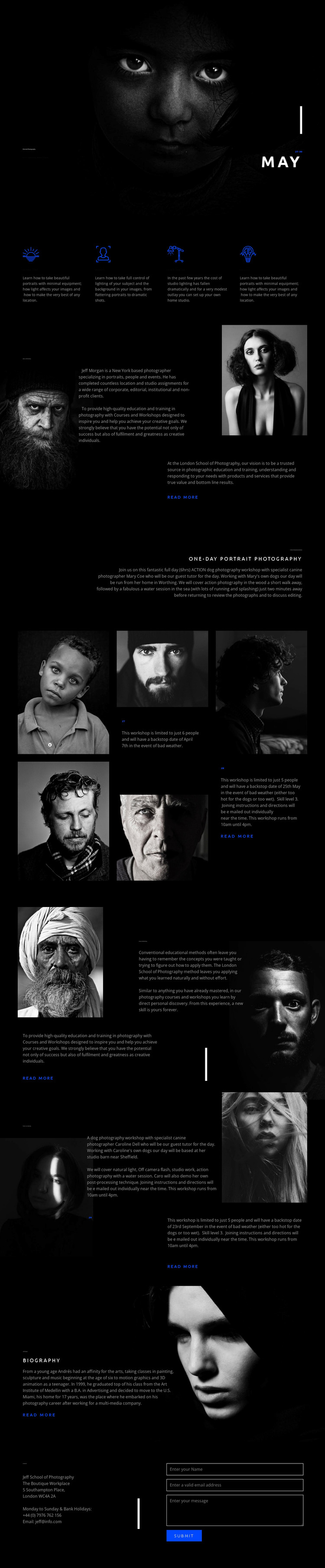
The four topic features give the design a clear set of permanent page content: Natural Light, Portrait, Studio Lighting, and Creative photography. In a WordPress-managed project, these areas can anchor a course or workshop overview while the supporting descriptions are refined as the educational offering changes. The page does not need to be treated as a generic portfolio because its content already connects photographic subjects with training.
The About Jeff Workshop section and the Unique Methodology section serve different content roles that can remain visible as the site develops. One introduces the workshop and photographer context; the other explains the teaching approach. The gallery-led workshop areas add visual material and supporting information, while the biography block offers another location for instructor-focused content. Together, these areas create a relationship between course information, imagery, and personal expertise that can be maintained when page text and photographs are updated.
The Contact Us section provides a practical page endpoint with contact details and fields for a name, email, and message. That structure supports enquiries without claiming that a WordPress post, blog, or category system already exists in the template. The dark backgrounds, white typography, blue accents, and repeated portrait imagery can continue across related WordPress pages so new content remains connected to the theme's established character. The result is a CMS-oriented interpretation based on the actual educational and editorial areas already present.
Customize with Nicepage
Open this ready-made template in the WordPress Website Builder and customize it visually in the Nicepage editor. Replace demo content, edit page sections, and adapt the design to your project without rebuilding the template from scratch.
Manage and Edit This Theme in WordPress
Customize and Install the WordPress Theme
Start with this ready-made theme instead of building the WordPress design from scratch. Customize its layout, content, typography, images, sections, and other design elements visually in Nicepage editor, then export and install the WordPress Theme, Plugin, and Pages on your WordPress site. The Nicepage WordPress Plugin lets you continue working with the site after installation.
Edit the Theme Directly in WordPress
After installation, you can edit the WordPress Theme directly in WordPress with the Nicepage WordPress Plugin. Use Site Style to customize site Colors, Fonts, Header, Footer, Blog, and Post Page Templates while working within your WordPress website.
Edit WordPress Pages Visually
Use the Nicepage WordPress Plugin to edit page content directly from the WordPress admin area. Open a WordPress Page with Nicepage and visually change its text, images, sections, and other page elements while continuing to manage the Page through WordPress.
WordPress Content and Theme Integration
Use the customized theme with WordPress Pages, Posts, Blog and Post Templates, menus, widgets, and other CMS-managed content. Shared theme elements such as Colors, Fonts, Header, Footer, Blog, and Post Page Templates can be managed as part of the overall site design, while WordPress provides the CMS environment for managing site content.
This workflow combines a ready-made WordPress Theme with visual customization, direct theme editing in WordPress, and continued content management through the Nicepage WordPress Plugin.





















