
Modern progressive design WordPress Theme


Edit Template Offline
2. Create new page and search for id 697431
Edit Template Online
Create Awesome Websites


Free Nicepage Builder
Keywords
Profile Content and Service Areas Fit a Page-Oriented Theme Structure
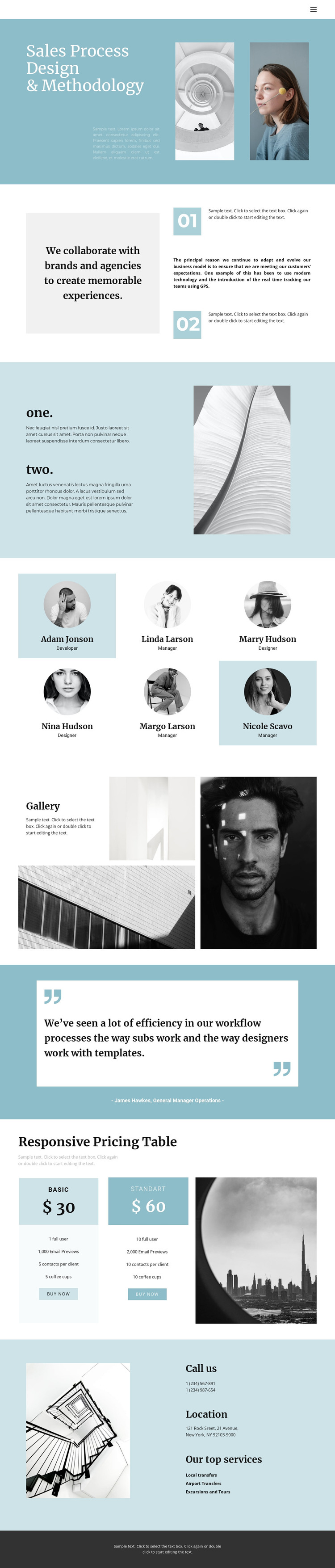
The six profile entries provide the clearest recurring content pattern in this design. Each item combines a portrait with a name and role label, creating a consistent area that can represent people-focused page content while preserving the compact grid visible in the template. The four-image gallery supplies a separate visual collection, giving the design a second content type rather than forcing every item into the profile pattern.
The methodology sections offer more permanent page-oriented content. The opening heading, collaboration statement, numbered points, and supporting imagery can explain the central sales process subject, while the testimonial band provides a focused statement area. The pricing section then groups two packages with displayed prices, feature lists, and buy-now actions. These relationships create distinct content zones that can remain visually coordinated as site information changes.
The contact area is especially important for the theme interpretation because it combines service listings—local transfers, airport transfers, and excursions and tours—with two displayed phone numbers and a New York address. If a project later adds regularly updated editorial material, that content should be kept conceptually separate from the permanent methodology, team, pricing, and contact areas; the supplied analysis does not verify blog or post sections. The shared header navigation, muted palette, and dark footer can continue to frame these page-oriented areas in a WordPress project.
Customize with Nicepage
Open this ready-made template in the WordPress Website Builder and customize it visually in the Nicepage editor. Replace demo content, edit page sections, and adapt the design to your project without rebuilding the template from scratch.
Manage and Edit This Theme in WordPress
Customize and Install the WordPress Theme
Start with this ready-made theme instead of building the WordPress design from scratch. Customize its layout, content, typography, images, sections, and other design elements visually in Nicepage editor, then export and install the WordPress Theme, Plugin, and Pages on your WordPress site. The Nicepage WordPress Plugin lets you continue working with the site after installation.
Edit the Theme Directly in WordPress
After installation, you can edit the WordPress Theme directly in WordPress with the Nicepage WordPress Plugin. Use Site Style to customize site Colors, Fonts, Header, Footer, Blog, and Post Page Templates while working within your WordPress website.
Edit WordPress Pages Visually
Use the Nicepage WordPress Plugin to edit page content directly from the WordPress admin area. Open a WordPress Page with Nicepage and visually change its text, images, sections, and other page elements while continuing to manage the Page through WordPress.
WordPress Content and Theme Integration
Use the customized theme with WordPress Pages, Posts, Blog and Post Templates, menus, widgets, and other CMS-managed content. Shared theme elements such as Colors, Fonts, Header, Footer, Blog, and Post Page Templates can be managed as part of the overall site design, while WordPress provides the CMS environment for managing site content.
This workflow combines a ready-made WordPress Theme with visual customization, direct theme editing in WordPress, and continued content management through the Nicepage WordPress Plugin.





















