Creative agency faq WordPress Theme


Edit Template Offline
2. Create new page and search for id 6330488
Edit Template Online
Create Awesome Websites


Free Nicepage Builder
Keywords
Five FAQ items give permanent service content a publishable page structure
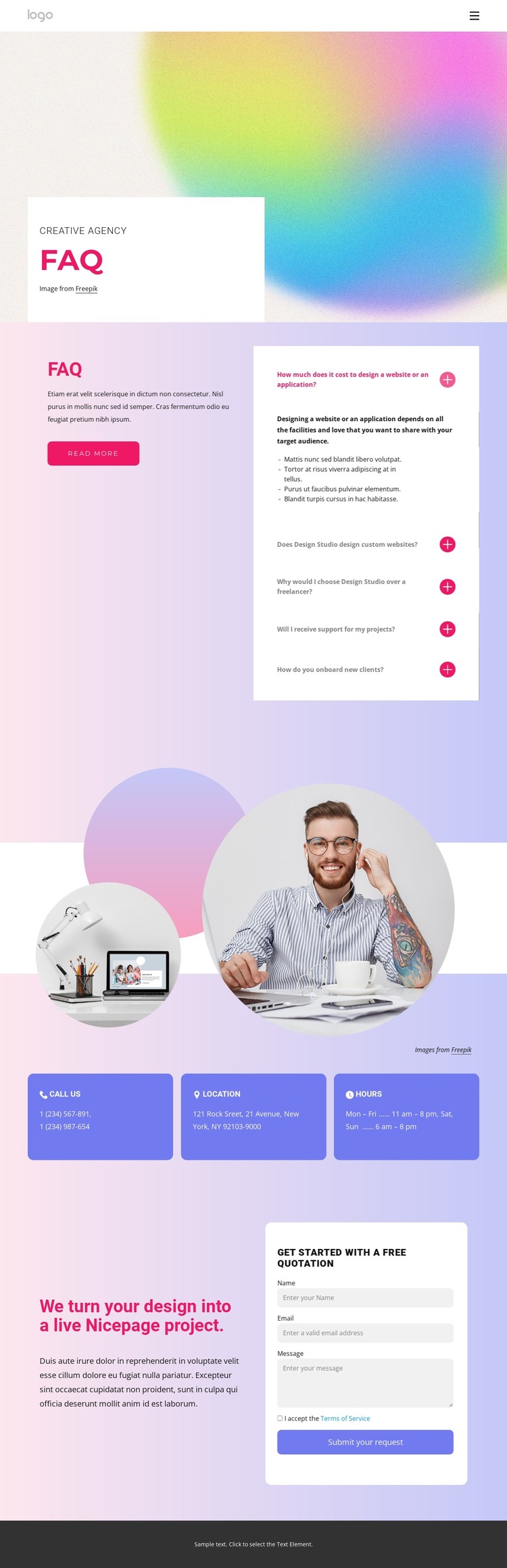
The page’s strongest WordPress-oriented content relationship is between its permanent FAQ information and the visual sections that surround it. Five questions address the concerns of prospective design clients, including cost, custom website work, choosing a studio, project support, and onboarding. Keeping those answers together in an accordion creates a clear page-oriented content area, while the short introduction and Read more action leave room for related explanatory material without changing the main design.
The contact section supports that content with three stable categories: phone, location, and opening hours. The circular photographs provide visual emphasis, but the cards offer a straightforward structure for information that belongs to the service site rather than to one temporary campaign. The final quotation block then connects the permanent service explanation with a response opportunity through its heading, supporting copy, request form, and Submit your request action.
In a WordPress-managed project, these areas can remain part of one recognizable theme direction as the site develops additional page content. The pastel gradients, rounded white surfaces, magenta accents, and bold typography provide continuity between informational sections and future content. The design does not claim existing posts or blog structures; its value is the clear separation of FAQ, contact, and quotation content within a page that can sit alongside other WordPress-managed service pages.
Customize with Nicepage
Open this ready-made template in the WordPress Website Builder and customize it visually in the Nicepage editor. Replace demo content, edit page sections, and adapt the design to your project without rebuilding the template from scratch.
Manage and Edit This Theme in WordPress
Customize and Install the WordPress Theme
Start with this ready-made theme instead of building the WordPress design from scratch. Customize its layout, content, typography, images, sections, and other design elements visually in Nicepage editor, then export and install the WordPress Theme, Plugin, and Pages on your WordPress site. The Nicepage WordPress Plugin lets you continue working with the site after installation.
Edit the Theme Directly in WordPress
After installation, you can edit the WordPress Theme directly in WordPress with the Nicepage WordPress Plugin. Use Site Style to customize site Colors, Fonts, Header, Footer, Blog, and Post Page Templates while working within your WordPress website.
Edit WordPress Pages Visually
Use the Nicepage WordPress Plugin to edit page content directly from the WordPress admin area. Open a WordPress Page with Nicepage and visually change its text, images, sections, and other page elements while continuing to manage the Page through WordPress.
WordPress Content and Theme Integration
Use the customized theme with WordPress Pages, Posts, Blog and Post Templates, menus, widgets, and other CMS-managed content. Shared theme elements such as Colors, Fonts, Header, Footer, Blog, and Post Page Templates can be managed as part of the overall site design, while WordPress provides the CMS environment for managing site content.
This workflow combines a ready-made WordPress Theme with visual customization, direct theme editing in WordPress, and continued content management through the Nicepage WordPress Plugin.