
Ideas for autumn looks WordPress Theme


Edit Template Offline
2. Create new page and search for id 20409
Edit Template Online
Create Awesome Websites


Free Nicepage Builder
Keywords
Editorial Features Give WordPress Content a Consistent Visual Context
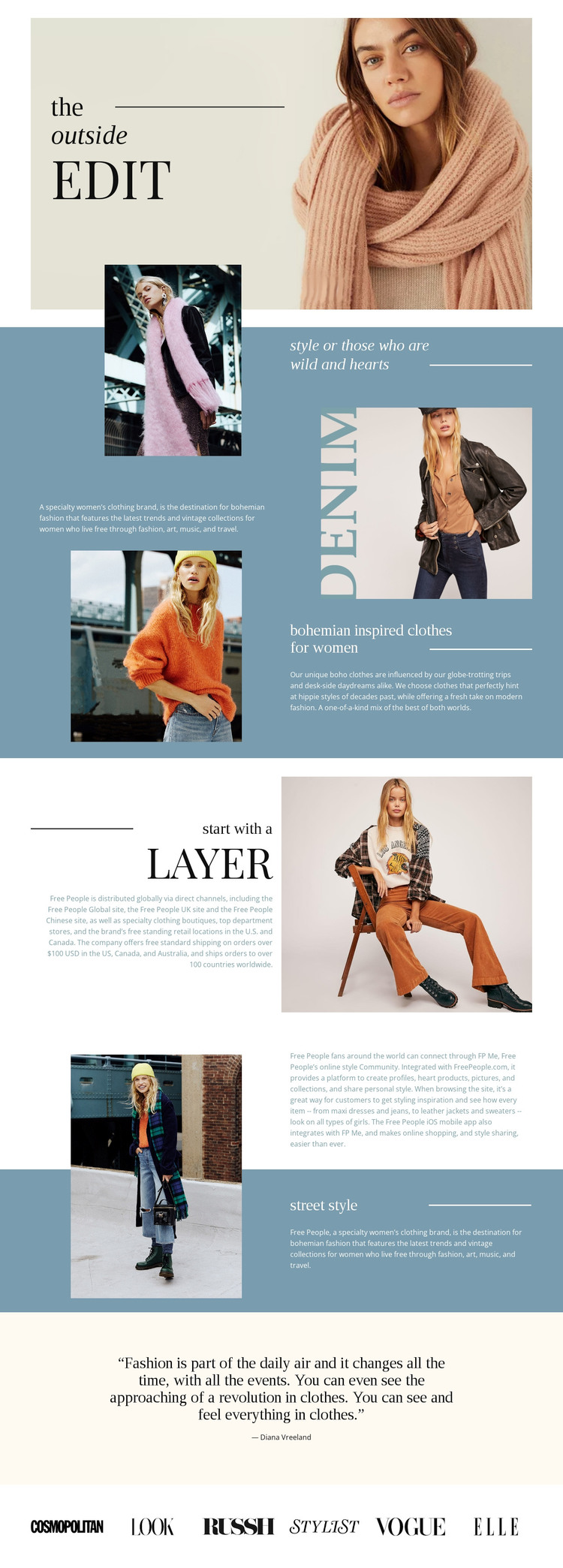
The page separates permanent fashion information into recognizable content areas. The opening portrait and “the outside edit” title establish the brand-facing introduction, while the descriptive brand section provides room for explanatory copy beside a large model photograph. The heading “bohemian inspired clothes for women” then identifies a clear clothing subject, and the layering and street-style sections add related editorial topics without changing the visual direction.
Those relationships are useful for a WordPress-oriented project because page content and regularly updated fashion material can be interpreted through different parts of the same design. The community paragraph and Diana Vreeland quotation create additional editorial spaces, while the six publication logos form a compact closing region for brand-context content. The template analysis does not verify an existing blog, post system, or WordPress-specific structure, so those should not be treated as components already present in the design.
The recurring combination of portrait imagery, serif type, muted blue feature panels, pale neutral sections, and horizontal dividers can nevertheless help keep permanent pages and later editorial content visually related. A WordPress theme adaptation would therefore begin with this confirmed fashion page and its content relationships, then extend the same visual character only where the project adds and verifies further site content.
Customize with Nicepage
Open this ready-made template in the WordPress Website Builder and customize it visually in the Nicepage editor. Replace demo content, edit page sections, and adapt the design to your project without rebuilding the template from scratch.
Manage and Edit This Theme in WordPress
Customize and Install the WordPress Theme
Start with this ready-made theme instead of building the WordPress design from scratch. Customize its layout, content, typography, images, sections, and other design elements visually in Nicepage editor, then export and install the WordPress Theme, Plugin, and Pages on your WordPress site. The Nicepage WordPress Plugin lets you continue working with the site after installation.
Edit the Theme Directly in WordPress
After installation, you can edit the WordPress Theme directly in WordPress with the Nicepage WordPress Plugin. Use Site Style to customize site Colors, Fonts, Header, Footer, Blog, and Post Page Templates while working within your WordPress website.
Edit WordPress Pages Visually
Use the Nicepage WordPress Plugin to edit page content directly from the WordPress admin area. Open a WordPress Page with Nicepage and visually change its text, images, sections, and other page elements while continuing to manage the Page through WordPress.
WordPress Content and Theme Integration
Use the customized theme with WordPress Pages, Posts, Blog and Post Templates, menus, widgets, and other CMS-managed content. Shared theme elements such as Colors, Fonts, Header, Footer, Blog, and Post Page Templates can be managed as part of the overall site design, while WordPress provides the CMS environment for managing site content.
This workflow combines a ready-made WordPress Theme with visual customization, direct theme editing in WordPress, and continued content management through the Nicepage WordPress Plugin.





















