
Four Seasons WordPress Theme


Edit Template Offline
2. Create new page and search for id 12874
Edit Template Online
Create Awesome Websites


Free Nicepage Builder
Keywords
Villa Review Content and Travel Topics Suit a WordPress Structure
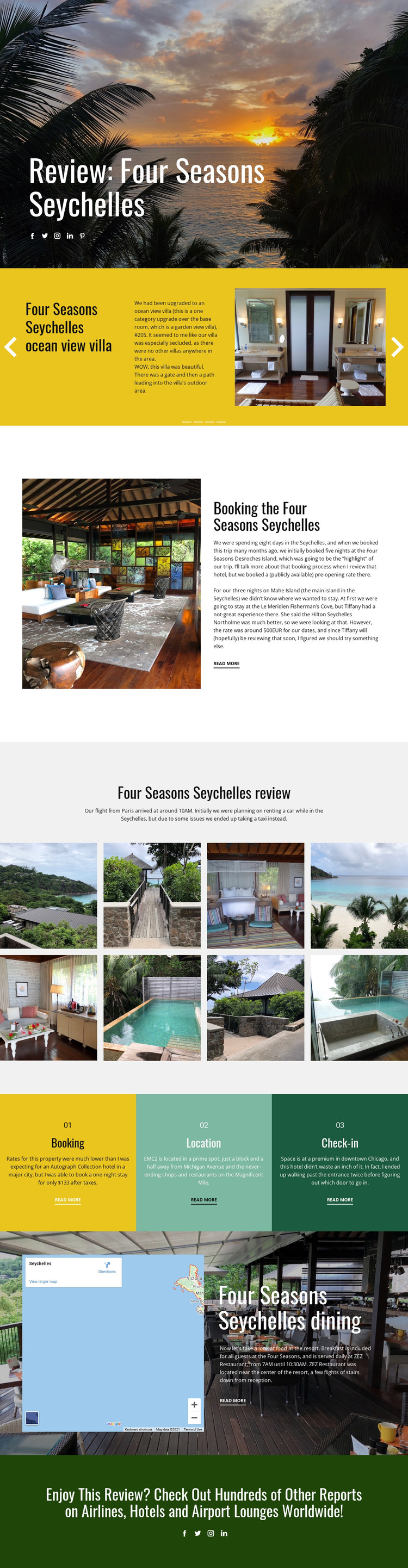
The page separates several kinds of content that can be useful in a WordPress-oriented project. The Four Seasons Seychelles review itself functions as the central page subject, while the ocean-view villa slider and eight-image gallery provide distinct visual areas for accommodation and resort imagery. The booking, location, and check-in panels divide supporting information into recognizable editorial topics rather than leaving it in one uninterrupted text block.
The map-and-dining section adds another content relationship by connecting the resort setting with the ZEZ Restaurant reference. These page-oriented areas can remain part of a consistent theme presentation, while future reports about other hotels, airlines, or airport lounges could follow the same visual direction if the project grows. The final green invitation is especially relevant to that broader editorial context because it links the featured review to a wider report collection. A WordPress interpretation should not assume that posts, categories, or blog structures already exist in this template; those are possible content arrangements, not verified components. What is verified is the design's division into a featured resort review, supporting topics, photography, location, dining, and related reading. That division gives a WordPress theme project clear material to organize as permanent page content or later-published travel coverage without reducing the design to a CMS label swap.
Customize with Nicepage
Open this ready-made template in the WordPress Website Builder and customize it visually in the Nicepage editor. Replace demo content, edit page sections, and adapt the design to your project without rebuilding the template from scratch.
Manage and Edit This Theme in WordPress
Customize and Install the WordPress Theme
Start with this ready-made theme instead of building the WordPress design from scratch. Customize its layout, content, typography, images, sections, and other design elements visually in Nicepage editor, then export and install the WordPress Theme, Plugin, and Pages on your WordPress site. The Nicepage WordPress Plugin lets you continue working with the site after installation.
Edit the Theme Directly in WordPress
After installation, you can edit the WordPress Theme directly in WordPress with the Nicepage WordPress Plugin. Use Site Style to customize site Colors, Fonts, Header, Footer, Blog, and Post Page Templates while working within your WordPress website.
Edit WordPress Pages Visually
Use the Nicepage WordPress Plugin to edit page content directly from the WordPress admin area. Open a WordPress Page with Nicepage and visually change its text, images, sections, and other page elements while continuing to manage the Page through WordPress.
WordPress Content and Theme Integration
Use the customized theme with WordPress Pages, Posts, Blog and Post Templates, menus, widgets, and other CMS-managed content. Shared theme elements such as Colors, Fonts, Header, Footer, Blog, and Post Page Templates can be managed as part of the overall site design, while WordPress provides the CMS environment for managing site content.
This workflow combines a ready-made WordPress Theme with visual customization, direct theme editing in WordPress, and continued content management through the Nicepage WordPress Plugin.





















