
Mission To Mars WordPress Theme


Edit Template Offline
2. Create new page and search for id 12792
Edit Template Online
Create Awesome Websites


Free Nicepage Builder
Keywords
Mission Features and Related Panels Suit Page-Oriented Editorial Content
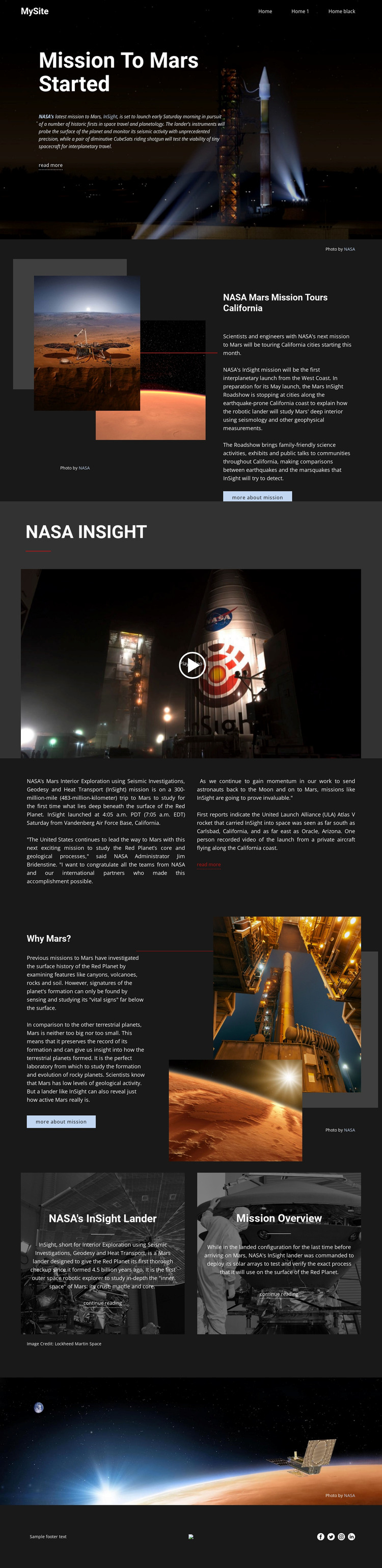
The design separates permanent subject areas that can translate naturally into WordPress-managed page content. The opening mission feature establishes the main story, while the California roadshow panel can represent a distinct public-outreach article. The NASA INSIGHT video occupies a dedicated media region, and the launch and research columns provide a visual pattern for explanatory pages that need more text than a headline-led feature.
The “Why Mars?” section is especially useful as a model for combining editorial explanation with supporting images. The two image-backed panels distinguish “NASA’s InSight lander” from “Mission Overview,” creating a relationship between a central feature and related content. Navigation, social links, and the footer supply shared site elements that can remain visually consistent while the page content develops. The template analysis does not verify an existing blog, post list, or WordPress-specific content structure, so those should be treated as possible adaptations rather than present components.
A WordPress project could therefore use this design direction for permanent mission pages, educational features, media-led explanations, and related reading. The important mapping is between the template’s content roles and the CMS environment: headline feature, article detail, video, scientific context, and linked subject panels. The verified WordPress Plugin can support continued theme editing, but the template’s main value remains its coherent editorial structure.
Customize with Nicepage
Open this ready-made template in the WordPress Website Builder and customize it visually in the Nicepage editor. Replace demo content, edit page sections, and adapt the design to your project without rebuilding the template from scratch.
Manage and Edit This Theme in WordPress
Customize and Install the WordPress Theme
Start with this ready-made theme instead of building the WordPress design from scratch. Customize its layout, content, typography, images, sections, and other design elements visually in Nicepage editor, then export and install the WordPress Theme, Plugin, and Pages on your WordPress site. The Nicepage WordPress Plugin lets you continue working with the site after installation.
Edit the Theme Directly in WordPress
After installation, you can edit the WordPress Theme directly in WordPress with the Nicepage WordPress Plugin. Use Site Style to customize site Colors, Fonts, Header, Footer, Blog, and Post Page Templates while working within your WordPress website.
Edit WordPress Pages Visually
Use the Nicepage WordPress Plugin to edit page content directly from the WordPress admin area. Open a WordPress Page with Nicepage and visually change its text, images, sections, and other page elements while continuing to manage the Page through WordPress.
WordPress Content and Theme Integration
Use the customized theme with WordPress Pages, Posts, Blog and Post Templates, menus, widgets, and other CMS-managed content. Shared theme elements such as Colors, Fonts, Header, Footer, Blog, and Post Page Templates can be managed as part of the overall site design, while WordPress provides the CMS environment for managing site content.
This workflow combines a ready-made WordPress Theme with visual customization, direct theme editing in WordPress, and continued content management through the Nicepage WordPress Plugin.





















