
Dream Travel Agency WordPress Theme


Edit Template Offline
2. Create new page and search for id 12450
Edit Template Online
Create Awesome Websites


Free Nicepage Builder
Keywords
Destination pages and package content can grow from the travel homepage
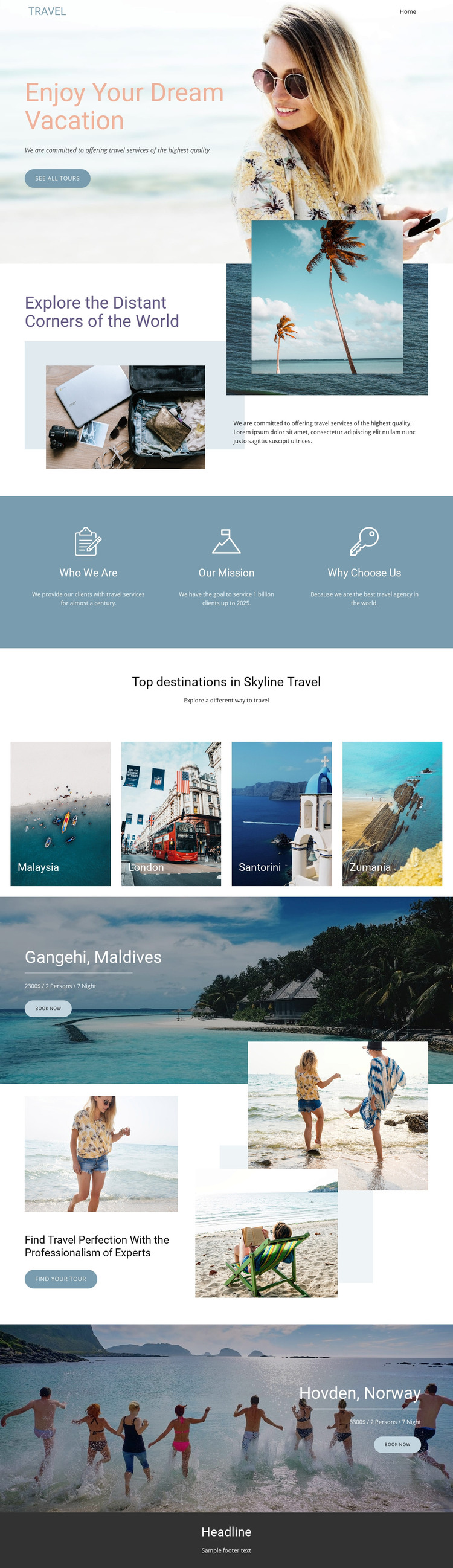
The page contains clear permanent content areas that suit a WordPress-managed travel project. The beach introduction can function as the primary travel message, while the exploration section gives the site a broader destination narrative through layered images and supporting copy. The three feature blocks organize page-oriented information into Who We Are, Our Mission, and Why Choose Us, making the agency story distinct from the destination content that follows.
The four destination tiles provide a repeated content pattern for Malaysia, London, Santorini, and Zumania. Their shared visual treatment could support a consistent way of presenting destination-related material, while the Gangehi, Maldives and Hovden, Norway sections show how selected packages can receive larger promotional regions. Each package combines a named destination, scenic image, package detail line, and Book now action, so permanent offer content remains connected to the travel theme.
The expertise section adds a separate Find your tour route and reinforces the relationship between agency positioning and visitor exploration. Navigation and mobile-navigation components provide shared site context, while the dark footer closes the current page with common information. The Nicepage WordPress Plugin can be a relevant product bridge when this visual direction is used with WordPress-managed content. The analysis does not verify posts, categories, or blog structures, so the interpretation stays with pages, destinations, packages, and reusable site sections.
Customize with Nicepage
Open this ready-made template in the WordPress Website Builder and customize it visually in the Nicepage editor. Replace demo content, edit page sections, and adapt the design to your project without rebuilding the template from scratch.
Manage and Edit This Theme in WordPress
Customize and Install the WordPress Theme
Start with this ready-made theme instead of building the WordPress design from scratch. Customize its layout, content, typography, images, sections, and other design elements visually in Nicepage editor, then export and install the WordPress Theme, Plugin, and Pages on your WordPress site. The Nicepage WordPress Plugin lets you continue working with the site after installation.
Edit the Theme Directly in WordPress
After installation, you can edit the WordPress Theme directly in WordPress with the Nicepage WordPress Plugin. Use Site Style to customize site Colors, Fonts, Header, Footer, Blog, and Post Page Templates while working within your WordPress website.
Edit WordPress Pages Visually
Use the Nicepage WordPress Plugin to edit page content directly from the WordPress admin area. Open a WordPress Page with Nicepage and visually change its text, images, sections, and other page elements while continuing to manage the Page through WordPress.
WordPress Content and Theme Integration
Use the customized theme with WordPress Pages, Posts, Blog and Post Templates, menus, widgets, and other CMS-managed content. Shared theme elements such as Colors, Fonts, Header, Footer, Blog, and Post Page Templates can be managed as part of the overall site design, while WordPress provides the CMS environment for managing site content.
This workflow combines a ready-made WordPress Theme with visual customization, direct theme editing in WordPress, and continued content management through the Nicepage WordPress Plugin.





















