
Planning Your Travel WordPress Theme


Edit Template Offline
2. Create new page and search for id 23416
Edit Template Online
Create Awesome Websites


Free Nicepage Builder
Keywords
Destination Content and Editorial Features Fit a WordPress Theme Structure
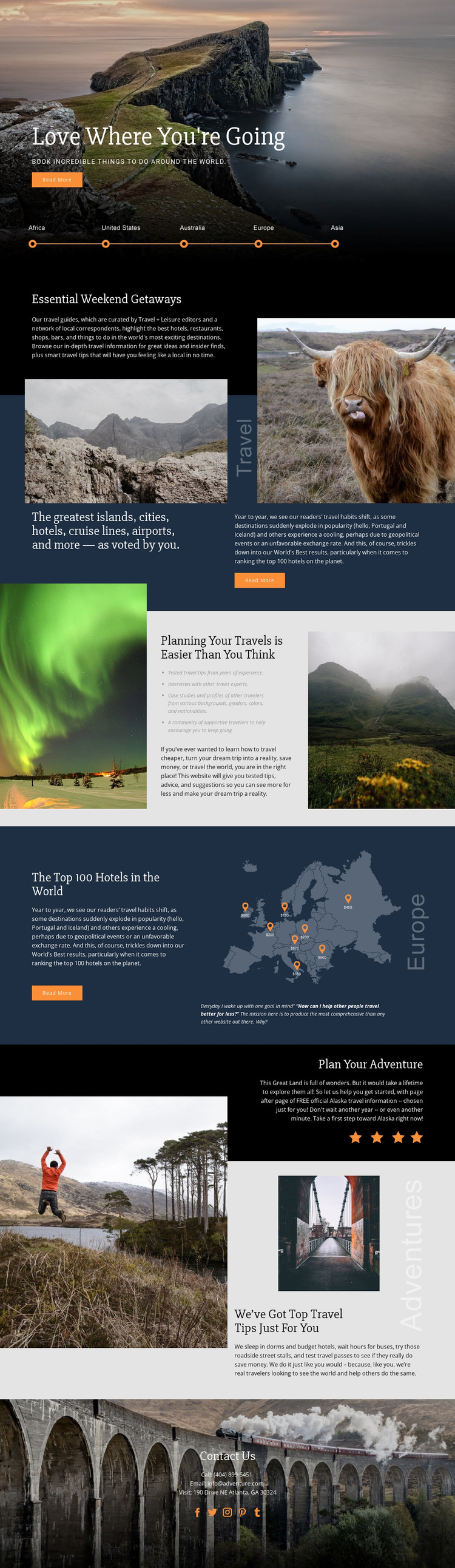
The page-oriented travel content gives this design a clear basis for a WordPress-managed site. The hero can introduce the overall travel direction, while the weekend getaway and destination recommendation sections provide separate areas for permanent guide content. The reader-voted categories—covering islands, cities, hotels, cruise lines, and airports—also suggest a useful relationship between recurring editorial subjects and the shared visual system, without claiming that specific WordPress posts or categories already exist.
The hotel ranking feature offers a different publishing pattern. Its text-led commentary is paired with a world map-style graphic and destination markers, creating a focused area for geographic and ranking-related information. The planning section, with its travel tips, interviews, case-study references, and community message, can support more explanatory content, while the later travel tips block offers another place for experience-based articles or advice as a project develops.
The visual identity remains consistent across these possible content areas: scenic photography, dark panels, serif typography, orange accents, and generous spacing connect the page sections. The closing Contact Us block groups phone, email, location, and social links as shared site information. In a WordPress-oriented project, that combination allows permanent travel information and changing editorial material to coexist within one recognizable theme direction, while the verified template itself remains a single travel page rather than proof of an existing blog structure.
Customize with Nicepage
Open this ready-made template in the WordPress Website Builder and customize it visually in the Nicepage editor. Replace demo content, edit page sections, and adapt the design to your project without rebuilding the template from scratch.
Manage and Edit This Theme in WordPress
Customize and Install the WordPress Theme
Start with this ready-made theme instead of building the WordPress design from scratch. Customize its layout, content, typography, images, sections, and other design elements visually in Nicepage editor, then export and install the WordPress Theme, Plugin, and Pages on your WordPress site. The Nicepage WordPress Plugin lets you continue working with the site after installation.
Edit the Theme Directly in WordPress
After installation, you can edit the WordPress Theme directly in WordPress with the Nicepage WordPress Plugin. Use Site Style to customize site Colors, Fonts, Header, Footer, Blog, and Post Page Templates while working within your WordPress website.
Edit WordPress Pages Visually
Use the Nicepage WordPress Plugin to edit page content directly from the WordPress admin area. Open a WordPress Page with Nicepage and visually change its text, images, sections, and other page elements while continuing to manage the Page through WordPress.
WordPress Content and Theme Integration
Use the customized theme with WordPress Pages, Posts, Blog and Post Templates, menus, widgets, and other CMS-managed content. Shared theme elements such as Colors, Fonts, Header, Footer, Blog, and Post Page Templates can be managed as part of the overall site design, while WordPress provides the CMS environment for managing site content.
This workflow combines a ready-made WordPress Theme with visual customization, direct theme editing in WordPress, and continued content management through the Nicepage WordPress Plugin.





















