Serving and helping medicine WordPress Theme


Edit Template Offline
2. Create new page and search for id 16755
Edit Template Online
Create Awesome Websites


Free Nicepage Builder
Keywords
Page Content and Repeated Clinic Sections Support WordPress Use
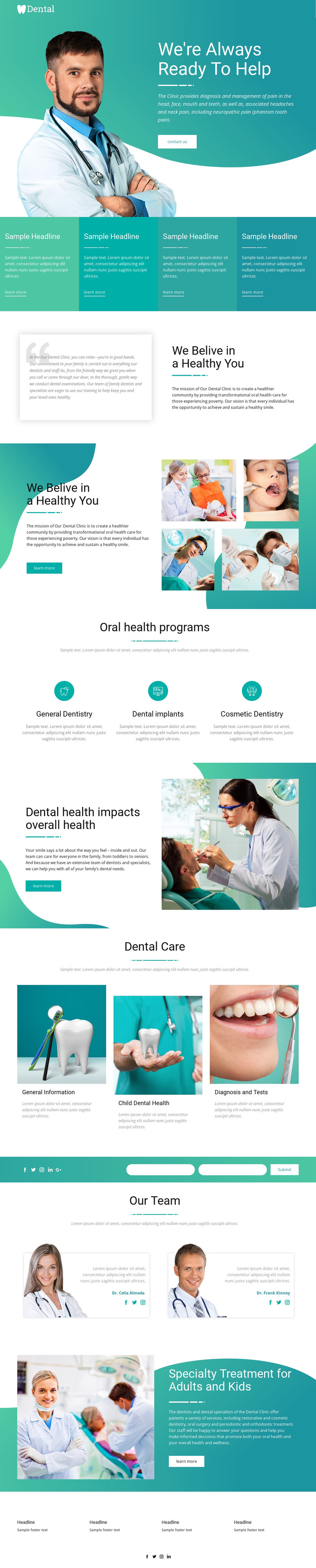
The design separates permanent clinic information into recognizable page areas. The hero introduces the practice and presents a Contact Us action, while the four feature panels provide a compact summary of highlighted services. The mission sections can carry the clinic’s family-care and community oral-health message, giving the site a stable page-oriented foundation before visitors reach more specific treatment content.
The three program categories—General Dentistry, Dental Implants, and Cosmetic Dentistry—offer a natural grouping for service information, while the Dental Care section addresses General Information, Child Dental Health, and Diagnosis and Tests through three image-and-text items. These are confirmed content areas of the design, not claims that WordPress Posts, categories, or blog structures already exist. Their value for a WordPress-managed project is that the theme presents distinct areas where permanent pages or appropriately managed content can retain a common visual direction.
The two dental team profiles create a separate people-focused area, and the specialty-treatment section broadens the message to adults and children. The contact form includes name and email inputs, while social links appear in multiple page regions and the footer contains four information columns. A WordPress project can therefore preserve a shared theme character across service, educational, team, and contact content. The WordPress Plugin is an optional product bridge for editing a theme directly in WordPress; the template-specific strength remains its clear division of clinic content.
Customize with Nicepage
Open this ready-made template in the WordPress Website Builder and customize it visually in the Nicepage editor. Replace demo content, edit page sections, and adapt the design to your project without rebuilding the template from scratch.
Manage and Edit This Theme in WordPress
Customize and Install the WordPress Theme
Start with this ready-made theme instead of building the WordPress design from scratch. Customize its layout, content, typography, images, sections, and other design elements visually in Nicepage editor, then export and install the WordPress Theme, Plugin, and Pages on your WordPress site. The Nicepage WordPress Plugin lets you continue working with the site after installation.
Edit the Theme Directly in WordPress
After installation, you can edit the WordPress Theme directly in WordPress with the Nicepage WordPress Plugin. Use Site Style to customize site Colors, Fonts, Header, Footer, Blog, and Post Page Templates while working within your WordPress website.
Edit WordPress Pages Visually
Use the Nicepage WordPress Plugin to edit page content directly from the WordPress admin area. Open a WordPress Page with Nicepage and visually change its text, images, sections, and other page elements while continuing to manage the Page through WordPress.
WordPress Content and Theme Integration
Use the customized theme with WordPress Pages, Posts, Blog and Post Templates, menus, widgets, and other CMS-managed content. Shared theme elements such as Colors, Fonts, Header, Footer, Blog, and Post Page Templates can be managed as part of the overall site design, while WordPress provides the CMS environment for managing site content.
This workflow combines a ready-made WordPress Theme with visual customization, direct theme editing in WordPress, and continued content management through the Nicepage WordPress Plugin.