The best medical workers WordPress Theme


Edit Template Offline
2. Create new page and search for id 5552185
Edit Template Online
Create Awesome Websites


Free Nicepage Builder
Keywords
Specialty Profiles Give WordPress Page Content a Clear Editorial Shape
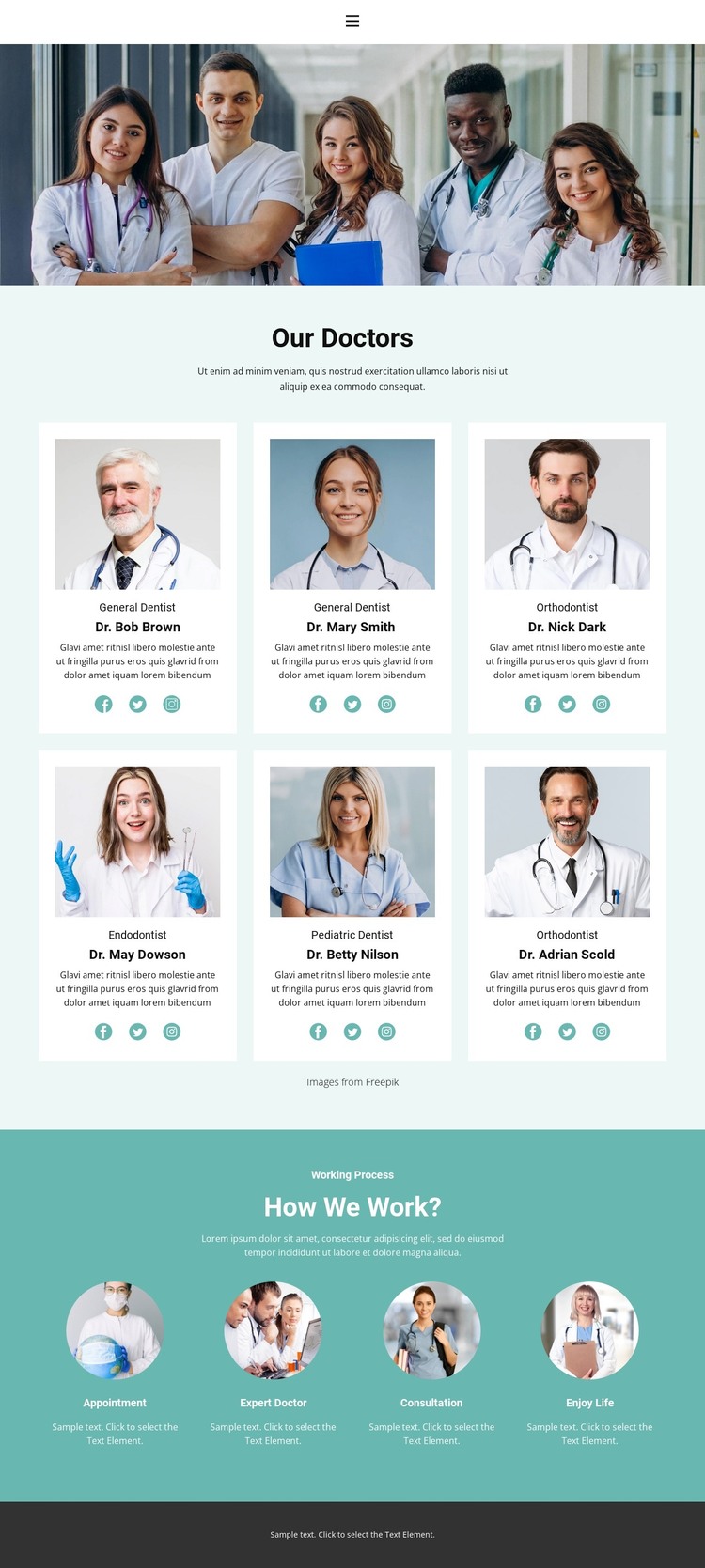
The six doctor cards provide the strongest content structure for a WordPress-oriented implementation. Each profile combines a portrait with a specialty label, descriptive copy, and social links, creating a repeatable unit for presenting people rather than a single block of undifferentiated text. The coverage of general dentistry, orthodontics, endodontics, and pediatric dentistry gives the page a useful editorial scope while leaving the sample names and descriptions as replaceable demo content.
The four process steps create a separate informational layer. Appointment, Expert Doctor, Consultation, and Enjoy Life can remain as a concise overview alongside the team directory, helping the page explain how professional care is framed after visitors have seen the profiles. This relationship between recurring people content and a fixed process summary is different from a page that only lists services or articles: the team supplies the human context, while the steps supply sequence.
Home, Team, and Contact provide the visible navigation framework around those content areas. In a WordPress project, the design can therefore serve as a visual environment for permanent page information and later editorial additions without claiming that posts, categories, or blog structures already exist in this template. The main benefit is continuity: profile content, specialty information, process explanation, and shared navigation can remain within one recognizable dental theme as the site’s content develops.
Customize with Nicepage
Open this ready-made template in the WordPress Website Builder and customize it visually in the Nicepage editor. Replace demo content, edit page sections, and adapt the design to your project without rebuilding the template from scratch.
Manage and Edit This Theme in WordPress
Customize and Install the WordPress Theme
Start with this ready-made theme instead of building the WordPress design from scratch. Customize its layout, content, typography, images, sections, and other design elements visually in Nicepage editor, then export and install the WordPress Theme, Plugin, and Pages on your WordPress site. The Nicepage WordPress Plugin lets you continue working with the site after installation.
Edit the Theme Directly in WordPress
After installation, you can edit the WordPress Theme directly in WordPress with the Nicepage WordPress Plugin. Use Site Style to customize site Colors, Fonts, Header, Footer, Blog, and Post Page Templates while working within your WordPress website.
Edit WordPress Pages Visually
Use the Nicepage WordPress Plugin to edit page content directly from the WordPress admin area. Open a WordPress Page with Nicepage and visually change its text, images, sections, and other page elements while continuing to manage the Page through WordPress.
WordPress Content and Theme Integration
Use the customized theme with WordPress Pages, Posts, Blog and Post Templates, menus, widgets, and other CMS-managed content. Shared theme elements such as Colors, Fonts, Header, Footer, Blog, and Post Page Templates can be managed as part of the overall site design, while WordPress provides the CMS environment for managing site content.
This workflow combines a ready-made WordPress Theme with visual customization, direct theme editing in WordPress, and continued content management through the Nicepage WordPress Plugin.