Rolls-Royce cars WordPress Theme


A Branded Gallery Area for WordPress Page Content
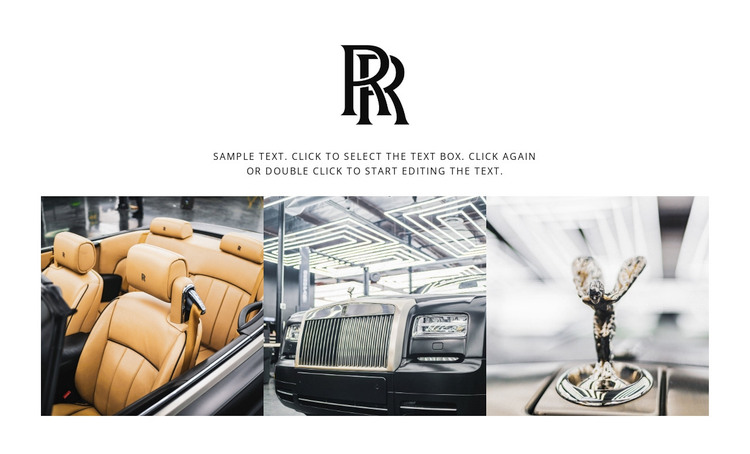
The monogram and supporting paragraph give the section a stable page-content role rather than a time-sensitive editorial sequence. The centered identity mark introduces the subject, and the short text layer provides context before the three automotive images. In a WordPress-managed page, this arrangement can remain a consistent visual section while the wider project manages other page content around it. The block’s role is therefore based on its permanent gallery subject and its clear internal organization.
The three images form the section’s main content group. Their even sizing and single horizontal row make the gallery easy to recognize as one related presentation of luxury interiors and exterior details. Lightbox behavior provides an additional viewing path for individual images without requiring the surrounding page to change its structure. The white background and generous vertical spacing also help the section sit alongside other publishable content without visually merging with unrelated regions.
A WordPress-oriented interpretation focuses on this reusable page section and the content it can carry. The monogram, paragraph, and image collection can remain visually consistent while other parts of the project handle broader publishing needs. Nothing in the block requires it to become a complete theme; its contribution is a defined automotive gallery area that can be placed within a CMS-managed page and coordinated with neighboring content.
Customize with Nicepage
Open this ready-made template in the WordPress Website Builder and customize it visually in the Nicepage editor. Replace demo content, edit page sections, and adapt the design to your project without rebuilding the template from scratch.
Edit Template Offline
2. Create a new page or select existing
3. Click Add new block, search for id 76408 and click enter
Edit Template Online
Create Awesome Websites


Free Nicepage Builder
Keywords
Manage and Edit This Theme in WordPress
Customize and Install the WordPress Theme
Start with this ready-made theme instead of building the WordPress design from scratch. Customize its layout, content, typography, images, sections, and other design elements visually in Nicepage editor, then export and install the WordPress Theme, Plugin, and Pages on your WordPress site. The Nicepage WordPress Plugin lets you continue working with the site after installation.
Edit the Theme Directly in WordPress
After installation, you can edit the WordPress Theme directly in WordPress with the Nicepage WordPress Plugin. Use Site Style to customize site Colors, Fonts, Header, Footer, Blog, and Post Page Templates while working within your WordPress website.
Edit WordPress Pages Visually
Use the Nicepage WordPress Plugin to edit page content directly from the WordPress admin area. Open a WordPress Page with Nicepage and visually change its text, images, sections, and other page elements while continuing to manage the Page through WordPress.
WordPress Content and Theme Integration
Use the customized theme with WordPress Pages, Posts, Blog and Post Templates, menus, widgets, and other CMS-managed content. Shared theme elements such as Colors, Fonts, Header, Footer, Blog, and Post Page Templates can be managed as part of the overall site design, while WordPress provides the CMS environment for managing site content.
This workflow combines a ready-made WordPress Theme with visual customization, direct theme editing in WordPress, and continued content management through the Nicepage WordPress Plugin.