Modern Airline Booking WordPress Theme


Edit Template Offline
2. Create new page and search for id 6648746
Edit Template Online
Create Awesome Websites


Free Nicepage Builder
Keywords
Route Cards and Service Content Create Distinct Airline Page Areas
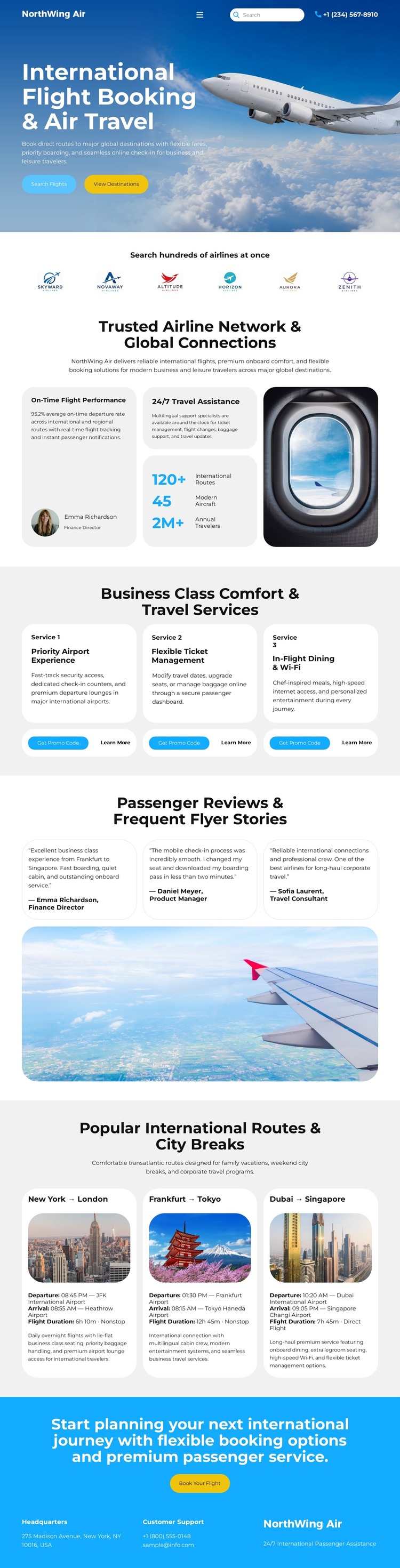
The page-oriented content is well suited to a WordPress-managed airline presentation because its sections already separate several kinds of information. The hero contains the immediate flight-search and booking context, while the airline-network area gives the site a broader company and connectivity message through five airline marks. These two regions can remain distinct in meaning: one introduces the visitor’s action, and the other explains the network surrounding it.
The three business class cards provide a reusable service presentation for Priority Airport Experience, Flexible Ticket Management, and In-Flight Dining & Wi-Fi. Passenger Reviews & Frequent Flyer Stories adds repeated experience content, while the route section presents New York–London, Frankfurt–Tokyo, and Dubai–Singapore as separate destination choices. Together, these areas create permanent airline information that can remain connected to the same visual system as additional project content develops.
The final booking and contact section gives the page a clear response area, with a planning message, booking button, headquarters information, customer support information, and airline contact information. In a WordPress-oriented project, the design can therefore frame page content and recurring airline information without requiring the unsupported claim that WordPress Posts, categories, or blog templates are already present. The WordPress interpretation comes from the way its content areas can be maintained and expanded within a managed site, while the travel-specific structure remains visible to visitors.
Customize with Nicepage
Open this ready-made template in the WordPress Website Builder and customize it visually in the Nicepage editor. Replace demo content, edit page sections, and adapt the design to your project without rebuilding the template from scratch.
Manage and Edit This Theme in WordPress
Customize and Install the WordPress Theme
Start with this ready-made theme instead of building the WordPress design from scratch. Customize its layout, content, typography, images, sections, and other design elements visually in Nicepage editor, then export and install the WordPress Theme, Plugin, and Pages on your WordPress site. The Nicepage WordPress Plugin lets you continue working with the site after installation.
Edit the Theme Directly in WordPress
After installation, you can edit the WordPress Theme directly in WordPress with the Nicepage WordPress Plugin. Use Site Style to customize site Colors, Fonts, Header, Footer, Blog, and Post Page Templates while working within your WordPress website.
Edit WordPress Pages Visually
Use the Nicepage WordPress Plugin to edit page content directly from the WordPress admin area. Open a WordPress Page with Nicepage and visually change its text, images, sections, and other page elements while continuing to manage the Page through WordPress.
WordPress Content and Theme Integration
Use the customized theme with WordPress Pages, Posts, Blog and Post Templates, menus, widgets, and other CMS-managed content. Shared theme elements such as Colors, Fonts, Header, Footer, Blog, and Post Page Templates can be managed as part of the overall site design, while WordPress provides the CMS environment for managing site content.
This workflow combines a ready-made WordPress Theme with visual customization, direct theme editing in WordPress, and continued content management through the Nicepage WordPress Plugin.