Car wash services in tabs WordPress Theme


Four Tabbed Offerings Create Stable WordPress Page Content
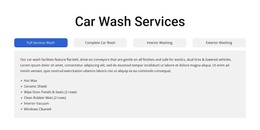
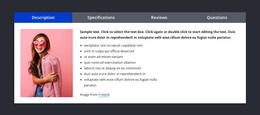
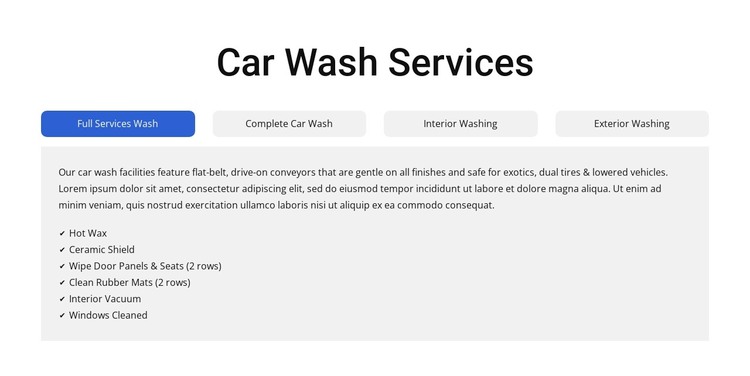
The centered “Car Wash Services” heading and four selectable categories create a stable content area for a WordPress-managed services page. Full Services Wash, Complete Car Wash, Interior Washing, and Exterior Washing each provide a distinct destination within the same section, so related offerings can be presented without expanding into four separate blocks. The tab interaction keeps the page compact while preserving a consistent place for every category’s explanation and included features.
Each service pane pairs descriptive copy with a checklist, giving the content a repeatable page-oriented structure. The first visible pane includes Hot Wax, Ceramic Shield, Wipe Door Panels & Seats, Clean Rubber Mats, Interior Vacuum, and Windows Cleaned. Other panes contain distinct features such as Wheel Cleaner, Rain Repel, Tire Shine, Clearcoat Protectant, Foam Polish, and Spot-Free Rinse. These items function as content details for their respective service categories rather than as a single undifferentiated list.
The blue active state, light-gray rounded controls, pale-gray panel, and white surrounding space make the selected content easy to identify. In a WordPress-oriented project, this block can serve as durable services-page content while the wider site handles other pages and publishing needs. The section remains a focused, reusable page region, not a complete theme or site.
Customize with Nicepage
Open this ready-made template in the WordPress Website Builder and customize it visually in the Nicepage editor. Replace demo content, edit page sections, and adapt the design to your project without rebuilding the template from scratch.
Edit Template Offline
2. Create a new page or select existing
3. Click Add new block, search for id 6330410 and click enter
Edit Template Online
Create Awesome Websites


Free Nicepage Builder
Keywords
Manage and Edit This Theme in WordPress
Customize and Install the WordPress Theme
Start with this ready-made theme instead of building the WordPress design from scratch. Customize its layout, content, typography, images, sections, and other design elements visually in Nicepage editor, then export and install the WordPress Theme, Plugin, and Pages on your WordPress site. The Nicepage WordPress Plugin lets you continue working with the site after installation.
Edit the Theme Directly in WordPress
After installation, you can edit the WordPress Theme directly in WordPress with the Nicepage WordPress Plugin. Use Site Style to customize site Colors, Fonts, Header, Footer, Blog, and Post Page Templates while working within your WordPress website.
Edit WordPress Pages Visually
Use the Nicepage WordPress Plugin to edit page content directly from the WordPress admin area. Open a WordPress Page with Nicepage and visually change its text, images, sections, and other page elements while continuing to manage the Page through WordPress.
WordPress Content and Theme Integration
Use the customized theme with WordPress Pages, Posts, Blog and Post Templates, menus, widgets, and other CMS-managed content. Shared theme elements such as Colors, Fonts, Header, Footer, Blog, and Post Page Templates can be managed as part of the overall site design, while WordPress provides the CMS environment for managing site content.
This workflow combines a ready-made WordPress Theme with visual customization, direct theme editing in WordPress, and continued content management through the Nicepage WordPress Plugin.