Grocery Store WordPress Theme


Edit Template Offline
2. Create new page and search for id 6650573
Edit Template Online
Create Awesome Websites


Free Nicepage Builder
Keywords
Featured Goods and Repeatable Retail Content Around the Grocery Brand
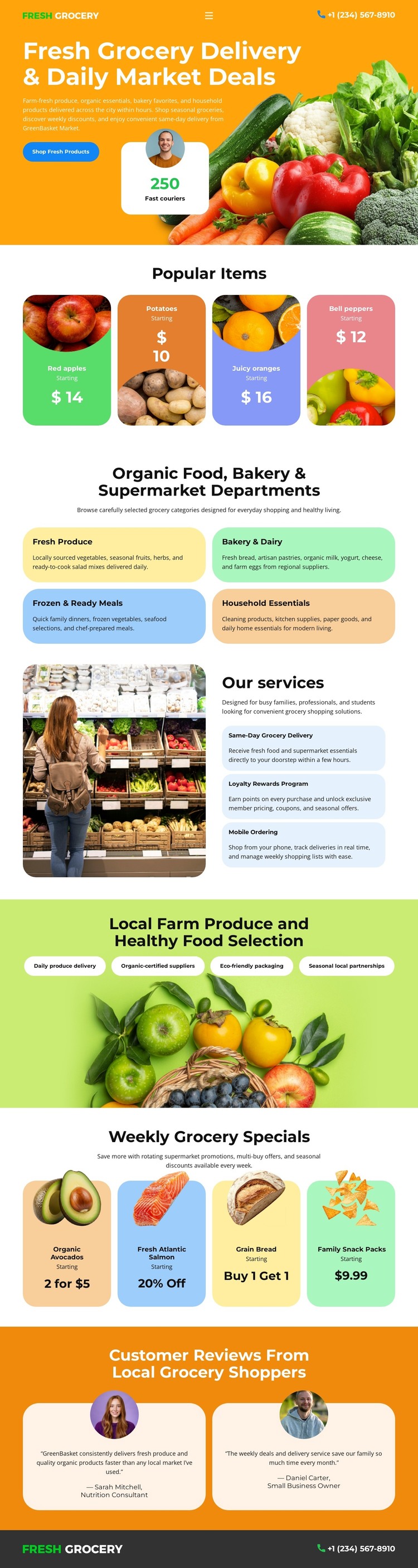
The four Popular Items cards and six department panels create two different kinds of page-oriented grocery content. Featured goods such as apples, oranges, and peppers can introduce the store's current emphasis, while department areas organize broader information around fresh produce, bakery and dairy, ready meals, household essentials, and related categories. Keeping those roles distinct helps a WordPress-managed site separate highlighted content from permanent category messaging without changing the visual direction.
The services section offers another useful content relationship. Same-day grocery delivery, loyalty rewards, and mobile ordering are grouped beside a grocery photograph, so the page can communicate practical customer services alongside product information. The four weekly-special cards provide a repeated promotional pattern, and the two review cards create a separate customer-feedback area. The hero's Shop Fresh Products button and the phone contact in the header and footer then connect these content regions to the store's shopping purpose. If the project later adds regularly updated grocery stories, announcements, or offer content, those additions can be interpreted around the existing product, department, service, and review structure; they should not be claimed as existing elements of this analyzed page. The design's value as a WordPress theme lies in giving permanent retail information and potentially changing content a coordinated visual setting, rather than in replacing the verified page with an invented blog or catalog system.
Customize with Nicepage
Open this ready-made template in the WordPress Website Builder and customize it visually in the Nicepage editor. Replace demo content, edit page sections, and adapt the design to your project without rebuilding the template from scratch.
Manage and Edit This Theme in WordPress
Customize and Install the WordPress Theme
Start with this ready-made theme instead of building the WordPress design from scratch. Customize its layout, content, typography, images, sections, and other design elements visually in Nicepage editor, then export and install the WordPress Theme, Plugin, and Pages on your WordPress site. The Nicepage WordPress Plugin lets you continue working with the site after installation.
Edit the Theme Directly in WordPress
After installation, you can edit the WordPress Theme directly in WordPress with the Nicepage WordPress Plugin. Use Site Style to customize site Colors, Fonts, Header, Footer, Blog, and Post Page Templates while working within your WordPress website.
Edit WordPress Pages Visually
Use the Nicepage WordPress Plugin to edit page content directly from the WordPress admin area. Open a WordPress Page with Nicepage and visually change its text, images, sections, and other page elements while continuing to manage the Page through WordPress.
WordPress Content and Theme Integration
Use the customized theme with WordPress Pages, Posts, Blog and Post Templates, menus, widgets, and other CMS-managed content. Shared theme elements such as Colors, Fonts, Header, Footer, Blog, and Post Page Templates can be managed as part of the overall site design, while WordPress provides the CMS environment for managing site content.
This workflow combines a ready-made WordPress Theme with visual customization, direct theme editing in WordPress, and continued content management through the Nicepage WordPress Plugin.