
Modern Football Team WordPress Theme


Edit Template Offline
2. Create new page and search for id 6627711
Edit Template Online
Create Awesome Websites


Free Nicepage Builder
Keywords
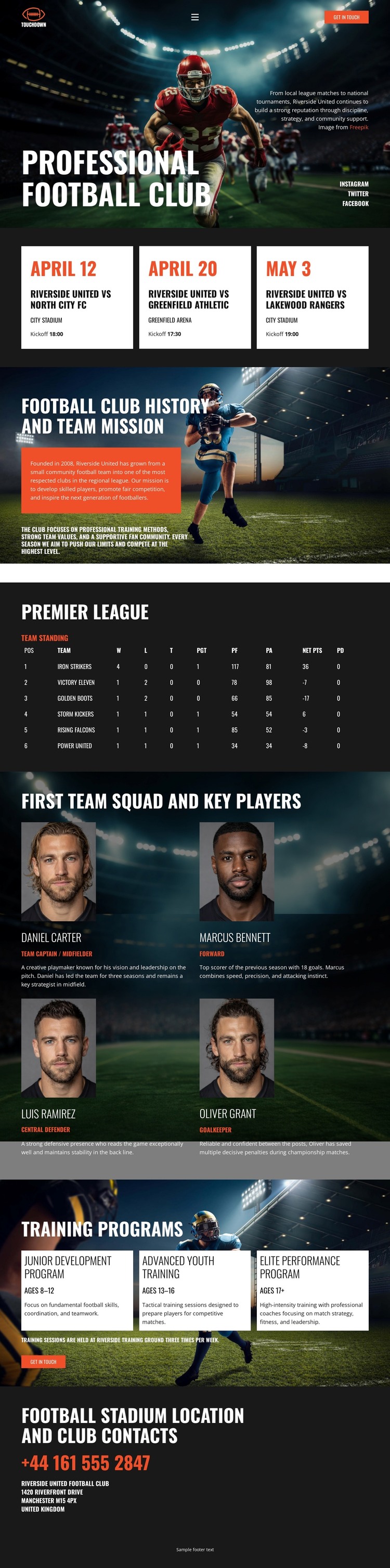
Squad Profiles and Training Paths Give Club Content a Publishable Shape
The four first-team player profiles create a clear page-content area built around names, roles, portraits, and biographies. That structure can support club information that needs to be presented as a group while keeping each player’s details visually distinct. The three training program cards provide a different but related content set, separating junior development, advanced youth training, and elite performance into recognizable offerings. Together, these sections give a WordPress-oriented project substantial people and program content rather than relying only on a promotional hero.
The fixture cards add a more time-sensitive layer with dates, opponents, competitions, and times, while the Premier League standings table presents a compact performance overview. History and mission content can remain the stable explanatory core, and the stadium contact block can serve as a permanent page area for location and communication details. The page’s navigation and shared visual treatment can connect these content areas while the dark stadium imagery, red accents, and repeated cards preserve a consistent theme character.
The template analysis confirms these sections but does not establish WordPress Posts, categories, or blog structures as existing elements. In a WordPress project, the design can instead be interpreted around permanent club pages and recurring content that may be expanded later. The WordPress Plugin can support direct theme editing in WordPress, while the template-specific value remains the way its squad, training, match, and contact areas are already organized.
Customize with Nicepage
Open this ready-made template in the WordPress Website Builder and customize it visually in the Nicepage editor. Replace demo content, edit page sections, and adapt the design to your project without rebuilding the template from scratch.
Manage and Edit This Theme in WordPress
Customize and Install the WordPress Theme
Start with this ready-made theme instead of building the WordPress design from scratch. Customize its layout, content, typography, images, sections, and other design elements visually in Nicepage editor, then export and install the WordPress Theme, Plugin, and Pages on your WordPress site. The Nicepage WordPress Plugin lets you continue working with the site after installation.
Edit the Theme Directly in WordPress
After installation, you can edit the WordPress Theme directly in WordPress with the Nicepage WordPress Plugin. Use Site Style to customize site Colors, Fonts, Header, Footer, Blog, and Post Page Templates while working within your WordPress website.
Edit WordPress Pages Visually
Use the Nicepage WordPress Plugin to edit page content directly from the WordPress admin area. Open a WordPress Page with Nicepage and visually change its text, images, sections, and other page elements while continuing to manage the Page through WordPress.
WordPress Content and Theme Integration
Use the customized theme with WordPress Pages, Posts, Blog and Post Templates, menus, widgets, and other CMS-managed content. Shared theme elements such as Colors, Fonts, Header, Footer, Blog, and Post Page Templates can be managed as part of the overall site design, while WordPress provides the CMS environment for managing site content.
This workflow combines a ready-made WordPress Theme with visual customization, direct theme editing in WordPress, and continued content management through the Nicepage WordPress Plugin.





















