Meet your trusted advisors WordPress Theme


Mission Content Gives a WordPress Page a Stable Narrative Section
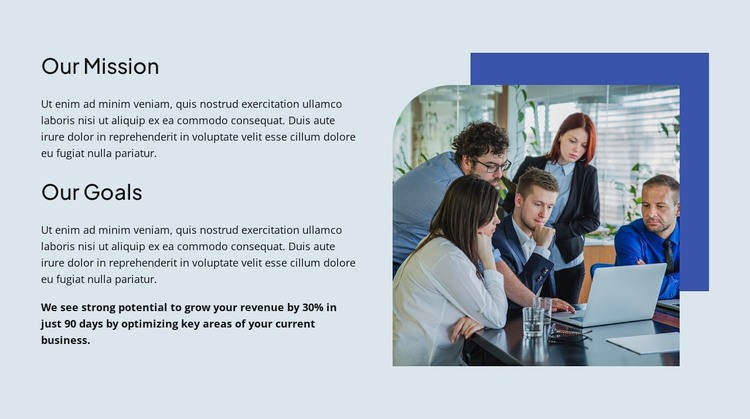
The left column reads as enduring page content rather than a stream of dated updates. “Our Mission” and “Our Goals” provide two stable subjects that can be maintained as part of an organization’s broader page content, with a supporting paragraph beneath each heading. The bold statement mentioning 30% revenue growth in 90 days creates a separate emphasis level; because it is supplied sample wording, it should be checked and replaced as needed before being treated as a published business claim.
The visual structure helps preserve that content role. A rounded photograph of a business team working around a laptop provides human context, while the deep blue rectangle behind it gives the image a consistent anchor. The pale blue background and generous whitespace keep the image from overwhelming the text, and the left-aligned headings make the two narrative units easy to scan within the section.
In a WordPress-oriented project, this block can serve as a stable mission-and-goals area on a page while the surrounding site manages other content separately. Nicepage supports WordPress page and theme workflows, including editing a WordPress Theme directly in WordPress, but that capability concerns the broader project. The analyzed section remains one reusable content region rather than a complete WordPress Theme.
Customize with Nicepage
Open this ready-made template in the WordPress Website Builder and customize it visually in the Nicepage editor. Replace demo content, edit page sections, and adapt the design to your project without rebuilding the template from scratch.
Edit Template Offline
2. Create a new page or select existing
3. Click Add new block, search for id 6499051 and click enter
Edit Template Online
Create Awesome Websites


Free Nicepage Builder
Keywords
Manage and Edit This Theme in WordPress
Customize and Install the WordPress Theme
Start with this ready-made theme instead of building the WordPress design from scratch. Customize its layout, content, typography, images, sections, and other design elements visually in Nicepage editor, then export and install the WordPress Theme, Plugin, and Pages on your WordPress site. The Nicepage WordPress Plugin lets you continue working with the site after installation.
Edit the Theme Directly in WordPress
After installation, you can edit the WordPress Theme directly in WordPress with the Nicepage WordPress Plugin. Use Site Style to customize site Colors, Fonts, Header, Footer, Blog, and Post Page Templates while working within your WordPress website.
Edit WordPress Pages Visually
Use the Nicepage WordPress Plugin to edit page content directly from the WordPress admin area. Open a WordPress Page with Nicepage and visually change its text, images, sections, and other page elements while continuing to manage the Page through WordPress.
WordPress Content and Theme Integration
Use the customized theme with WordPress Pages, Posts, Blog and Post Templates, menus, widgets, and other CMS-managed content. Shared theme elements such as Colors, Fonts, Header, Footer, Blog, and Post Page Templates can be managed as part of the overall site design, while WordPress provides the CMS environment for managing site content.
This workflow combines a ready-made WordPress Theme with visual customization, direct theme editing in WordPress, and continued content management through the Nicepage WordPress Plugin.