Your professional opportunity WordPress Theme


Edit Template Offline
2. Create new page and search for id 6056508
Edit Template Online
Create Awesome Websites


Free Nicepage Builder
Keywords
Support Content Moves from Page Information to a WordPress Response Area
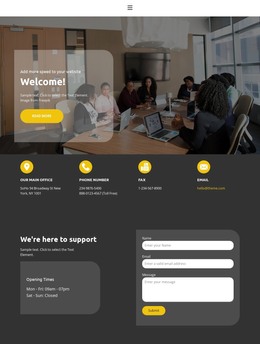
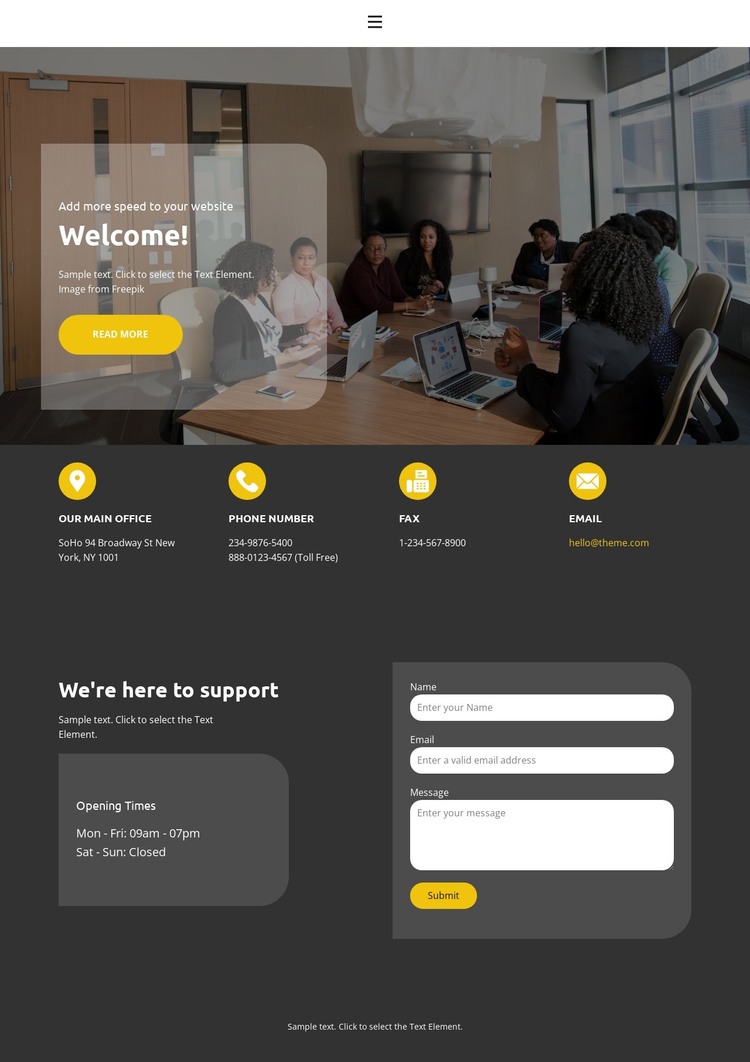
The page-oriented content is divided into useful permanent information areas. The Welcome! hero introduces the support context, while the four cards provide separate office, phone, fax, and email details that can remain part of the page's stable contact content. The lower block then shifts from reference information to interaction: support copy and Opening Times explain the service context before the adjacent form collects a name, email address, and message.
This division gives a WordPress-oriented project more than a decorative contact screen. The contact categories can remain visible as page information, while the message form represents a distinct content-and-response area that belongs to the same visual system. Navigation and mobile navigation provide the access framework, and the centered footer closes the page without competing with the form. The meeting-room image and translucent card can continue to identify the support context when related page content is added.
The sample address, phone numbers, fax number, email, and schedule are structural evidence only and should not be presented as verified business data. Their categories show how the theme expects information to be organized. WordPress-managed content can therefore occupy the existing office, communication, availability, and support areas without requiring the design to be reinterpreted as a blog or product layout. The dark panels, rounded forms, yellow actions, and white type preserve a consistent theme character as that content changes.
Customize with Nicepage
Open this ready-made template in the WordPress Website Builder and customize it visually in the Nicepage editor. Replace demo content, edit page sections, and adapt the design to your project without rebuilding the template from scratch.
Manage and Edit This Theme in WordPress
Customize and Install the WordPress Theme
Start with this ready-made theme instead of building the WordPress design from scratch. Customize its layout, content, typography, images, sections, and other design elements visually in Nicepage editor, then export and install the WordPress Theme, Plugin, and Pages on your WordPress site. The Nicepage WordPress Plugin lets you continue working with the site after installation.
Edit the Theme Directly in WordPress
After installation, you can edit the WordPress Theme directly in WordPress with the Nicepage WordPress Plugin. Use Site Style to customize site Colors, Fonts, Header, Footer, Blog, and Post Page Templates while working within your WordPress website.
Edit WordPress Pages Visually
Use the Nicepage WordPress Plugin to edit page content directly from the WordPress admin area. Open a WordPress Page with Nicepage and visually change its text, images, sections, and other page elements while continuing to manage the Page through WordPress.
WordPress Content and Theme Integration
Use the customized theme with WordPress Pages, Posts, Blog and Post Templates, menus, widgets, and other CMS-managed content. Shared theme elements such as Colors, Fonts, Header, Footer, Blog, and Post Page Templates can be managed as part of the overall site design, while WordPress provides the CMS environment for managing site content.
This workflow combines a ready-made WordPress Theme with visual customization, direct theme editing in WordPress, and continued content management through the Nicepage WordPress Plugin.