See Photo Gallery WordPress Theme


Stable Capability Content Across a WordPress-Managed Page
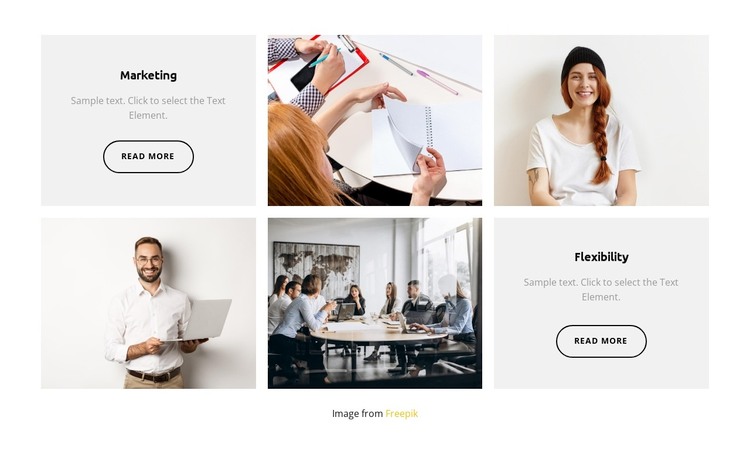
Marketing and Flexibility form two durable content units that can fit naturally within a WordPress-managed page. Each panel names a capability and includes a read more link, so the section can present concise page information while directing visitors toward fuller explanations elsewhere in the surrounding project. Four photographic tiles fill the other positions, giving the content a visual frame without changing the block into an editorial feed or a dynamic post listing. The six regions remain organized as a three-column, two-row mosaic with the text panels diagonally opposite.
This page-content interpretation differs from treating the block as a complete theme. The section can remain a stable features area while other WordPress-managed pages carry broader introductions, detailed services, contact information, or regularly updated material. Centered text and light-gray surfaces make the two capability panels easy to maintain as related content, while matching outlined links preserve their shared action role. The image tiles can be replaced or updated as project content evolves, but the underlying arrangement remains reusable. Nicepage's WordPress workflow can place designed sections within managed pages; the specific value here is the clear separation between two named capabilities and four supporting visual regions.
Customize with Nicepage
Open this ready-made template in the WordPress Website Builder and customize it visually in the Nicepage editor. Replace demo content, edit page sections, and adapt the design to your project without rebuilding the template from scratch.
Edit Template Offline
2. Create a new page or select existing
3. Click Add new block, search for id 3545756 and click enter
Edit Template Online
Create Awesome Websites


Free Nicepage Builder
Keywords
Manage and Edit This Theme in WordPress
Customize and Install the WordPress Theme
Start with this ready-made theme instead of building the WordPress design from scratch. Customize its layout, content, typography, images, sections, and other design elements visually in Nicepage editor, then export and install the WordPress Theme, Plugin, and Pages on your WordPress site. The Nicepage WordPress Plugin lets you continue working with the site after installation.
Edit the Theme Directly in WordPress
After installation, you can edit the WordPress Theme directly in WordPress with the Nicepage WordPress Plugin. Use Site Style to customize site Colors, Fonts, Header, Footer, Blog, and Post Page Templates while working within your WordPress website.
Edit WordPress Pages Visually
Use the Nicepage WordPress Plugin to edit page content directly from the WordPress admin area. Open a WordPress Page with Nicepage and visually change its text, images, sections, and other page elements while continuing to manage the Page through WordPress.
WordPress Content and Theme Integration
Use the customized theme with WordPress Pages, Posts, Blog and Post Templates, menus, widgets, and other CMS-managed content. Shared theme elements such as Colors, Fonts, Header, Footer, Blog, and Post Page Templates can be managed as part of the overall site design, while WordPress provides the CMS environment for managing site content.
This workflow combines a ready-made WordPress Theme with visual customization, direct theme editing in WordPress, and continued content management through the Nicepage WordPress Plugin.